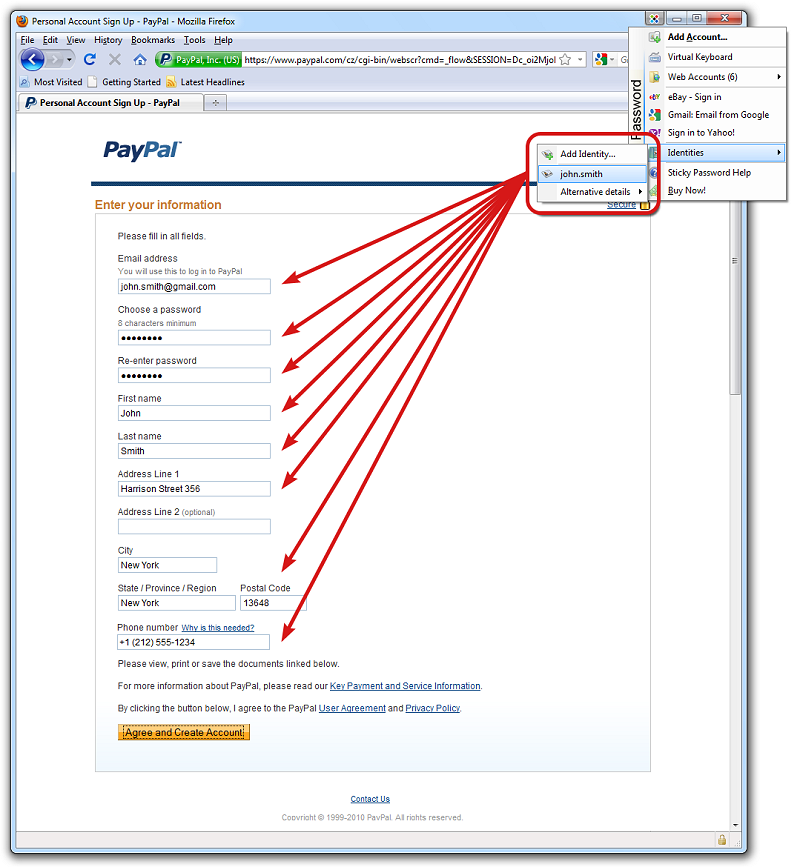
Sticky Password version 8.9.9.2256 has been released, offering enhanced features designed to improve online security and streamline password management. This powerful tool automates the process of filling in website forms and managing various passwords, allowing users to bypass the frustration of remembering multiple login credentials.
Key Features and Security Enhancements
Sticky Password includes advanced functionalities such as secure password generation, encrypted storage, and device synchronization, ensuring sensitive information is well-protected and easily accessible. The software employs industry-standard encryption algorithms, including military-grade AES, to safeguard against threats like phishing, keyloggers, and identity theft, providing users with peace of mind.
Free Features and User Benefits
- Automatic Logins: Recognizes password-protected sites and logs users in effortlessly.
- One-Click Form Filling: Quickly fills out online forms accurately.
- Browser Integration: Seamlessly integrates with major browsers and applications.
- Password Importation: An Installation Wizard facilitates easy migration from other password managers.
- Automatic Updates: Ensures users always have the latest version.
Identity Theft Protection
Sticky Password generates strong passwords and protects users from phishing scams by ensuring logins are not sent to fraudulent websites. Its multi-layered protection against keyloggers, including a Virtual Keyboard, enhances user security further.
Organization and Accessibility
The software allows users to organize passwords efficiently, with only one Master Password to remember. It includes a portable version that can be installed on USB drives for on-the-go access, as well as features like secure export options and enhanced grouping for password organization.
Licensing and Compatibility
Sticky Password offers a portable version included with each license, ensuring easy access to passwords across different locations. The software supports popular browsers such as Internet Explorer, Firefox, and Google Chrome.
Expert Assessment
Overall, Sticky Password is recognized for its robust security features and user-friendly interface, providing flexible cloud and local syncing options. While it may not have as extensive a feature set as some competitors like LastPass, it stands out due to its competitive pricing and strong security focus. Its local Wi-Fi syncing feature further enhances its appeal as a reliable password management solution.
Future Considerations
As online security threats continue to evolve, ongoing updates and feature enhancements will be critical for Sticky Password to maintain its competitive edge. Additionally, expanding compatibility with more platforms and enhancing its feature set could attract a broader user base. Continuous user feedback will be essential in refining its offerings to meet the needs of a diverse audience.
In conclusion, Sticky Password provides a comprehensive solution for password management, prioritizing user security and convenience, while remaining a viable option in the competitive landscape of password management tools
Key Features and Security Enhancements
Sticky Password includes advanced functionalities such as secure password generation, encrypted storage, and device synchronization, ensuring sensitive information is well-protected and easily accessible. The software employs industry-standard encryption algorithms, including military-grade AES, to safeguard against threats like phishing, keyloggers, and identity theft, providing users with peace of mind.
Free Features and User Benefits
- Automatic Logins: Recognizes password-protected sites and logs users in effortlessly.
- One-Click Form Filling: Quickly fills out online forms accurately.
- Browser Integration: Seamlessly integrates with major browsers and applications.
- Password Importation: An Installation Wizard facilitates easy migration from other password managers.
- Automatic Updates: Ensures users always have the latest version.
Identity Theft Protection
Sticky Password generates strong passwords and protects users from phishing scams by ensuring logins are not sent to fraudulent websites. Its multi-layered protection against keyloggers, including a Virtual Keyboard, enhances user security further.
Organization and Accessibility
The software allows users to organize passwords efficiently, with only one Master Password to remember. It includes a portable version that can be installed on USB drives for on-the-go access, as well as features like secure export options and enhanced grouping for password organization.
Licensing and Compatibility
Sticky Password offers a portable version included with each license, ensuring easy access to passwords across different locations. The software supports popular browsers such as Internet Explorer, Firefox, and Google Chrome.
Expert Assessment
Overall, Sticky Password is recognized for its robust security features and user-friendly interface, providing flexible cloud and local syncing options. While it may not have as extensive a feature set as some competitors like LastPass, it stands out due to its competitive pricing and strong security focus. Its local Wi-Fi syncing feature further enhances its appeal as a reliable password management solution.
Future Considerations
As online security threats continue to evolve, ongoing updates and feature enhancements will be critical for Sticky Password to maintain its competitive edge. Additionally, expanding compatibility with more platforms and enhancing its feature set could attract a broader user base. Continuous user feedback will be essential in refining its offerings to meet the needs of a diverse audience.
In conclusion, Sticky Password provides a comprehensive solution for password management, prioritizing user security and convenience, while remaining a viable option in the competitive landscape of password management tools
Sticky Password 8.9.9.2256 released
Sticky Password will help you stay safe online and save time by filling in website forms and passwords automatically.