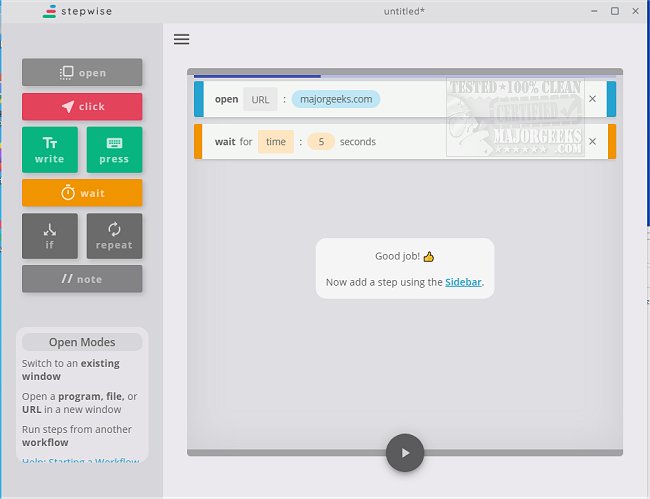
Stepwise version 2.2.7 has been released, offering a user-friendly solution for automating repetitive tasks that can hinder your daily productivity. This utility simplifies the automation process with a non-programming-intensive approach, allowing users to easily set up, name, and save workflows through an intuitive interface. With a variety of tutorials available on the author's website, users can quickly learn how to utilize Stepwise effectively.
The interface is designed for clarity, providing helpful tips as users navigate through the automation process. For instance, if you frequently check the MajorGeeks site, you can automate this task to receive updates daily without manual effort. Additionally, there is a portable version of Stepwise that allows users to benefit from its features while on the go.
Stepwise empowers individuals to better manage their time by automating repetitive tasks, ultimately enhancing productivity. Its easy configuration means that anyone can take advantage of this tool to streamline their workflow.
To further enhance your productivity, consider exploring related tips such as automatic and manual trigger start explanations, keyboard shortcuts for dismissing Windows 10/11 notifications, an ultimate list of file explorer keyboard shortcuts, and additional time-saving shortcuts. By integrating these tools and techniques into your daily routine, you can create a more efficient work environment
The interface is designed for clarity, providing helpful tips as users navigate through the automation process. For instance, if you frequently check the MajorGeeks site, you can automate this task to receive updates daily without manual effort. Additionally, there is a portable version of Stepwise that allows users to benefit from its features while on the go.
Stepwise empowers individuals to better manage their time by automating repetitive tasks, ultimately enhancing productivity. Its easy configuration means that anyone can take advantage of this tool to streamline their workflow.
To further enhance your productivity, consider exploring related tips such as automatic and manual trigger start explanations, keyboard shortcuts for dismissing Windows 10/11 notifications, an ultimate list of file explorer keyboard shortcuts, and additional time-saving shortcuts. By integrating these tools and techniques into your daily routine, you can create a more efficient work environment
Stepwise 2.2.7 released
Stepwise is a user-friendly option for automating repetitive tasks that can potentially slow down your daily workflow.