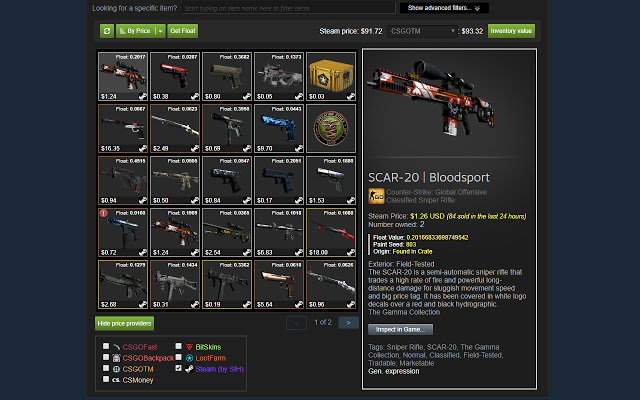
Steam Inventory Helper (SIH) is a browser extension available for Chrome and Edge that enhances the Steam market and inventory experience. This tool serves as a personal assistant for users, making it easier to manage trades, inventory, and marketplace activities.
Why You Need Steam Inventory Helper
Managing a Steam inventory can be cumbersome, especially when flipping skins or trading. SIH automates repetitive tasks, such as quick-selling items and bulk listing them, thus saving users time. It also includes valuable features like price comparison tools and enhancements for trade offers.
Key Features of Steam Inventory Helper
- Price Insights: View market prices at a glance to identify trends and make informed trades.
- Enhanced Trading Tools: Easily manage trade offers with detailed filters and automation options.
- Bulk Actions: Quickly select and list multiple items on the market.
- Market History Tracking: Analyze buying and selling patterns to refine trading strategies.
- Security Features: Protect against phishing scams by tracking trade offers.
Getting started with SIH is straightforward. Users can download the extension from the Chrome Web Store, install it, and customize settings based on their trading preferences.
Important Features at a Glance
- Displays item prices directly in your Steam inventory.
- Allows bulk selling with auto-accept and auto-adjust price features.
- Enables quick buying of items with one click.
- Provides desktop notifications for new trade offers (requires background permission).
- Displays item prices in the trade offer window via mouse-over.
- Calculates total trade offer value directly in the trade window.
- Filters items on the "My sell listings" tab.
- Facilitates the buying of Steam trading cards directly from the in-game cards page.
- Automatically ignores/block friend invites below a certain Steam level.
The Catch
Despite its advantages, some users have raised privacy concerns regarding the extension's access to Steam accounts. It’s crucial to be aware of permissions and avoid sharing sensitive information.
Geek Verdict
For those serious about Steam trading or looking to streamline inventory management, Steam Inventory Helper is a practical and powerful tool. While it’s user-friendly, attention to security settings is essential.
Similar Guides:
- How to Disable Steam Popups & Notifications
- How to Hide Your Gameplay Activity in Steam Profile and Chat
- How to Categorize Your Steam Games With Collections
- How to Create a Shortcut to Steam Games on the Desktop or Taskbar
- How to Fix 'Update Queued' in Steam
Conclusion
The latest version of Steam Inventory Helper, 2.9.6, continues to support users in navigating the complexities of the Steam marketplace. As trading and inventory management become increasingly integral to the gaming experience, tools like SIH are essential for optimizing performance and security. As the gaming landscape evolves, users can expect ongoing updates and feature enhancements that cater to their needs, making the trading experience on Steam not only more efficient but also more enjoyable
Why You Need Steam Inventory Helper
Managing a Steam inventory can be cumbersome, especially when flipping skins or trading. SIH automates repetitive tasks, such as quick-selling items and bulk listing them, thus saving users time. It also includes valuable features like price comparison tools and enhancements for trade offers.
Key Features of Steam Inventory Helper
- Price Insights: View market prices at a glance to identify trends and make informed trades.
- Enhanced Trading Tools: Easily manage trade offers with detailed filters and automation options.
- Bulk Actions: Quickly select and list multiple items on the market.
- Market History Tracking: Analyze buying and selling patterns to refine trading strategies.
- Security Features: Protect against phishing scams by tracking trade offers.
Getting started with SIH is straightforward. Users can download the extension from the Chrome Web Store, install it, and customize settings based on their trading preferences.
Important Features at a Glance
- Displays item prices directly in your Steam inventory.
- Allows bulk selling with auto-accept and auto-adjust price features.
- Enables quick buying of items with one click.
- Provides desktop notifications for new trade offers (requires background permission).
- Displays item prices in the trade offer window via mouse-over.
- Calculates total trade offer value directly in the trade window.
- Filters items on the "My sell listings" tab.
- Facilitates the buying of Steam trading cards directly from the in-game cards page.
- Automatically ignores/block friend invites below a certain Steam level.
The Catch
Despite its advantages, some users have raised privacy concerns regarding the extension's access to Steam accounts. It’s crucial to be aware of permissions and avoid sharing sensitive information.
Geek Verdict
For those serious about Steam trading or looking to streamline inventory management, Steam Inventory Helper is a practical and powerful tool. While it’s user-friendly, attention to security settings is essential.
Similar Guides:
- How to Disable Steam Popups & Notifications
- How to Hide Your Gameplay Activity in Steam Profile and Chat
- How to Categorize Your Steam Games With Collections
- How to Create a Shortcut to Steam Games on the Desktop or Taskbar
- How to Fix 'Update Queued' in Steam
Conclusion
The latest version of Steam Inventory Helper, 2.9.6, continues to support users in navigating the complexities of the Steam marketplace. As trading and inventory management become increasingly integral to the gaming experience, tools like SIH are essential for optimizing performance and security. As the gaming landscape evolves, users can expect ongoing updates and feature enhancements that cater to their needs, making the trading experience on Steam not only more efficient but also more enjoyable
Steam Inventory Helper 2.9.6 released
Steam Inventory Helper is a browser addon for Chrome and Edge it is meant to help improve your Steam market and inventory experience.