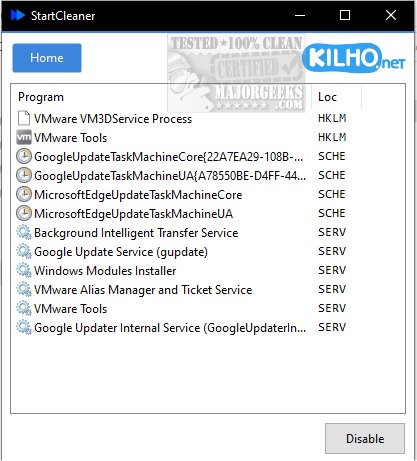
StartCleaner 1.0.7 has been released, providing users with an efficient tool for managing programs that automatically launch during system startup. This software features a user-friendly interface, enabling users to easily review, enable, or disable startup applications. By streamlining the startup process, StartCleaner can enhance boot times and overall system performance, ensuring devices operate smoothly from the moment they are powered on.
The application offers a straightforward solution for managing startup processes, including unified control over startup folders. Users can effortlessly add, remove, or disable applications that launch at startup, and the program also provides access to the task scheduler. This feature allows users to configure the timing and conditions for specific tasks to execute upon startup. Additionally, StartCleaner includes system service management, empowering users to control which services run during startup for improved speed and efficiency.
To disable a startup item, users simply select the desired program and click the "Disable" button, making the process quick and hassle-free. StartCleaner encourages users to maintain a current restore point to safeguard against potential issues. A unique aspect of StartCleaner is its approach to managing settings; users can disable programs instead of permanently deleting them, offering a safe and reversible way to customize their experience. This feature allows for experimentation with different configurations without the risk of losing important settings.
Overall, StartCleaner empowers users to unlock their device's full potential, providing tools to personalize and optimize the startup experience for a faster, more efficient boot process.
Extension:
In addition to its core features, StartCleaner 1.0.7 is designed to support a range of operating systems, catering to both novice and experienced users. The software is optimized for various configurations, ensuring compatibility with different hardware setups. Future updates may include enhanced analytics to track the impact of startup items on system performance, providing users with deeper insights into how each application affects boot times.
Moreover, the developers plan to integrate a community forum where users can share tips, tricks, and best practices for maximizing the use of StartCleaner. This collaborative approach aims to foster a user-centric environment where feedback can lead to continuous improvements in the software.
As technology evolves, StartCleaner aims to keep pace with new advancements, including compatibility with emerging operating systems and cloud-based services. The goal is to ensure that users can manage their startup processes not only effectively but also securely, as data privacy becomes increasingly important in the digital landscape. With these enhancements, StartCleaner is set to become an essential tool for anyone looking to optimize their computing experience
The application offers a straightforward solution for managing startup processes, including unified control over startup folders. Users can effortlessly add, remove, or disable applications that launch at startup, and the program also provides access to the task scheduler. This feature allows users to configure the timing and conditions for specific tasks to execute upon startup. Additionally, StartCleaner includes system service management, empowering users to control which services run during startup for improved speed and efficiency.
To disable a startup item, users simply select the desired program and click the "Disable" button, making the process quick and hassle-free. StartCleaner encourages users to maintain a current restore point to safeguard against potential issues. A unique aspect of StartCleaner is its approach to managing settings; users can disable programs instead of permanently deleting them, offering a safe and reversible way to customize their experience. This feature allows for experimentation with different configurations without the risk of losing important settings.
Overall, StartCleaner empowers users to unlock their device's full potential, providing tools to personalize and optimize the startup experience for a faster, more efficient boot process.
Extension:
In addition to its core features, StartCleaner 1.0.7 is designed to support a range of operating systems, catering to both novice and experienced users. The software is optimized for various configurations, ensuring compatibility with different hardware setups. Future updates may include enhanced analytics to track the impact of startup items on system performance, providing users with deeper insights into how each application affects boot times.
Moreover, the developers plan to integrate a community forum where users can share tips, tricks, and best practices for maximizing the use of StartCleaner. This collaborative approach aims to foster a user-centric environment where feedback can lead to continuous improvements in the software.
As technology evolves, StartCleaner aims to keep pace with new advancements, including compatibility with emerging operating systems and cloud-based services. The goal is to ensure that users can manage their startup processes not only effectively but also securely, as data privacy becomes increasingly important in the digital landscape. With these enhancements, StartCleaner is set to become an essential tool for anyone looking to optimize their computing experience
StartCleaner 1.0.7 released
StartCleaner helps you effectively manage the programs that launch automatically on startup.