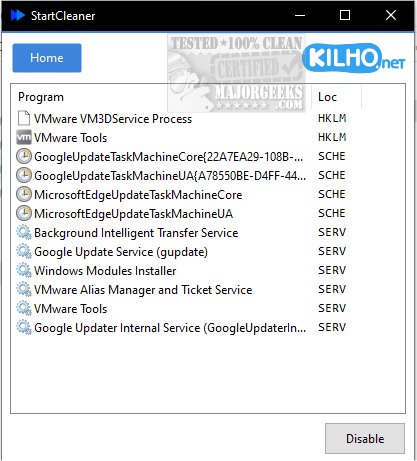
StartCleaner 1.0.6 has been released, offering users a robust tool for managing programs that launch automatically upon startup. This software boasts a user-friendly interface, allowing users to efficiently review, enable, or disable startup applications, which can lead to improved boot times and overall system performance. By streamlining the startup process, StartCleaner ensures that devices operate smoothly from the moment they are powered on.
The application simplifies startup management by providing centralized control over startup folders, enabling users to easily add, remove, or disable programs set to launch at startup. It also gives access to the task scheduler for configuring the timing and conditions for specific tasks executed at startup. Additionally, StartCleaner includes system service management, allowing users to control which services are activated during startup, further enhancing speed and efficiency.
Using StartCleaner is straightforward; to disable a startup item, users simply select the application and click the "Disable" button. It's recommended to have a current restore point in place as a precaution against potential issues. A standout feature of StartCleaner is its ability to disable settings without permanently deleting them, offering a safe and reversible way to customize user experiences. This flexibility allows users to experiment with different configurations without the risk of losing important settings.
In summary, StartCleaner empowers users to unlock their device's full potential by enabling them to personalize and optimize their startup experience, leading to a faster boot process tailored to their specific needs.
To further enhance user experience, the software is complemented by resources on managing startup apps in Windows, understanding the startup impact of applications, and running Microsoft Store and other apps at startup. Users can look forward to a more efficient computing experience with StartCleaner
The application simplifies startup management by providing centralized control over startup folders, enabling users to easily add, remove, or disable programs set to launch at startup. It also gives access to the task scheduler for configuring the timing and conditions for specific tasks executed at startup. Additionally, StartCleaner includes system service management, allowing users to control which services are activated during startup, further enhancing speed and efficiency.
Using StartCleaner is straightforward; to disable a startup item, users simply select the application and click the "Disable" button. It's recommended to have a current restore point in place as a precaution against potential issues. A standout feature of StartCleaner is its ability to disable settings without permanently deleting them, offering a safe and reversible way to customize user experiences. This flexibility allows users to experiment with different configurations without the risk of losing important settings.
In summary, StartCleaner empowers users to unlock their device's full potential by enabling them to personalize and optimize their startup experience, leading to a faster boot process tailored to their specific needs.
To further enhance user experience, the software is complemented by resources on managing startup apps in Windows, understanding the startup impact of applications, and running Microsoft Store and other apps at startup. Users can look forward to a more efficient computing experience with StartCleaner
StartCleaner 1.0.6 released
StartCleaner helps you effectively manage the programs that launch automatically on startup.