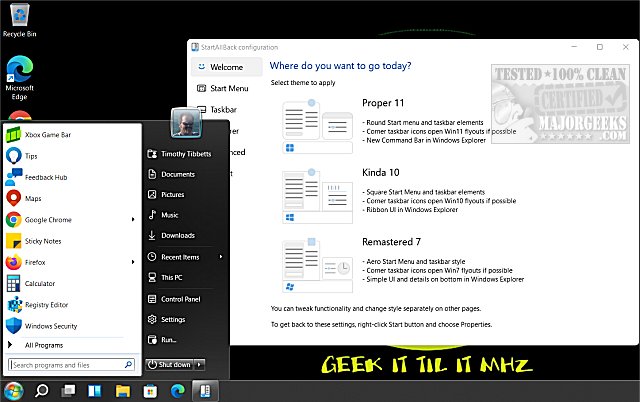
StartAllBack is a utility designed to modify various aspects of Windows 11, including the Start Menu, Taskbar, and File Explorer, to resemble the classic layouts of Windows 7 and 10. While Windows 11 offers a modern, sleek interface, many users find the changes non-intuitive and prefer the traditional design. StartAllBack addresses this need by allowing users to customize their experience and regain the familiarity they miss.
Key Features of StartAllBack:
- Customizable Start Menu: Users can select from options like "Proper 11," "Kinda 10," or "Remastered 7" to revert to their preferred Start Menu style.
- Revamped Taskbar: The tool restores classic taskbar features, such as labels on task icons, adjustable icon sizes, and the flexibility to reposition the taskbar on different screen edges.
- Enhanced File Explorer: Users can bring back the traditional ribbon, command bar, and details pane, along with stylish translucent effects.
- Improved Context Menus: The tool provides rounded acrylic menus that are responsive and touch-friendly, enhancing user interaction.
Why Choose StartAllBack?
StartAllBack is particularly beneficial for professionals who rely on an efficient workflow, casual users who appreciate a nostalgic aesthetic, or anyone resistant to unnecessary changes. The software simplifies the transition from Windows 11’s new layout back to a more familiar interface with just a few clicks.
Affordable Pricing:
StartAllBack is priced at $4.99 for a single PC license, offering a one-time payment for a lifetime license. This small investment is justified by the significant convenience and comfort it provides to users seeking a familiar Windows experience.
Conclusion:
StartAllBack serves as a powerful solution to the frustrations associated with Windows 11's interface. Its lightweight and customizable nature ensures it integrates seamlessly into the operating system, restoring functionality and layout preferences that many users find essential. For those grappling with the changes of Windows 11, StartAllBack is a practical tweak that revitalizes their computing experience.
Future Considerations:
As Windows continues to evolve, tools like StartAllBack might become increasingly valuable for users who favor classic interfaces. Future updates could introduce additional customization options and features, further enhancing user satisfaction. Whether for productivity enhancement or aesthetic preference, StartAllBack represents a bridge between the new and the beloved old
Key Features of StartAllBack:
- Customizable Start Menu: Users can select from options like "Proper 11," "Kinda 10," or "Remastered 7" to revert to their preferred Start Menu style.
- Revamped Taskbar: The tool restores classic taskbar features, such as labels on task icons, adjustable icon sizes, and the flexibility to reposition the taskbar on different screen edges.
- Enhanced File Explorer: Users can bring back the traditional ribbon, command bar, and details pane, along with stylish translucent effects.
- Improved Context Menus: The tool provides rounded acrylic menus that are responsive and touch-friendly, enhancing user interaction.
Why Choose StartAllBack?
StartAllBack is particularly beneficial for professionals who rely on an efficient workflow, casual users who appreciate a nostalgic aesthetic, or anyone resistant to unnecessary changes. The software simplifies the transition from Windows 11’s new layout back to a more familiar interface with just a few clicks.
Affordable Pricing:
StartAllBack is priced at $4.99 for a single PC license, offering a one-time payment for a lifetime license. This small investment is justified by the significant convenience and comfort it provides to users seeking a familiar Windows experience.
Conclusion:
StartAllBack serves as a powerful solution to the frustrations associated with Windows 11's interface. Its lightweight and customizable nature ensures it integrates seamlessly into the operating system, restoring functionality and layout preferences that many users find essential. For those grappling with the changes of Windows 11, StartAllBack is a practical tweak that revitalizes their computing experience.
Future Considerations:
As Windows continues to evolve, tools like StartAllBack might become increasingly valuable for users who favor classic interfaces. Future updates could introduce additional customization options and features, further enhancing user satisfaction. Whether for productivity enhancement or aesthetic preference, StartAllBack represents a bridge between the new and the beloved old
StartAllBack 3.9.22 released
StartAllBack can modify your Windows 11 Start Menu, Taskbar, File Explorer, and more to look like Windows 7 or 10.