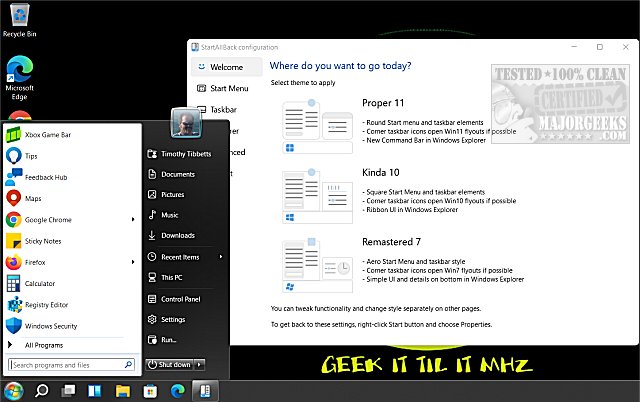
StartAllBack has launched its latest version, 3.9.21, providing users with the ability to transform their Windows 11 interface to resemble the classic styles of Windows 7 and 10. While Windows 11 boasts a modern aesthetic, many users prefer the familiarity and functionality of earlier versions. StartAllBack caters to this need, allowing for a personalized experience that combines the robust performance of Windows 11 with a traditional layout.
Why Choose StartAllBack?
Windows 11's interface may not suit everyone, and StartAllBack offers a customizable solution. Key features include:
- Customizable Start Menu: Users can select from options like "Proper 11," "Kinda 10," or "Remastered 7" to revert to their preferred Start Menu style.
- Revamped Taskbar: Features such as task icon labels, adjustable icon sizes, and repositionable taskbar enhance usability.
- Improved File Explorer: The tool reinstates the classic ribbon, command bar, and details pane, complete with modern translucent effects.
- Context Menu Fixes: Enhanced menus provide a sleek, responsive, and touch-friendly experience.
When StartAllBack is Ideal
For users who find the Windows 11 layout cumbersome—whether professionals needing efficiency, casual users who appreciate vintage aesthetics, or those resistant to change—StartAllBack serves as an effective remedy. With a few simple adjustments, it reintroduces a streamlined and familiar interface.
Affordable Convenience
StartAllBack is a premium tool priced at $4.99 for a single PC license. This one-time fee grants users a lifetime license, making it a cost-effective solution for those seeking a more familiar Windows experience.
Final Thoughts
StartAllBack stands out as a straightforward yet powerful solution for those frustrated by Windows 11's user interface. Its lightweight design and seamless integration into the system make it an appealing choice for users longing for a more traditional layout. If you have been struggling with Windows 11's changes, this tool could be the key to restoring functionality and comfort to your computing experience.
Further Related Content:
- How to Move the Windows 11 Taskbar to the Top of Your Screen
- How to Adjust Taskbar Size in Windows 11
Extension: In addition to its current features, future updates to StartAllBack could include enhanced integration with Windows 11's newer functionalities, allowing users to enjoy both the classic layout and the latest updates. Additionally, community-driven feedback could foster further customization options, making the software even more versatile for a diverse user base. As Windows continues to evolve, tools like StartAllBack can help bridge the gap between innovation and user preference, ensuring that everyone finds their ideal workspace
Why Choose StartAllBack?
Windows 11's interface may not suit everyone, and StartAllBack offers a customizable solution. Key features include:
- Customizable Start Menu: Users can select from options like "Proper 11," "Kinda 10," or "Remastered 7" to revert to their preferred Start Menu style.
- Revamped Taskbar: Features such as task icon labels, adjustable icon sizes, and repositionable taskbar enhance usability.
- Improved File Explorer: The tool reinstates the classic ribbon, command bar, and details pane, complete with modern translucent effects.
- Context Menu Fixes: Enhanced menus provide a sleek, responsive, and touch-friendly experience.
When StartAllBack is Ideal
For users who find the Windows 11 layout cumbersome—whether professionals needing efficiency, casual users who appreciate vintage aesthetics, or those resistant to change—StartAllBack serves as an effective remedy. With a few simple adjustments, it reintroduces a streamlined and familiar interface.
Affordable Convenience
StartAllBack is a premium tool priced at $4.99 for a single PC license. This one-time fee grants users a lifetime license, making it a cost-effective solution for those seeking a more familiar Windows experience.
Final Thoughts
StartAllBack stands out as a straightforward yet powerful solution for those frustrated by Windows 11's user interface. Its lightweight design and seamless integration into the system make it an appealing choice for users longing for a more traditional layout. If you have been struggling with Windows 11's changes, this tool could be the key to restoring functionality and comfort to your computing experience.
Further Related Content:
- How to Move the Windows 11 Taskbar to the Top of Your Screen
- How to Adjust Taskbar Size in Windows 11
Extension: In addition to its current features, future updates to StartAllBack could include enhanced integration with Windows 11's newer functionalities, allowing users to enjoy both the classic layout and the latest updates. Additionally, community-driven feedback could foster further customization options, making the software even more versatile for a diverse user base. As Windows continues to evolve, tools like StartAllBack can help bridge the gap between innovation and user preference, ensuring that everyone finds their ideal workspace
StartAllBack 3.9.21 released
StartAllBack can modify your Windows 11 Start Menu, Taskbar, File Explorer, and more to look like Windows 7 or 10.