A new version of Start Menu Helper, version 1.2.2, has been released. This Open Source application is designed to help users tidy up their Start Menu both now and in the future. Before using the app, it is advisable to back up your Start Menu to avoid any irreversible changes that may not be to your liking; this process is quick and straightforward.
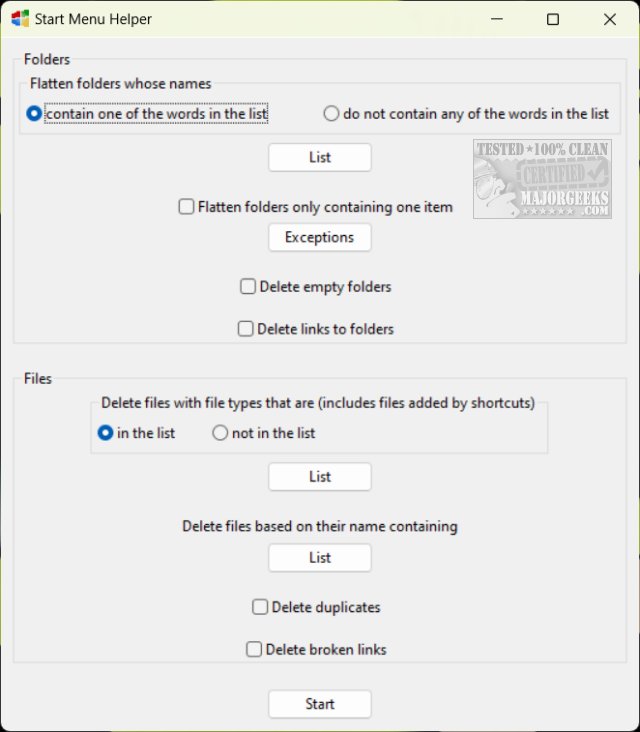
Start Menu Helper is user-friendly, featuring a simple black and gray color scheme. The application divides its functionalities into two main categories: Folders and Files. Users can select multiple options to delete empty folders, shortcuts, files, duplicates, and broken links. The app also provides lists and exceptions for many of these options, making it easier to manage your Start Menu.
Whether you're looking to organize your Start Menu Folders or Files, Start Menu Helper is a free tool that can effectively assist in maintaining your Start Menu's organization.
In addition to its core features, users may also find helpful resources such as guides on adding folder shortcuts to the Windows 11 Start Menu, hiding recommendations, showing more pins, counting items, and displaying additional tiles in both Windows 10 and Windows 11 Start Menus. As users seek to enhance their experience with the Start Menu, Start Menu Helper provides a valuable solution for a cleaner, more organized interface.
Looking ahead, future updates could potentially introduce additional features, such as enhanced customization options and improved user interfaces, making it even easier for users to tailor their Start Menu experience to their individual preferences
Start Menu Helper is user-friendly, featuring a simple black and gray color scheme. The application divides its functionalities into two main categories: Folders and Files. Users can select multiple options to delete empty folders, shortcuts, files, duplicates, and broken links. The app also provides lists and exceptions for many of these options, making it easier to manage your Start Menu.
Whether you're looking to organize your Start Menu Folders or Files, Start Menu Helper is a free tool that can effectively assist in maintaining your Start Menu's organization.
In addition to its core features, users may also find helpful resources such as guides on adding folder shortcuts to the Windows 11 Start Menu, hiding recommendations, showing more pins, counting items, and displaying additional tiles in both Windows 10 and Windows 11 Start Menus. As users seek to enhance their experience with the Start Menu, Start Menu Helper provides a valuable solution for a cleaner, more organized interface.
Looking ahead, future updates could potentially introduce additional features, such as enhanced customization options and improved user interfaces, making it even easier for users to tailor their Start Menu experience to their individual preferences
Start Menu Helper 1.2.2 released
Start Menu Helper is an Open Source app to clean up your Start Menu now and in the future.