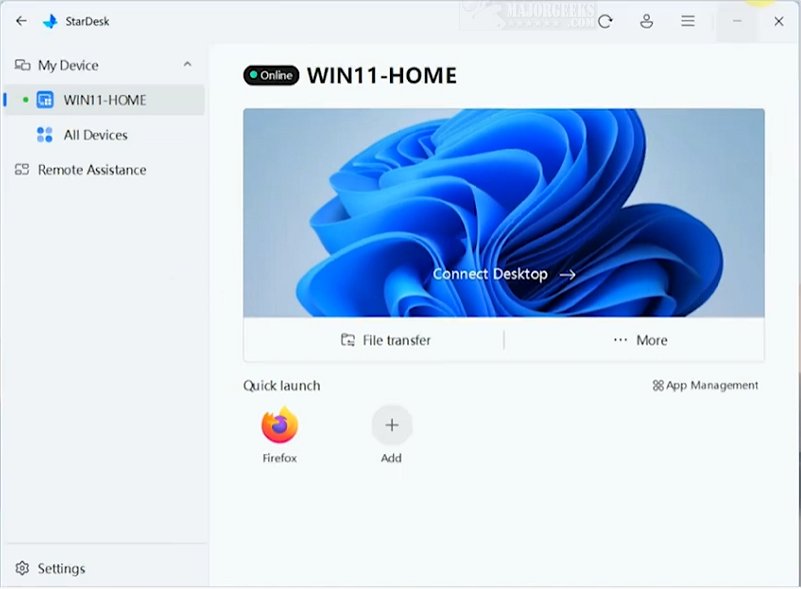
StarDesk is a cutting-edge remote connection software that prioritizes low latency, providing users with highly responsive remote sessions and minimal setup time. Its intuitive design makes it easy for users of all experience levels to navigate, making it an ideal choice for both personal and professional use.
User-Friendly Setup and Experience
The setup process for StarDesk is streamlined, starting with account authentication via Google. This quick initial step leads to automatic registration of relevant devices, allowing users to switch between host and guest roles seamlessly. Connections can be established in mere seconds, and once connected, guests have full control over the host computer. The option to enable Remote Boot in the settings menu adds another layer of functionality.
While the reliance on Google for authentication is convenient, some users may prefer a self-contained access method akin to TeamViewer. However, the overall process remains user-friendly regardless of this preference.
Enhanced Control Center and Quick Launch Features
StarDesk includes a comprehensive Control Center, where users can customize various connection properties, such as display resolution and security settings. The built-in File Transfer utility simplifies file sharing, enhancing the overall remote experience.
One of the most innovative features is Quick Launch. This tool scans the host computer for installed software, allowing users to create a personalized list of frequently used applications for easy access during future sessions. Features like pinning a web browser or the Control Panel can significantly improve the efficiency of remote work.
The Verdict on StarDesk
StarDesk stands out as a robust desktop connection solution that effectively meets user needs. Its blend of powerful features and an accessible interface ensures that even those with minimal experience can utilize its capabilities with confidence. This unique combination of sophistication and ease of use positions StarDesk as an exceptional tool for a wide range of users, boosting productivity and simplifying remote connections.
Future Developments and Considerations
As StarDesk continues to evolve, future updates could explore alternative authentication methods to enhance user flexibility. Additionally, integrating more advanced security features could further solidify its position in the competitive remote connection software market. Overall, StarDesk 1.2.0 is a promising addition, paving the way for easier and more effective remote collaboration
User-Friendly Setup and Experience
The setup process for StarDesk is streamlined, starting with account authentication via Google. This quick initial step leads to automatic registration of relevant devices, allowing users to switch between host and guest roles seamlessly. Connections can be established in mere seconds, and once connected, guests have full control over the host computer. The option to enable Remote Boot in the settings menu adds another layer of functionality.
While the reliance on Google for authentication is convenient, some users may prefer a self-contained access method akin to TeamViewer. However, the overall process remains user-friendly regardless of this preference.
Enhanced Control Center and Quick Launch Features
StarDesk includes a comprehensive Control Center, where users can customize various connection properties, such as display resolution and security settings. The built-in File Transfer utility simplifies file sharing, enhancing the overall remote experience.
One of the most innovative features is Quick Launch. This tool scans the host computer for installed software, allowing users to create a personalized list of frequently used applications for easy access during future sessions. Features like pinning a web browser or the Control Panel can significantly improve the efficiency of remote work.
The Verdict on StarDesk
StarDesk stands out as a robust desktop connection solution that effectively meets user needs. Its blend of powerful features and an accessible interface ensures that even those with minimal experience can utilize its capabilities with confidence. This unique combination of sophistication and ease of use positions StarDesk as an exceptional tool for a wide range of users, boosting productivity and simplifying remote connections.
Future Developments and Considerations
As StarDesk continues to evolve, future updates could explore alternative authentication methods to enhance user flexibility. Additionally, integrating more advanced security features could further solidify its position in the competitive remote connection software market. Overall, StarDesk 1.2.0 is a promising addition, paving the way for easier and more effective remote collaboration
StarDesk 1.2.0 released
StarDesk is an innovative remote connection software designed to deliver low latency, ensuring that users experience highly responsive remote sessions with minimal setup time.