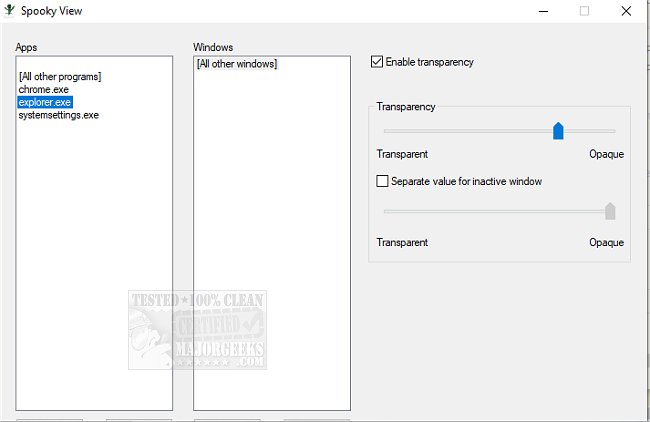
The latest version of Spooky View, a user-friendly application, allows you to easily make any window on your desktop transparent. This enhances your workspace by enabling you to choose specific applications and customize their transparency settings according to your preferences.
Upon installation, Spooky View resides in the system tray, providing quick access to its straightforward interface. Users can effortlessly add applications to the list and adjust their transparency levels using intuitive sliders. Additionally, there's an option to set a different transparency value for inactive windows, allowing for a more tailored visual experience.
For added convenience, Spooky View can be set to launch automatically at startup, a feature that can be activated with a simple right-click on the systray icon. This makes it an excellent choice for those who appreciate aesthetic flexibility in their work environment without compromising system performance.
In summary, Spooky View is a low-resource application that enhances desktop aesthetics while maintaining functionality. Whether you’re looking to create a more visually appealing workspace or simply want to manage multiple windows more effectively, Spooky View offers a practical solution.
Extensions and Features to Consider
Future updates could introduce features such as customizable presets for different work scenarios, integration with virtual desktops, and support for additional operating systems. Enhanced compatibility with popular productivity tools or an option to save and share transparency settings could also be valuable additions to further enhance user experience
Upon installation, Spooky View resides in the system tray, providing quick access to its straightforward interface. Users can effortlessly add applications to the list and adjust their transparency levels using intuitive sliders. Additionally, there's an option to set a different transparency value for inactive windows, allowing for a more tailored visual experience.
For added convenience, Spooky View can be set to launch automatically at startup, a feature that can be activated with a simple right-click on the systray icon. This makes it an excellent choice for those who appreciate aesthetic flexibility in their work environment without compromising system performance.
In summary, Spooky View is a low-resource application that enhances desktop aesthetics while maintaining functionality. Whether you’re looking to create a more visually appealing workspace or simply want to manage multiple windows more effectively, Spooky View offers a practical solution.
Extensions and Features to Consider
Future updates could introduce features such as customizable presets for different work scenarios, integration with virtual desktops, and support for additional operating systems. Enhanced compatibility with popular productivity tools or an option to save and share transparency settings could also be valuable additions to further enhance user experience
Spooky View 1.1.0 released
Spooky View allows you to make any window transparent through a simple process.