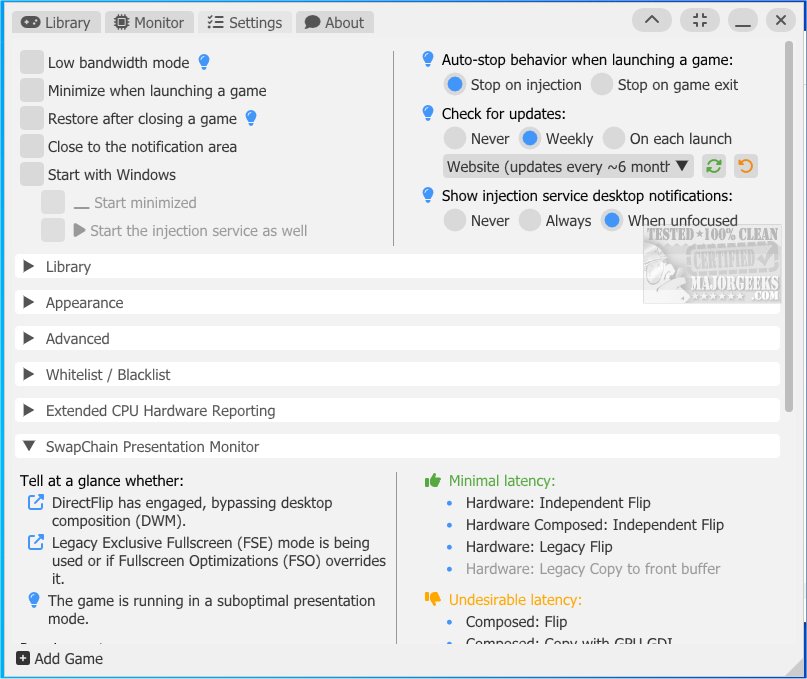
The latest release of Special K, version 26.4.3.1, introduces an extensive suite of tools and features aimed at enhancing the PC gaming experience. This versatile tool is designed for gamers who want to optimize their performance and customize their gaming environment to suit their preferences and hardware capabilities.
Key Features and Functionalities
Special K serves multiple purposes, including fixing and enhancing graphics, conducting detailed performance analyses, and providing correction mods. This multi-purpose tool is continually updated with new features to address common issues in PC gaming. However, users should exercise caution, as using Special K in online games may lead to bans.
Customization Options
The customization framework of Special K allows users to modify various game aspects, including gameplay mechanics, graphics, and user interface elements. This empowers gamers to tailor their experience significantly, enhancing overall enjoyment.
Advanced Capabilities
The tool’s primary focus is on modifying the graphics pipeline, which enhances in-game visuals. It also includes features for configuring input devices, managing audio settings, and optimizing specific functions related to Steam. Over the years, developers have incorporated game-specific adjustments for popular titles such as Chrono Cross, Final Fantasy XV, and NieR: Automata, among others.
Comprehensive Toolset
Special K offers numerous tools and overrides that can be applied to most games, including:
- Advanced FPS limiter for improved frame pacing.
- Enhanced latency and performance in borderless window mode for Direct3D 11 games.
- HDR screenshot capabilities and retrofitting options for various graphics APIs.
- Customization of DirectStorage and DLSS settings.
- Audio device management based on display output.
- XInput emulation for PlayStation controllers.
- Features for managing input devices and triggering actions upon unlocking Steam achievements.
Getting Started with Special K
For users looking to dive into Special K, a comprehensive Wiki is available to assist with setup and answer frequently asked questions.
Related Topics for Gamers
Additionally, the article hints at related topics that could further enhance a gamer’s experience, such as enabling/disabling fullscreen optimizations in Windows 10 and 11, monitoring FPS, uninstalling the Xbox Game Bar and Console Companion, and managing Game Mode settings.
Future Prospects
As gaming technology continues to evolve, Special K is positioned to adapt and expand its offerings, ensuring that PC gamers have access to cutting-edge tools for performance optimization and customization. The community around Special K is likely to grow, providing ongoing support and new ideas for enhancing the gaming experience
Key Features and Functionalities
Special K serves multiple purposes, including fixing and enhancing graphics, conducting detailed performance analyses, and providing correction mods. This multi-purpose tool is continually updated with new features to address common issues in PC gaming. However, users should exercise caution, as using Special K in online games may lead to bans.
Customization Options
The customization framework of Special K allows users to modify various game aspects, including gameplay mechanics, graphics, and user interface elements. This empowers gamers to tailor their experience significantly, enhancing overall enjoyment.
Advanced Capabilities
The tool’s primary focus is on modifying the graphics pipeline, which enhances in-game visuals. It also includes features for configuring input devices, managing audio settings, and optimizing specific functions related to Steam. Over the years, developers have incorporated game-specific adjustments for popular titles such as Chrono Cross, Final Fantasy XV, and NieR: Automata, among others.
Comprehensive Toolset
Special K offers numerous tools and overrides that can be applied to most games, including:
- Advanced FPS limiter for improved frame pacing.
- Enhanced latency and performance in borderless window mode for Direct3D 11 games.
- HDR screenshot capabilities and retrofitting options for various graphics APIs.
- Customization of DirectStorage and DLSS settings.
- Audio device management based on display output.
- XInput emulation for PlayStation controllers.
- Features for managing input devices and triggering actions upon unlocking Steam achievements.
Getting Started with Special K
For users looking to dive into Special K, a comprehensive Wiki is available to assist with setup and answer frequently asked questions.
Related Topics for Gamers
Additionally, the article hints at related topics that could further enhance a gamer’s experience, such as enabling/disabling fullscreen optimizations in Windows 10 and 11, monitoring FPS, uninstalling the Xbox Game Bar and Console Companion, and managing Game Mode settings.
Future Prospects
As gaming technology continues to evolve, Special K is positioned to adapt and expand its offerings, ensuring that PC gamers have access to cutting-edge tools for performance optimization and customization. The community around Special K is likely to grow, providing ongoing support and new ideas for enhancing the gaming experience
Special K 26.4.3.1 released
Special K offers a wide range of tools and features designed to enhance the PC gaming experience.