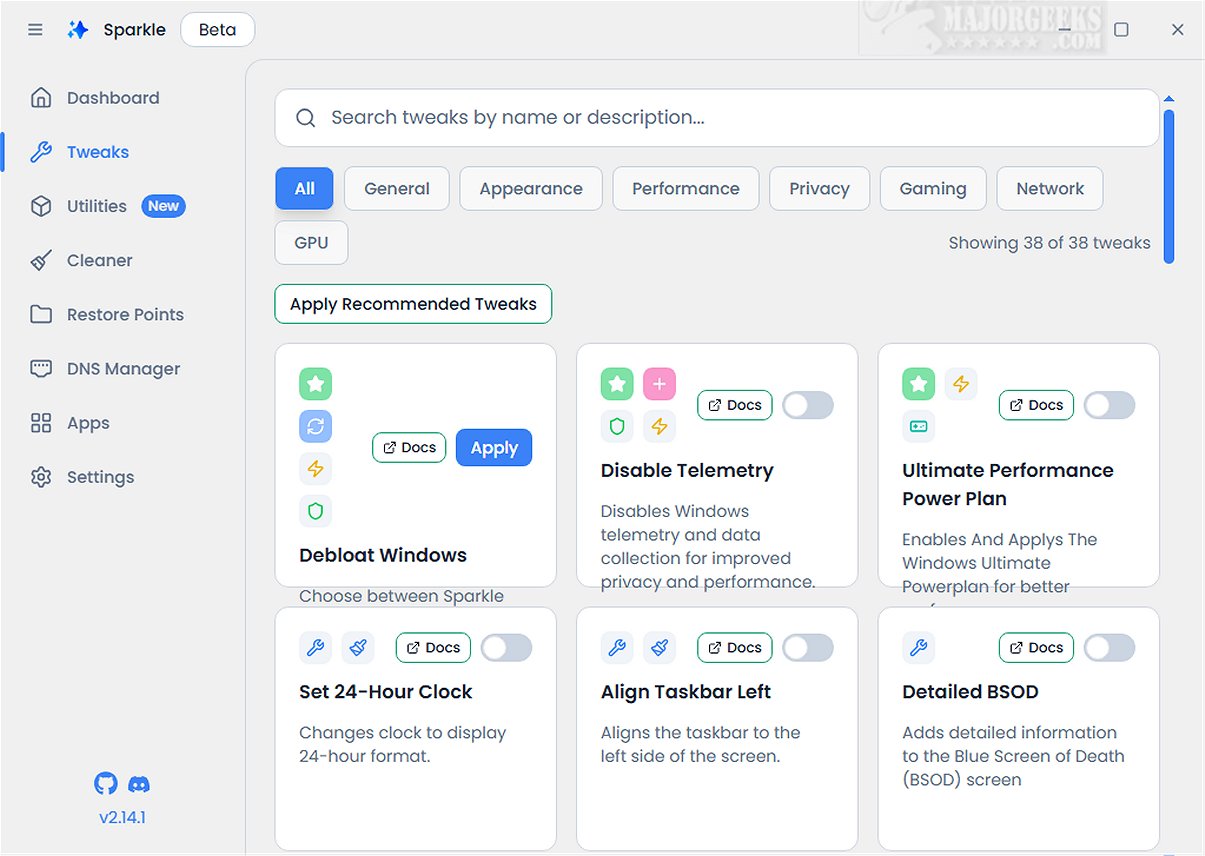
Sparkle is a multifunctional Windows application aimed at improving system performance by removing unnecessary Microsoft bloatware and applying various customization enhancements. This latest version, Sparkle 2.15.1 Beta, introduces several features that make it an essential tool for users looking to optimize their Windows experience.
Key Features of Sparkle:
1. Bloatware Removal and Customization: Users can disable telemetry features that monitor user activity, turn off Copilot for a more streamlined workflow, and apply specialized NVIDIA optimizations to enhance gaming performance. Additionally, Sparkle provides an easy way to uninstall OneDrive, giving users greater control over their installed applications.
2. App Installer Integration: A significant highlight of Sparkle is its integration with app installers like Winget and Chocolatey. This built-in functionality ensures that users can access and install the latest software conveniently, with both installers regularly updated to keep the user's toolkit current.
3. User-Friendly Interface: Sparkle features an intuitive interface with a dedicated Utilities page that facilitates essential maintenance tasks. Users can run Disk Cleanup to free up storage space, view detailed system information to monitor performance, and quickly restart graphics drivers to address display issues.
4. Safe Usage with Restore Points: Before using Sparkle, it is advisable to create a system restore point, a feature that Sparkle offers. This precaution allows users to revert to a previous state if any issues arise during or after the application’s use. Maintaining an updated backup is also recommended for added security.
Conclusion: The Geek Verdict
In summary, Sparkle is a robust solution that combines a variety of essential features into one cohesive application. Its offerings include a user-friendly Winget App Installer, a versatile Chocolatey App Installer, an effective Windows Debloat Tool, a reliable temporary file cleaner, and a dynamic DNS Changer. These functionalities position Sparkle as the ultimate tool for optimizing and personalizing the Windows user experience.
Future Enhancements: As Sparkle continues to evolve, users can expect further enhancements and new features based on feedback from the beta release. The development team is likely to focus on streamlining the user interface, expanding app compatibility, and introducing more customization options to cater to a broader audience.
Overall, Sparkle 2.15.1 Beta represents a significant step forward in Windows system optimization tools, providing users with the capabilities they need to maintain and personalize their systems effectively
Key Features of Sparkle:
1. Bloatware Removal and Customization: Users can disable telemetry features that monitor user activity, turn off Copilot for a more streamlined workflow, and apply specialized NVIDIA optimizations to enhance gaming performance. Additionally, Sparkle provides an easy way to uninstall OneDrive, giving users greater control over their installed applications.
2. App Installer Integration: A significant highlight of Sparkle is its integration with app installers like Winget and Chocolatey. This built-in functionality ensures that users can access and install the latest software conveniently, with both installers regularly updated to keep the user's toolkit current.
3. User-Friendly Interface: Sparkle features an intuitive interface with a dedicated Utilities page that facilitates essential maintenance tasks. Users can run Disk Cleanup to free up storage space, view detailed system information to monitor performance, and quickly restart graphics drivers to address display issues.
4. Safe Usage with Restore Points: Before using Sparkle, it is advisable to create a system restore point, a feature that Sparkle offers. This precaution allows users to revert to a previous state if any issues arise during or after the application’s use. Maintaining an updated backup is also recommended for added security.
Conclusion: The Geek Verdict
In summary, Sparkle is a robust solution that combines a variety of essential features into one cohesive application. Its offerings include a user-friendly Winget App Installer, a versatile Chocolatey App Installer, an effective Windows Debloat Tool, a reliable temporary file cleaner, and a dynamic DNS Changer. These functionalities position Sparkle as the ultimate tool for optimizing and personalizing the Windows user experience.
Future Enhancements: As Sparkle continues to evolve, users can expect further enhancements and new features based on feedback from the beta release. The development team is likely to focus on streamlining the user interface, expanding app compatibility, and introducing more customization options to cater to a broader audience.
Overall, Sparkle 2.15.1 Beta represents a significant step forward in Windows system optimization tools, providing users with the capabilities they need to maintain and personalize their systems effectively
Sparkle 2.15.1 Beta released
Sparkle is a versatile Windows application designed to enhance your system's performance by effectively removing unnecessary Microsoft bloatware and applying various customization tweaks.