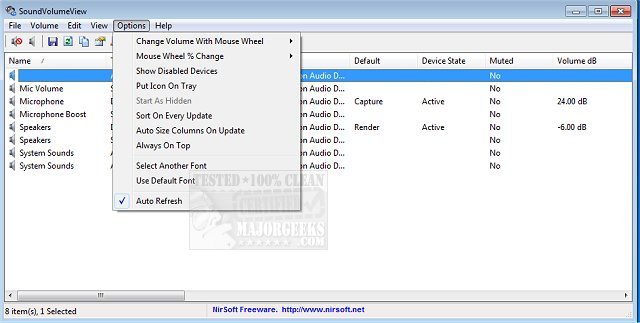
SoundVolumeView version 2.50 has been released, providing users with a convenient tool to manage and view their PC's audio settings. This software displays essential audio information, such as the current volume levels for all active sound components on the system. One of its key features is the ability to save a sound profile, which includes the current volume levels and the mute/unmute state of all sound devices, including default settings. Users can later load this saved profile to restore their audio settings instantly.
Additionally, SoundVolumeView offers robust command-line support, enabling users to perform various tasks without needing to interact with the graphical user interface. This includes saving and loading profiles, adjusting volume levels across all sound components, and muting or unmuting devices.
For users seeking to enhance their audio experience, related topics include enabling Windows Sonic Surround Sound on Windows 10 and 11, toggling key sounds, renaming sound input or output devices, troubleshooting low computer sound volume, and fixing general sound problems on Windows.
In the future, it would be beneficial for SoundVolumeView to incorporate additional features such as audio visualization tools, integrated sound testing options, and more customizable user interfaces that cater to different user preferences. These enhancements could further improve the user experience and make audio management more intuitive and accessible
Additionally, SoundVolumeView offers robust command-line support, enabling users to perform various tasks without needing to interact with the graphical user interface. This includes saving and loading profiles, adjusting volume levels across all sound components, and muting or unmuting devices.
For users seeking to enhance their audio experience, related topics include enabling Windows Sonic Surround Sound on Windows 10 and 11, toggling key sounds, renaming sound input or output devices, troubleshooting low computer sound volume, and fixing general sound problems on Windows.
In the future, it would be beneficial for SoundVolumeView to incorporate additional features such as audio visualization tools, integrated sound testing options, and more customizable user interfaces that cater to different user preferences. These enhancements could further improve the user experience and make audio management more intuitive and accessible
SoundVolumeView 2.50 released
SoundVolumeView will quickly display your PC's general audio information, including current volume levels for all active sound components.