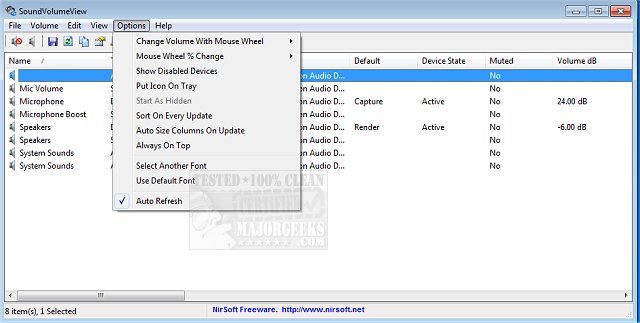
SoundVolumeView version 2.49 has been released, offering users a convenient way to view and manage audio settings on their PCs. This utility provides a quick overview of the current volume levels for all active sound components, allowing for easy monitoring of audio status.
One of the standout features of SoundVolumeView is its ability to save sound profiles. Users can create a file that captures the current volume levels and the mute/unmute state of every sound component, including default sound devices. This functionality allows users to restore these settings later, making it easy to switch between different audio configurations as needed.
Additionally, SoundVolumeView includes extensive command-line support, enabling users to perform tasks such as saving and loading profiles, adjusting the volume of all sound components, and muting or unmuting devices without needing to interact with a graphical user interface. This makes it a powerful tool for users who prefer or require automation in managing their audio settings.
To enhance your audio experience, consider exploring related articles on how to enable Windows Sonic Surround Sound, toggle key sounds, rename sound input/output devices, troubleshoot low volume issues, and resolve general sound problems on Windows systems. These resources can provide further insights into optimizing your audio setup.
In summary, SoundVolumeView 2.49 is a versatile utility for managing audio settings on Windows PCs, offering both user-friendly features and advanced command-line capabilities
One of the standout features of SoundVolumeView is its ability to save sound profiles. Users can create a file that captures the current volume levels and the mute/unmute state of every sound component, including default sound devices. This functionality allows users to restore these settings later, making it easy to switch between different audio configurations as needed.
Additionally, SoundVolumeView includes extensive command-line support, enabling users to perform tasks such as saving and loading profiles, adjusting the volume of all sound components, and muting or unmuting devices without needing to interact with a graphical user interface. This makes it a powerful tool for users who prefer or require automation in managing their audio settings.
To enhance your audio experience, consider exploring related articles on how to enable Windows Sonic Surround Sound, toggle key sounds, rename sound input/output devices, troubleshoot low volume issues, and resolve general sound problems on Windows systems. These resources can provide further insights into optimizing your audio setup.
In summary, SoundVolumeView 2.49 is a versatile utility for managing audio settings on Windows PCs, offering both user-friendly features and advanced command-line capabilities
SoundVolumeView 2.49 released
SoundVolumeView will quickly display your PC's general audio information, including current volume levels for all active sound components.