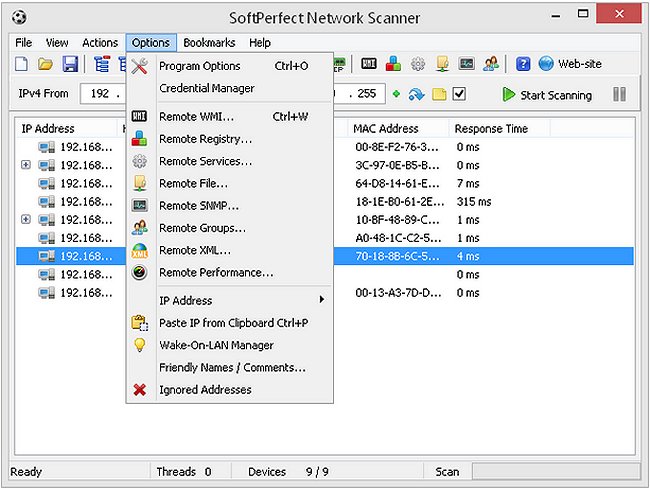
SoftPerfect Network Scanner has released version 26.1, enhancing its capabilities as a multi-threaded scanner for IP addresses, NetBIOS, and SNMP, featuring a modern user interface and a variety of advanced tools. This software is designed for both system administrators and casual users aiming to bolster their computer security.
The scanner operates by pinging devices to identify active TCP ports and showcases shared resources within the network, including hidden and system folders. Users can conveniently mount shared folders as network drives, navigate them via Windows Explorer, and filter results based on specific criteria. Additionally, the tool can check user-defined ports for activity and can resolve hostnames while automatically detecting local and external IP ranges.
Notable features of SoftPerfect Network Scanner include:
- The ability to ping computers without needing administrative rights.
- Detection of hardware (MAC) addresses, even across routers.
- Identification of hidden shared folders and writable shares.
- Retrieval of internal and external IP addresses.
- Scanning for active TCP ports and SNMP services.
- Displaying currently logged-on users.
- Mounting and exploring network resources.
- Launching third-party applications.
- Exporting results in formats such as HTML, XML, CSV, and TXT.
- Support for Wake-On-LAN, remote shutdown, and network messaging.
- Comprehensive information retrieval via WMI.
Moreover, the software is completely free, requires no installation, and is devoid of any adware, spyware, or malware.
In addition to its functions, users may benefit from related resources on enhancing wireless network performance, resetting network settings in Windows 10 and 11, and managing TCP/IP configurations or DNS cache flushing. With these features, SoftPerfect Network Scanner is a powerful tool for maintaining and securing network environments.
Future updates could further enhance its capabilities, potentially integrating more advanced security protocols, expanded user interface customization options, and improved compatibility with various operating systems
The scanner operates by pinging devices to identify active TCP ports and showcases shared resources within the network, including hidden and system folders. Users can conveniently mount shared folders as network drives, navigate them via Windows Explorer, and filter results based on specific criteria. Additionally, the tool can check user-defined ports for activity and can resolve hostnames while automatically detecting local and external IP ranges.
Notable features of SoftPerfect Network Scanner include:
- The ability to ping computers without needing administrative rights.
- Detection of hardware (MAC) addresses, even across routers.
- Identification of hidden shared folders and writable shares.
- Retrieval of internal and external IP addresses.
- Scanning for active TCP ports and SNMP services.
- Displaying currently logged-on users.
- Mounting and exploring network resources.
- Launching third-party applications.
- Exporting results in formats such as HTML, XML, CSV, and TXT.
- Support for Wake-On-LAN, remote shutdown, and network messaging.
- Comprehensive information retrieval via WMI.
Moreover, the software is completely free, requires no installation, and is devoid of any adware, spyware, or malware.
In addition to its functions, users may benefit from related resources on enhancing wireless network performance, resetting network settings in Windows 10 and 11, and managing TCP/IP configurations or DNS cache flushing. With these features, SoftPerfect Network Scanner is a powerful tool for maintaining and securing network environments.
Future updates could further enhance its capabilities, potentially integrating more advanced security protocols, expanded user interface customization options, and improved compatibility with various operating systems
SoftPerfect Network Scanner 26.1 released
SoftPerfect Network Scanner is a multi-threaded IP, NetBIOS and SNMP scanner with a modern interface and several advanced features.