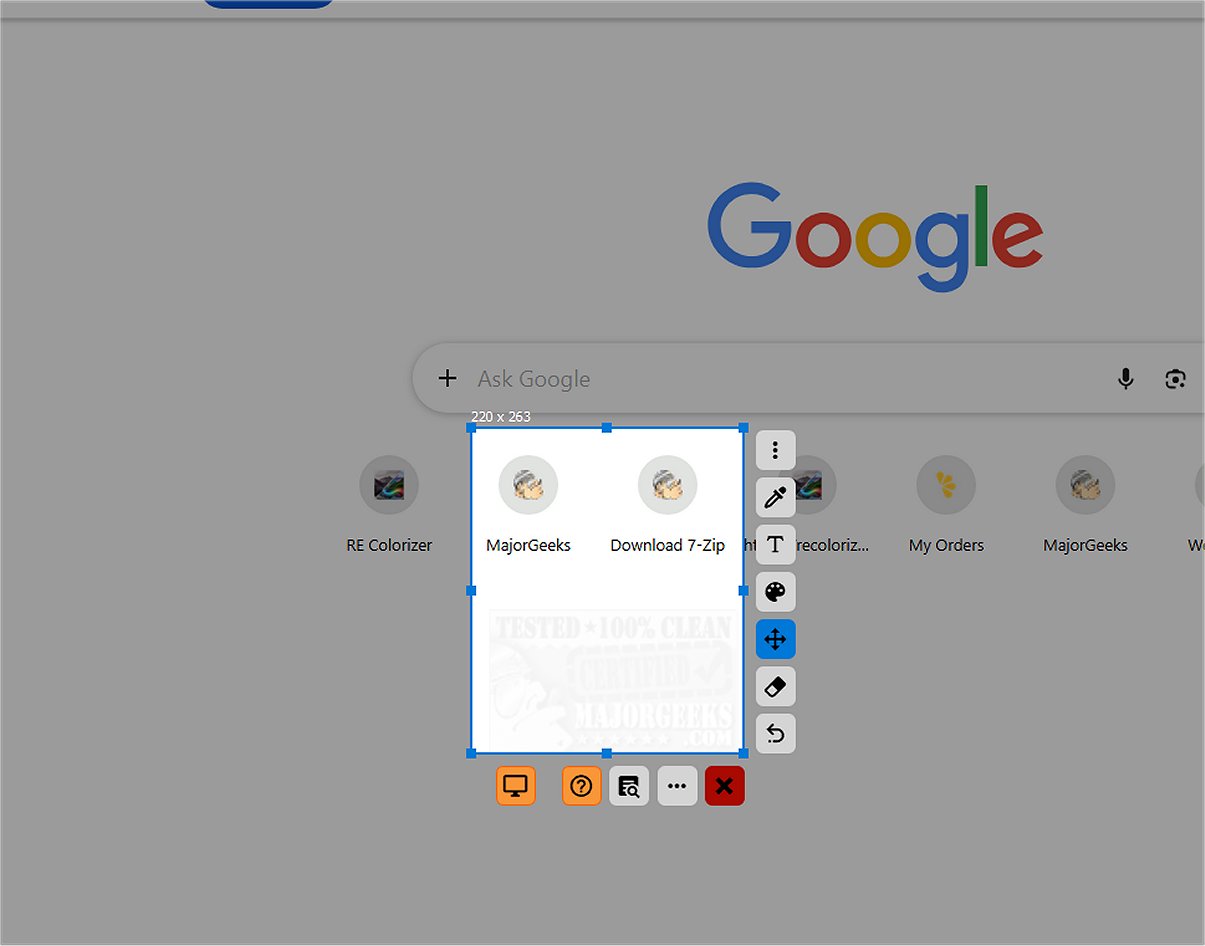
SnipFor is an advanced application designed for capturing and saving specific portions of your screen. The recent release, version 2.1.0, enhances its capability to allow users to select any area of their display, take snapshots, and store them for immediate or future use.
User-Friendly Interface
The interface of SnipFor has been tailored for optimal user experience, presenting a modern and intuitive layout. It features an array of user-friendly tools conveniently located on the side, which enable quick annotation through drawing, text insertion, or markup directly onto the captured image. These tools are designed with clear icons, ensuring users can navigate seamlessly without confusion.
Precision in Screen Capture
A notable highlight of SnipFor is its precise capture-area adjustment feature. Users can modify their selection with exceptional accuracy, down to a single pixel. This precision is particularly beneficial for those looking to capture specific content without any extraneous elements, resulting in clean and purposeful screenshots.
Advanced Optical Character Recognition (OCR)
What sets SnipFor apart from typical screenshot tools is its advanced Optical Character Recognition (OCR) engine. This feature allows users to identify and convert text within screenshots, which is especially useful in various contexts such as meetings, paused videos, remote desktop sessions, or PDF documents where text copying is restricted. With a few clicks, you can effortlessly extract and utilize text, streamlining your workflow.
Privacy-Centric OCR Functionality
SnipFor prioritizes user privacy by ensuring that the OCR runs entirely on the local device, meaning no extracted text is sent to external servers. This approach is crucial for users handling sensitive information, as it mitigates the risk of data breaches and provides a secure environment for managing confidential documents.
Overall Assessment
In summary, SnipFor is a robust screen-snipping tool that not only allows for capturing and annotating screenshots but also provides OCR capabilities for text extraction. Users can even pin snippets on top of other windows for quick access. However, a minor drawback noted is that certain elements may not be fully translated into English, even if the language is selected during installation. Once the app is launched, the majority of the interface appears correctly translated.
Conclusion and Future Prospects
SnipFor 2.1.0 is a reliable choice for anyone looking for a screen capture tool that combines functionality with privacy. Future updates could focus on improving language translations and expanding the range of available annotation tools, further enhancing the user experience. Overall, SnipFor offers an indispensable tool for productivity, especially for professionals who frequently capture and utilize screen content.
Related Resources:
- How to Take Screenshots in Windows 10 & 11
- How to Create Screen Snip Shortcut in Windows 10 & 11
- How to Reset the Screenshot Index Counter With a Batch File or Context Menu
- How to Take High Resolution Screenshots in Windows 10 & 11
- How to Add Sound When You Press Print Scree
User-Friendly Interface
The interface of SnipFor has been tailored for optimal user experience, presenting a modern and intuitive layout. It features an array of user-friendly tools conveniently located on the side, which enable quick annotation through drawing, text insertion, or markup directly onto the captured image. These tools are designed with clear icons, ensuring users can navigate seamlessly without confusion.
Precision in Screen Capture
A notable highlight of SnipFor is its precise capture-area adjustment feature. Users can modify their selection with exceptional accuracy, down to a single pixel. This precision is particularly beneficial for those looking to capture specific content without any extraneous elements, resulting in clean and purposeful screenshots.
Advanced Optical Character Recognition (OCR)
What sets SnipFor apart from typical screenshot tools is its advanced Optical Character Recognition (OCR) engine. This feature allows users to identify and convert text within screenshots, which is especially useful in various contexts such as meetings, paused videos, remote desktop sessions, or PDF documents where text copying is restricted. With a few clicks, you can effortlessly extract and utilize text, streamlining your workflow.
Privacy-Centric OCR Functionality
SnipFor prioritizes user privacy by ensuring that the OCR runs entirely on the local device, meaning no extracted text is sent to external servers. This approach is crucial for users handling sensitive information, as it mitigates the risk of data breaches and provides a secure environment for managing confidential documents.
Overall Assessment
In summary, SnipFor is a robust screen-snipping tool that not only allows for capturing and annotating screenshots but also provides OCR capabilities for text extraction. Users can even pin snippets on top of other windows for quick access. However, a minor drawback noted is that certain elements may not be fully translated into English, even if the language is selected during installation. Once the app is launched, the majority of the interface appears correctly translated.
Conclusion and Future Prospects
SnipFor 2.1.0 is a reliable choice for anyone looking for a screen capture tool that combines functionality with privacy. Future updates could focus on improving language translations and expanding the range of available annotation tools, further enhancing the user experience. Overall, SnipFor offers an indispensable tool for productivity, especially for professionals who frequently capture and utilize screen content.
Related Resources:
- How to Take Screenshots in Windows 10 & 11
- How to Create Screen Snip Shortcut in Windows 10 & 11
- How to Reset the Screenshot Index Counter With a Batch File or Context Menu
- How to Take High Resolution Screenshots in Windows 10 & 11
- How to Add Sound When You Press Print Scree
SnipFor 2.1.0 released
SnipFor is a sophisticated tool for capturing and saving specific screen content. You can select a portion of their display, take a snapshot, and the application will store it for immediate or future use.