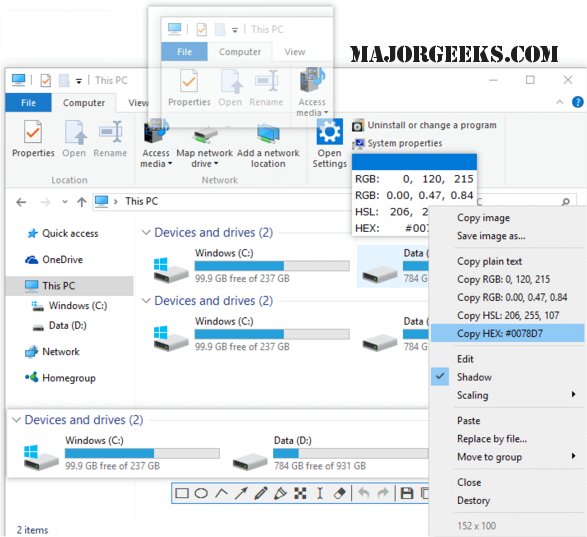
The recently released Snipaste 2.11.3 offers users a powerful snipping tool that enhances screen capture capabilities with additional editing features. Recommended by MajorGeeks user Kleinkinstein, who is a long-time Greenshot user, Snipaste provides unique functionalities that set it apart from other tools.
With Snipaste, users can capture images and various clipboard content, which can then be displayed on the desktop as floating windows. These windows can be easily manipulated, organized into groups, and saved in multiple formats, including PNG, JPG, and BMP. For those who prefer immediate access, captured content can also be sent directly to the clipboard for quick use.
Snipaste includes a variety of essential editing functions, such as rotation, zooming, and adjusting translucence, making it highly versatile. Additionally, it can capture colors, support multiple themes, auto-detect UI elements, and features a history playback function. The tool is designed to work seamlessly across multiple screens and supports HiDPI (retina display) settings, ensuring a high-quality user experience.
This update not only enhances the functionality of Snipaste but also positions it as a formidable alternative to other screen capture tools. Users looking for a comprehensive solution for screen capturing and editing will find Snipaste 2.11.3 to be an excellent choice.
In conclusion, Snipaste 2.11.3 stands out in the realm of screenshot tools by combining advanced editing features with user-friendly functionalities. Whether for professional or personal use, this tool caters to a wide range of needs, making it a valuable addition to any user's software toolkit
With Snipaste, users can capture images and various clipboard content, which can then be displayed on the desktop as floating windows. These windows can be easily manipulated, organized into groups, and saved in multiple formats, including PNG, JPG, and BMP. For those who prefer immediate access, captured content can also be sent directly to the clipboard for quick use.
Snipaste includes a variety of essential editing functions, such as rotation, zooming, and adjusting translucence, making it highly versatile. Additionally, it can capture colors, support multiple themes, auto-detect UI elements, and features a history playback function. The tool is designed to work seamlessly across multiple screens and supports HiDPI (retina display) settings, ensuring a high-quality user experience.
This update not only enhances the functionality of Snipaste but also positions it as a formidable alternative to other screen capture tools. Users looking for a comprehensive solution for screen capturing and editing will find Snipaste 2.11.3 to be an excellent choice.
In conclusion, Snipaste 2.11.3 stands out in the realm of screenshot tools by combining advanced editing features with user-friendly functionalities. Whether for professional or personal use, this tool caters to a wide range of needs, making it a valuable addition to any user's software toolkit
Snipaste 2.11.3 released
Snipaste provides you with a robust snipping tool that includes captured screen editing and more.