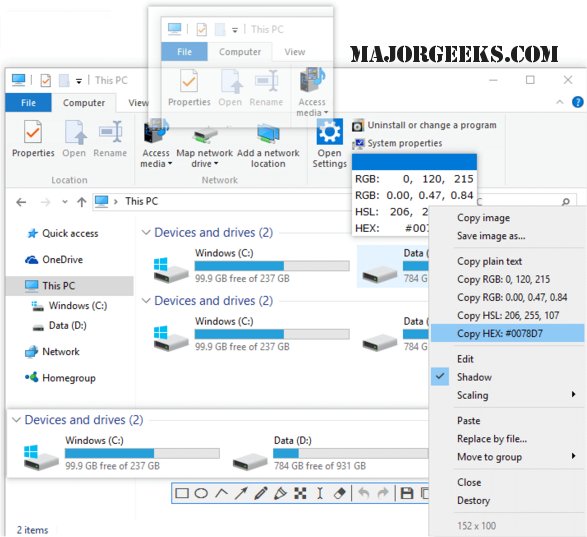
The latest release of Snipaste, version 2.11.2, enhances its capabilities as a versatile snipping tool, perfect for users who require efficient screen capturing combined with editing features. Recommended by MajorGeeks contributor Kleinkinstein, who also favors Greenshot, Snipaste is appreciated for its additional functionalities.
With Snipaste, users can not only capture images but also work with various clipboard contents, which can be displayed as floating windows on the desktop. These windows offer flexibility; they can be moved around, organized into groups, and saved as files in multiple formats, including PNG, JPG, and BMP. For quick access, users can send their creations directly to the clipboard.
The tool includes a range of essential functions such as rotation, zoom, and translucence adjustments. It also features color grabbing, supports multiple themes, and auto-detects UI elements. Additional functionalities include a history playback feature and compatibility with multi-screen setups and HiDP (retina display) support, making it a robust choice for both casual and professional users.
In summary, Snipaste 2.11.2 is a powerful tool for anyone looking to enhance their screen capturing and editing workflow, offering a wide array of features that cater to various user needs. As the landscape of screen capture tools continues to evolve, Snipaste stands out for its user-friendly interface and extensive functionality, making it an excellent alternative for those exploring their options
With Snipaste, users can not only capture images but also work with various clipboard contents, which can be displayed as floating windows on the desktop. These windows offer flexibility; they can be moved around, organized into groups, and saved as files in multiple formats, including PNG, JPG, and BMP. For quick access, users can send their creations directly to the clipboard.
The tool includes a range of essential functions such as rotation, zoom, and translucence adjustments. It also features color grabbing, supports multiple themes, and auto-detects UI elements. Additional functionalities include a history playback feature and compatibility with multi-screen setups and HiDP (retina display) support, making it a robust choice for both casual and professional users.
In summary, Snipaste 2.11.2 is a powerful tool for anyone looking to enhance their screen capturing and editing workflow, offering a wide array of features that cater to various user needs. As the landscape of screen capture tools continues to evolve, Snipaste stands out for its user-friendly interface and extensive functionality, making it an excellent alternative for those exploring their options
Snipaste 2.11.2 released
Snipaste provides you with a robust snipping tool that includes captured screen editing and more.