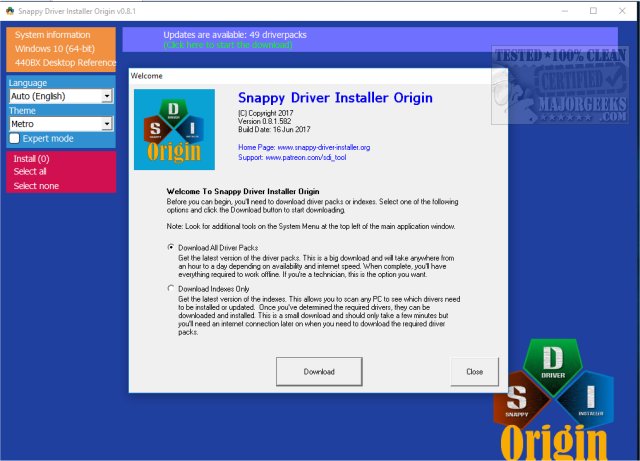
Snappy Driver Installer Origin (SDIO), an open-source fork of the original Snappy Driver Installer, has recently released version 1.17.3.824. This project was initiated by a former developer who sought to refine and streamline the driver installation process, addressing perceived inefficiencies in the original software.
What is Snappy Driver Installer Origin?
SDIO is designed as a comprehensive tool for installing, updating, and managing device drivers effortlessly. It supports offline functionality, allowing users to work without an internet connection, and is fully customizable, giving users complete control over updates. Whether you're rejuvenating an old computer or enhancing a new one, SDIO ensures optimal performance for your PC.
Key Features
Upon launching SDIO, users can choose between downloading all driver packs for offline use or obtaining lighter driver indexes when connected to the internet. The program boasts a robust algorithm for optimal driver matching, making it superior to many competitors. For tech enthusiasts, the Expert Mode offers advanced features such as sorting drivers by status, comparing versions, and filtering options. Notably, SDIO operates across all Windows versions, from XP to Windows 11.
One standout feature is its built-in torrent option, enabling rapid downloads of large driver packs (over 10 GB), a significant advantage for those without reliable internet access.
Portability and Efficiency
SDIO's portability is another significant advantage, allowing users to run it from a USB drive on any Windows PC without installation. This makes it an invaluable tool for IT professionals and technicians who need to troubleshoot or optimize systems quickly. The software is also multilingual and customizable to suit various workflows.
For those managing multiple devices, SDIO offers a built-in scripting engine, allowing for automation of repetitive tasks. Users can also personalize the interface with themes and dark mode options.
Who Can Benefit?
SDIO caters to a wide audience, including IT professionals, power users, and casual users seeking an easy way to manage drivers. Its intuitive interface makes it accessible for anyone, whether they want detailed control or a simple 'auto-update' option.
Practical Benefits
By using SDIO, users can eliminate the hassle of finding compatible drivers, effectively resolving issues related to outdated or missing drivers. Its efficiency surpasses many paid alternatives, and it operates without intrusive advertisements or unnecessary add-ons. Additionally, the offline capabilities allow users to resolve driver issues without internet access, a crucial feature for fresh installs.
Conclusion: Why You Should Download Snappy Driver Installer Origin
Snappy Driver Installer Origin strikes an excellent balance of speed, accuracy, and utility, making it an essential tool for anyone serious about maintaining their PC. Its free, open-source nature, along with its portable design and extensive features, makes it a more capable solution than many paid options available. Offering peace of mind and enhanced control over your system, SDIO is a must-try for anyone looking to streamline their driver management process. Download Snappy Driver Installer Origin today and experience the difference for yourself!
Related Resources:
- How to Download the Latest Drivers for Windows
- What Are Windows DCH Drivers?
- How to Stop Windows Updates from Downloading Drivers on Windows 10
- What is Windows Hardware Quality Labs (WHQL)?
In addition, users can expect regular updates from the active developer community, ensuring that SDIO continues to evolve and improve. With its commitment to user experience and efficiency, Snappy Driver Installer Origin is more than just a tool; it's a vital component of a well-maintained computing environment
What is Snappy Driver Installer Origin?
SDIO is designed as a comprehensive tool for installing, updating, and managing device drivers effortlessly. It supports offline functionality, allowing users to work without an internet connection, and is fully customizable, giving users complete control over updates. Whether you're rejuvenating an old computer or enhancing a new one, SDIO ensures optimal performance for your PC.
Key Features
Upon launching SDIO, users can choose between downloading all driver packs for offline use or obtaining lighter driver indexes when connected to the internet. The program boasts a robust algorithm for optimal driver matching, making it superior to many competitors. For tech enthusiasts, the Expert Mode offers advanced features such as sorting drivers by status, comparing versions, and filtering options. Notably, SDIO operates across all Windows versions, from XP to Windows 11.
One standout feature is its built-in torrent option, enabling rapid downloads of large driver packs (over 10 GB), a significant advantage for those without reliable internet access.
Portability and Efficiency
SDIO's portability is another significant advantage, allowing users to run it from a USB drive on any Windows PC without installation. This makes it an invaluable tool for IT professionals and technicians who need to troubleshoot or optimize systems quickly. The software is also multilingual and customizable to suit various workflows.
For those managing multiple devices, SDIO offers a built-in scripting engine, allowing for automation of repetitive tasks. Users can also personalize the interface with themes and dark mode options.
Who Can Benefit?
SDIO caters to a wide audience, including IT professionals, power users, and casual users seeking an easy way to manage drivers. Its intuitive interface makes it accessible for anyone, whether they want detailed control or a simple 'auto-update' option.
Practical Benefits
By using SDIO, users can eliminate the hassle of finding compatible drivers, effectively resolving issues related to outdated or missing drivers. Its efficiency surpasses many paid alternatives, and it operates without intrusive advertisements or unnecessary add-ons. Additionally, the offline capabilities allow users to resolve driver issues without internet access, a crucial feature for fresh installs.
Conclusion: Why You Should Download Snappy Driver Installer Origin
Snappy Driver Installer Origin strikes an excellent balance of speed, accuracy, and utility, making it an essential tool for anyone serious about maintaining their PC. Its free, open-source nature, along with its portable design and extensive features, makes it a more capable solution than many paid options available. Offering peace of mind and enhanced control over your system, SDIO is a must-try for anyone looking to streamline their driver management process. Download Snappy Driver Installer Origin today and experience the difference for yourself!
Related Resources:
- How to Download the Latest Drivers for Windows
- What Are Windows DCH Drivers?
- How to Stop Windows Updates from Downloading Drivers on Windows 10
- What is Windows Hardware Quality Labs (WHQL)?
In addition, users can expect regular updates from the active developer community, ensuring that SDIO continues to evolve and improve. With its commitment to user experience and efficiency, Snappy Driver Installer Origin is more than just a tool; it's a vital component of a well-maintained computing environment
Snappy Driver Installer Origin 1.17.3.824 released
Snappy Driver Installer Origin is an Open Source fork of Snappy Driver Installer designed by a former contributing developer and build master who felt that project had gone astray.
Snappy Driver Installer Origin 1.17.3.824 released @ MajorGeeks