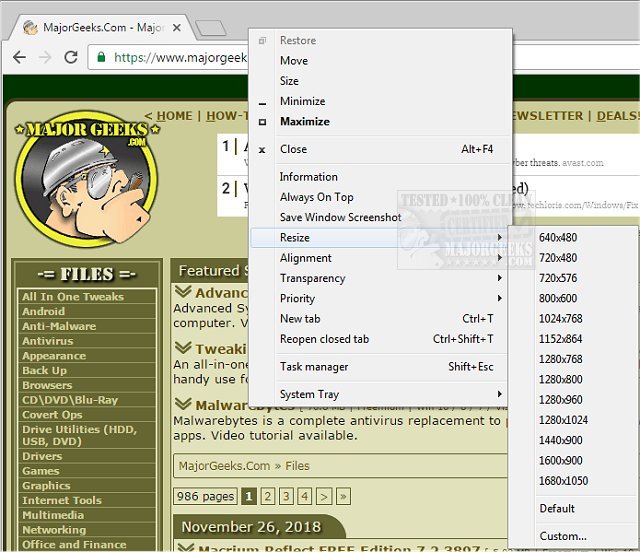
SmartSystemMenu 2.33.0 has been released, introducing a portable utility designed to enhance the system menu of all windows on a host system. This utility significantly improves the efficiency of working with multiple windows by providing a suite of useful functions that streamline the workflow. Notably portable, SmartSystemMenu can be easily loaded onto a flash drive for use on various machines.
Once activated, SmartSystemMenu minimizes to the system tray, where its icon primarily serves as an indicator of its active status, with options to auto-start the app or exit entirely. The main functionality is accessed through a right-click context menu that provides detailed information about the target window, including its handle, caption, class, style, and dimensions, as well as its associated process details.
SmartSystemMenu enhances the default Windows settings by offering features that simplify window management, which are typically harder to access. These features include:
- Information: Displays a dialog with detailed information about the current window and process.
- Always On Top: Keeps the selected window above all others.
- Save Window Screenshot: Facilitates saving a screenshot of the current window.
- Resize: Allows users to adjust the size of the current window.
- Alignment: Enables the alignment of the current window to any of the nine positions on the desktop.
- Transparency: Adjusts the transparency level of the current window.
- Priority: Alters the program priority of the current window.
- System Tray: Minimizes the current window to the system tray.
If User Account Control (UAC) is enabled on the operating system, a UAC dialog will appear when the program is executed, as it requires elevated privileges. After launching the program, users can access these custom menu items across all system menus of open windows.
In addition to its practical functions, SmartSystemMenu serves as a helpful tool for users needing advanced window management capabilities that are often overlooked. Its user-friendly approach makes window operations easier and more accessible.
With this latest update, users can look forward to a more productive experience when managing windows, whether working on a single machine or multiple devices. The ongoing development of SmartSystemMenu highlights its commitment to enhancing user interface interactions in Windows environments
Once activated, SmartSystemMenu minimizes to the system tray, where its icon primarily serves as an indicator of its active status, with options to auto-start the app or exit entirely. The main functionality is accessed through a right-click context menu that provides detailed information about the target window, including its handle, caption, class, style, and dimensions, as well as its associated process details.
SmartSystemMenu enhances the default Windows settings by offering features that simplify window management, which are typically harder to access. These features include:
- Information: Displays a dialog with detailed information about the current window and process.
- Always On Top: Keeps the selected window above all others.
- Save Window Screenshot: Facilitates saving a screenshot of the current window.
- Resize: Allows users to adjust the size of the current window.
- Alignment: Enables the alignment of the current window to any of the nine positions on the desktop.
- Transparency: Adjusts the transparency level of the current window.
- Priority: Alters the program priority of the current window.
- System Tray: Minimizes the current window to the system tray.
If User Account Control (UAC) is enabled on the operating system, a UAC dialog will appear when the program is executed, as it requires elevated privileges. After launching the program, users can access these custom menu items across all system menus of open windows.
In addition to its practical functions, SmartSystemMenu serves as a helpful tool for users needing advanced window management capabilities that are often overlooked. Its user-friendly approach makes window operations easier and more accessible.
With this latest update, users can look forward to a more productive experience when managing windows, whether working on a single machine or multiple devices. The ongoing development of SmartSystemMenu highlights its commitment to enhancing user interface interactions in Windows environments
SmartSystemMenu 2.33.0 released
SmartSystemMenu is a portable utility that will extend the system menu of all windows in the host system.