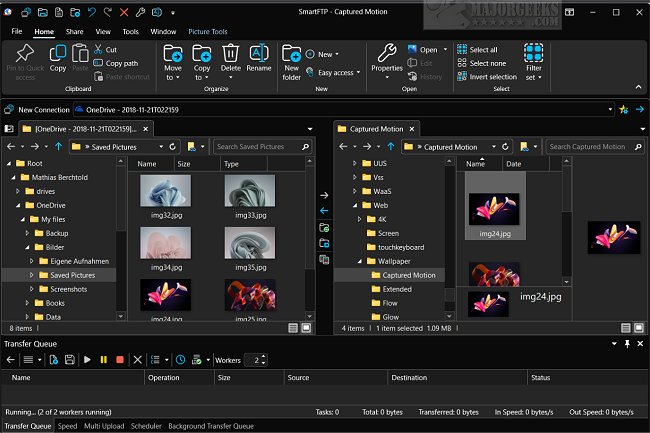
SmartFTP has recently released version 10.0.3310, enhancing its capabilities as a versatile file transfer client. This user-friendly application supports a myriad of protocols including FTP, FTPS, SFTP, WebDAV, and integrates with cloud storage services such as Amazon S3, Backblaze B2, Google Drive, and OneDrive, along with providing SSH Terminal functionality.
SmartFTP caters to a diverse range of users, particularly those needing efficient file transfers between local systems and remote servers. It is especially beneficial for web developers who need to publish and maintain websites, as well as for individuals looking to back up and synchronize important files. The software prioritizes security, enabling secure transfers of sensitive data through robust protocols while managing large files and extensive datasets seamlessly.
Key features of SmartFTP include SSL (Implicit/Explicit), FXP support, multiple connections, and proxy firewall support. Its intuitive drag-and-drop interface simplifies file management, and automation features enhance productivity by streamlining file transfer processes. Additional capabilities encompass:
- Support for multiple cloud storage services and protocols,
- Advanced scheduling for file transfers,
- Enhanced security compliance (HIPAA, FIPS),
- Multilingual support for a global user base,
- Remote file editing and bulk renaming options,
- Transfer integrity verification through advanced checksums.
SmartFTP's modern graphical user interface supports high DPI displays and features such as thumbnails view, source file preview, and visual compare. For advanced users, the software offers a Software Development Kit (SDK) and extensive customization through commands.
In summary, SmartFTP 10.0.3310 is a reliable and effective solution for secure and efficient file transfers, ensuring users can focus on their projects with peace of mind regarding data safety. As file transfer needs evolve, SmartFTP continues to adapt, making it a valuable tool for both individual users and organizations alike
SmartFTP caters to a diverse range of users, particularly those needing efficient file transfers between local systems and remote servers. It is especially beneficial for web developers who need to publish and maintain websites, as well as for individuals looking to back up and synchronize important files. The software prioritizes security, enabling secure transfers of sensitive data through robust protocols while managing large files and extensive datasets seamlessly.
Key features of SmartFTP include SSL (Implicit/Explicit), FXP support, multiple connections, and proxy firewall support. Its intuitive drag-and-drop interface simplifies file management, and automation features enhance productivity by streamlining file transfer processes. Additional capabilities encompass:
- Support for multiple cloud storage services and protocols,
- Advanced scheduling for file transfers,
- Enhanced security compliance (HIPAA, FIPS),
- Multilingual support for a global user base,
- Remote file editing and bulk renaming options,
- Transfer integrity verification through advanced checksums.
SmartFTP's modern graphical user interface supports high DPI displays and features such as thumbnails view, source file preview, and visual compare. For advanced users, the software offers a Software Development Kit (SDK) and extensive customization through commands.
In summary, SmartFTP 10.0.3310 is a reliable and effective solution for secure and efficient file transfers, ensuring users can focus on their projects with peace of mind regarding data safety. As file transfer needs evolve, SmartFTP continues to adapt, making it a valuable tool for both individual users and organizations alike
SmartFTP 10.0.3310 released
SmartFTP is an easy-to-use FTP, FTPS, SFTP, WebDAV, Amazon S3, Backblaze B2, Google Drive, OneDrive, and SSH Terminal client.