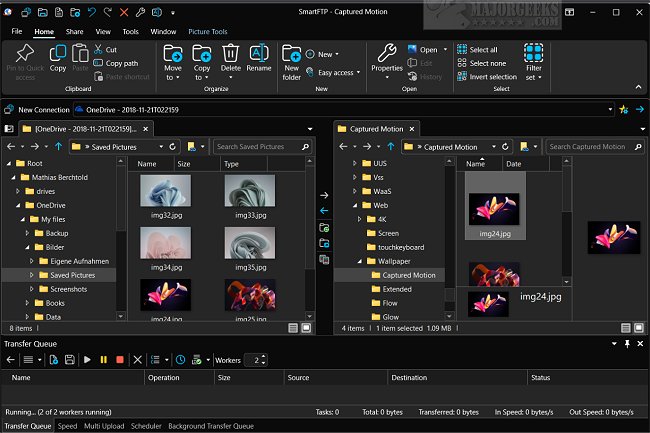
SmartFTP 10.0.3308 has been released, enhancing its functionality as a versatile file transfer client. It supports various protocols, including FTP, FTPS, SFTP, and WebDAV, as well as cloud storage services such as Amazon S3, Backblaze B2, Google Drive, and OneDrive, making it suitable for a wide range of users.
What is SmartFTP?
SmartFTP is a user-friendly client designed for efficient file transfers between local computers and remote servers. It is particularly beneficial for web developers, IT professionals, and users needing reliable file backup and synchronization solutions. The application’s intuitive interface, featuring drag-and-drop functionality, simplifies file management, while its robust security measures ensure safe handling of sensitive data.
Key Features:
SmartFTP provides a host of features, including:
- Support for multiple protocols (FTP, FTPS, SFTP, WebDAV)
- Integration with various cloud storage services
- SSH Terminal capabilities
- SSL encryption for secure transfers
- Comprehensive file synchronization and management tools
- Advanced scheduling and automation options
- Multi-language support and high DPI display compatibility
Additional features include transfer integrity verification, remote file editing, bulk renaming, and extensive proxy/firewall support. SmartFTP also allows for unlimited simultaneous connections and includes enhanced NAT/UPnP support.
Who Is It For?
SmartFTP caters to anyone needing a reliable solution for file transfers, from web developers managing websites to individuals backing up data. Its comprehensive suite of features addresses various needs, ensuring users can manage their files across different platforms effectively.
Conclusion:
SmartFTP stands out as a dependable tool for secure and efficient file transfers, allowing users to focus on their projects with confidence in their data's safety. With its extensive functionalities and user-friendly design, SmartFTP continues to be a preferred choice for efficient file management across multiple platforms and protocols.
Extended Considerations:
As technology evolves, future updates to SmartFTP could potentially enhance its integration with emerging cloud services and file management protocols. Additionally, incorporating features like AI-driven file management or advanced analytics could provide users with deeper insights into their file transfer patterns, further improving the efficiency of their workflows. With ongoing support and development, SmartFTP is likely to remain a leading choice for file transfer solutions in various industries
What is SmartFTP?
SmartFTP is a user-friendly client designed for efficient file transfers between local computers and remote servers. It is particularly beneficial for web developers, IT professionals, and users needing reliable file backup and synchronization solutions. The application’s intuitive interface, featuring drag-and-drop functionality, simplifies file management, while its robust security measures ensure safe handling of sensitive data.
Key Features:
SmartFTP provides a host of features, including:
- Support for multiple protocols (FTP, FTPS, SFTP, WebDAV)
- Integration with various cloud storage services
- SSH Terminal capabilities
- SSL encryption for secure transfers
- Comprehensive file synchronization and management tools
- Advanced scheduling and automation options
- Multi-language support and high DPI display compatibility
Additional features include transfer integrity verification, remote file editing, bulk renaming, and extensive proxy/firewall support. SmartFTP also allows for unlimited simultaneous connections and includes enhanced NAT/UPnP support.
Who Is It For?
SmartFTP caters to anyone needing a reliable solution for file transfers, from web developers managing websites to individuals backing up data. Its comprehensive suite of features addresses various needs, ensuring users can manage their files across different platforms effectively.
Conclusion:
SmartFTP stands out as a dependable tool for secure and efficient file transfers, allowing users to focus on their projects with confidence in their data's safety. With its extensive functionalities and user-friendly design, SmartFTP continues to be a preferred choice for efficient file management across multiple platforms and protocols.
Extended Considerations:
As technology evolves, future updates to SmartFTP could potentially enhance its integration with emerging cloud services and file management protocols. Additionally, incorporating features like AI-driven file management or advanced analytics could provide users with deeper insights into their file transfer patterns, further improving the efficiency of their workflows. With ongoing support and development, SmartFTP is likely to remain a leading choice for file transfer solutions in various industries
SmartFTP 10.0.3308 released
SmartFTP is an easy-to-use FTP, FTPS, SFTP, WebDAV, Amazon S3, Backblaze B2, Google Drive, OneDrive, and SSH Terminal client.