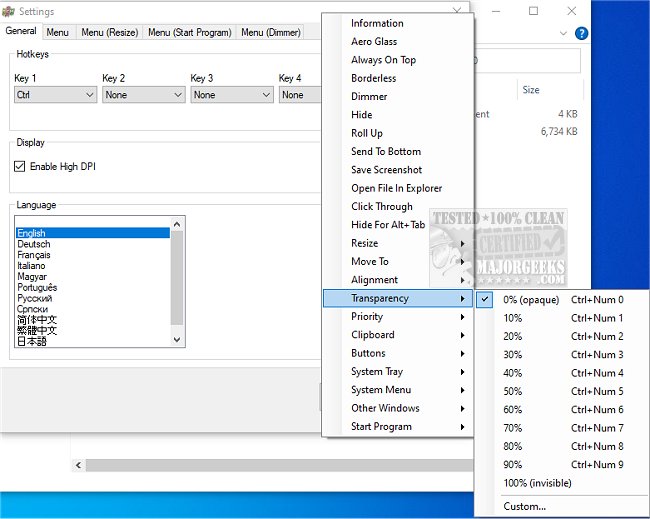
SmartContextMenu 1.8.0 has been released, enhancing the functionality of SmartSystemMenu by adding a context menu to all system windows. This application is versatile, supporting various window types, including those that lack a system menu. With SmartContextMenu, users can quickly access a context menu through a right-click, even in windows where this feature isn't typically available.
One of the standout features of SmartContextMenu is its stability; it avoids using hooks in separate DLL modules, which can lead to instability issues. Instead, the application employs an integrated system that ensures reliable performance across different window types.
To utilize SmartContextMenu, users simply run the executable file, position the mouse cursor over the desired window, and use the hotkeys "Ctrl + Right Mouse Button." Additionally, users can customize menu settings and hotkeys via the systray settings dialog or by editing the SmartContextMenu.xml file. The application also supports command-line operations, with a list of commands available on the developer's repository.
SmartContextMenu offers a robust set of menu items, including options for information, roll-up, Aero glass effect, always on top, sending windows to the bottom, saving screenshots, opening files in Explorer, and more. This comprehensive array of features makes it an ideal choice for users seeking greater control over their window context menus.
In summary, SmartContextMenu 1.8.0 not only enhances user experience by providing additional functionality to system windows but also ensures high stability and customization options. This makes it a valuable tool for anyone looking to improve their workflow with more efficient window management
One of the standout features of SmartContextMenu is its stability; it avoids using hooks in separate DLL modules, which can lead to instability issues. Instead, the application employs an integrated system that ensures reliable performance across different window types.
To utilize SmartContextMenu, users simply run the executable file, position the mouse cursor over the desired window, and use the hotkeys "Ctrl + Right Mouse Button." Additionally, users can customize menu settings and hotkeys via the systray settings dialog or by editing the SmartContextMenu.xml file. The application also supports command-line operations, with a list of commands available on the developer's repository.
SmartContextMenu offers a robust set of menu items, including options for information, roll-up, Aero glass effect, always on top, sending windows to the bottom, saving screenshots, opening files in Explorer, and more. This comprehensive array of features makes it an ideal choice for users seeking greater control over their window context menus.
In summary, SmartContextMenu 1.8.0 not only enhances user experience by providing additional functionality to system windows but also ensures high stability and customization options. This makes it a valuable tool for anyone looking to improve their workflow with more efficient window management
SmartContextMenu 1.8.0 released
SmartContextMenu provides a more enhanced option to SmartSystemMenu, adding a context menu to all system windows.