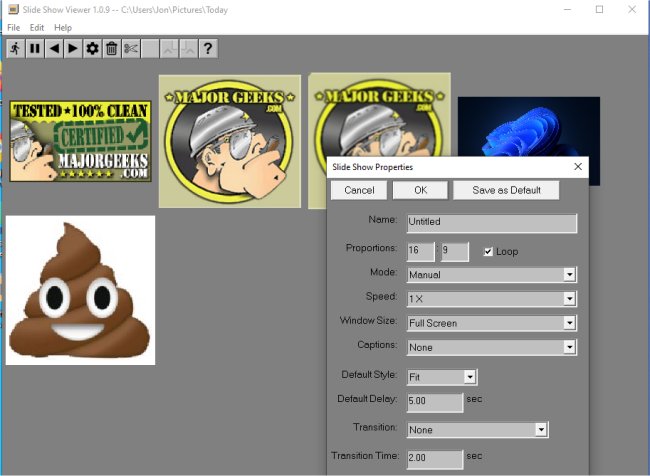
Slide Show Viewer version 1.0.19 has been released, offering a customizable application designed to display TIFF or JPEG files in a slide show format. Users can create slide shows by organizing images into a designated folder, along with a slide show index file (default name: index.ssi) that contains settings such as slide order and display preferences. The program allows for functionalities like panning and zooming images for enhanced viewing experiences, and users can choose between automatic slide transitions at set intervals or manual navigation.
One of the key features is the ability to create multiple index files for the same folder, enabling various presentations of the same images. Currently, the app only supports JPEG and TIFF formats and utilizes color management based on the embedded profiles in the images and the selected monitor profile. An in-app Help File is provided to assist users in getting started with the application.
Slide Show Viewer serves as a compelling alternative to default image viewing options, allowing users to rediscover and enjoy images that may have been overlooked.
In addition to its core functionalities, future updates could enhance Slide Show Viewer by introducing support for additional image formats such as PNG and BMP, incorporating advanced editing tools for images, or enabling online sharing of slide shows directly from the app. Integration with cloud storage solutions could also be beneficial, allowing users to access and display their images from various devices seamlessly. Additionally, a feature that allows users to add music or sound effects to their slide shows could create a more immersive viewing experience
One of the key features is the ability to create multiple index files for the same folder, enabling various presentations of the same images. Currently, the app only supports JPEG and TIFF formats and utilizes color management based on the embedded profiles in the images and the selected monitor profile. An in-app Help File is provided to assist users in getting started with the application.
Slide Show Viewer serves as a compelling alternative to default image viewing options, allowing users to rediscover and enjoy images that may have been overlooked.
In addition to its core functionalities, future updates could enhance Slide Show Viewer by introducing support for additional image formats such as PNG and BMP, incorporating advanced editing tools for images, or enabling online sharing of slide shows directly from the app. Integration with cloud storage solutions could also be beneficial, allowing users to access and display their images from various devices seamlessly. Additionally, a feature that allows users to add music or sound effects to their slide shows could create a more immersive viewing experience
Slide Show Viewer 1.0.19 released
Slide Show Viewer is a customizable app that can display TIFF or JPEG files as a slide show.