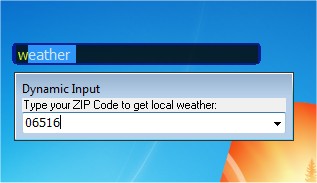
SlickRun has recently released versions 4.6.1.0 and 4.4.9.3, enhancing its functionality as a tool that allows users quick access to any program or website through a command line interface. The utility floats on the screen, ensuring that it remains accessible regardless of what the user is currently working on. One of the standout features of SlickRun is the ability to create command aliases, referred to as MagicWords. For example, a lengthy file path like "C:\Program Files\Outlook Express\msimn.exe" can be shortened to a simple command like "MAIL," significantly reducing the number of keystrokes needed to launch frequently used applications or websites.
It's important to note that SlickRun is not designed as a hotkey utility. Users looking for software that allows them to use keyboard shortcuts to execute commands may need to explore other options.
In addition to SlickRun, users may also find value in exploring related topics such as a comprehensive list of command prompt and PowerShell commands, basic tutorials on using PowerShell or Command Prompt as an administrator, and methods to customize or manage the command prompt in Windows 10 and 11.
As we move forward, it would be beneficial for users to consider the integration of SlickRun with other productivity tools and workflows. This could enhance their efficiency even further, allowing for a more seamless experience when navigating between applications and managing tasks on their devices. Exploring additional features, such as customizable themes or user scripts, could also expand SlickRun's utility for different user needs
It's important to note that SlickRun is not designed as a hotkey utility. Users looking for software that allows them to use keyboard shortcuts to execute commands may need to explore other options.
In addition to SlickRun, users may also find value in exploring related topics such as a comprehensive list of command prompt and PowerShell commands, basic tutorials on using PowerShell or Command Prompt as an administrator, and methods to customize or manage the command prompt in Windows 10 and 11.
As we move forward, it would be beneficial for users to consider the integration of SlickRun with other productivity tools and workflows. This could enhance their efficiency even further, allowing for a more seamless experience when navigating between applications and managing tasks on their devices. Exploring additional features, such as customizable themes or user scripts, could also expand SlickRun's utility for different user needs
SlickRun 4.6.1.0 / 4.4.9.3 released
SlickRun provides free instant access to any program or website via the command line.