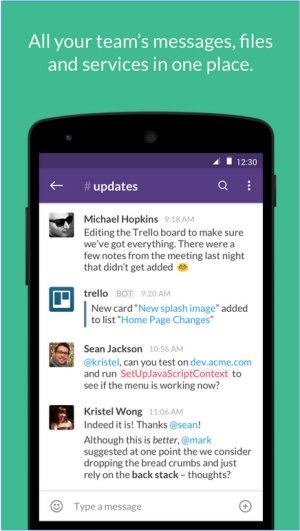
Slack, recently updated to version 4.48.94, is an all-encompassing communication platform designed to enhance team collaboration through real-time messaging, file sharing, and both one-on-one and group conversations. It aims to reduce reliance on traditional emails and centralizes all forms of messaging, making it an essential tool for businesses, remote teams, and organizations striving for an efficient workspace.
Key Features and Functionalities of Slack
At its core, Slack serves as a messaging app but offers extensive capabilities through its Channel feature, which allows teams to categorize discussions by project, department, or topic. This organization keeps conversations focused and relevant, minimizing clutter. Users can engage in direct messaging for quick private chats and share files, documents, and links within conversations, thereby eliminating the need for excessive email attachments.
Moreover, Slack boasts a powerful search functionality enabling users to effortlessly retrieve past messages, files, and discussions. A standout advantage of Slack is its vast integration ecosystem, allowing connections to tools such as Google Drive, Trello, Zoom, Asana, and many others. This connectivity transforms Slack into a comprehensive hub for team collaboration, project management, and task automation.
Features at a Glance:
- Channels & Direct Messages: Organize conversations by projects, topics, or departments.
- File Sharing: Easily upload documents, images, and links into chats.
- Integrations: Connect with hundreds of applications to streamline workflows.
- Searchable History: Quickly access old messages and files.
- Automation & Bots: Use Slackbot for reminders and task automation.
- Voice & Video Calls: Communicate with teammates without switching platforms.
Pricing Structure
Slack offers a free plan that provides a robust foundation, including 90 days of message history, up to 10 integrations, and one-on-one video calls. For teams requiring more extensive functionality, the Pro plan allows unlimited message history and advanced integrations, while the Business+ and Enterprise Grid plans cater to larger organizations with additional security and compliance features.
Comparison with Competitors
In comparison to competitors like Microsoft Teams and Google Chat, Slack excels with its user-friendly design, ease of setup, and adaptability to various workflows. It is particularly beneficial for remote teams, where organized communication is paramount. However, the limitations of the free plan—specifically regarding message history and integrations—might hinder growing teams, and the costs associated with paid plans can accumulate for larger organizations.
Pros & Cons of Slack
Pros:
- Clean, user-friendly interface
- Extensive integrations with third-party applications
- Organized conversation channels
- Accessibility across all devices (desktop, mobile, web)
- Searchable message history (available with paid plans)
Cons:
- Free plan limits message history to 90 days
- Notifications can become overwhelming
- Paid plans may be costly for larger teams
Conclusion: The Verdict on Slack
In conclusion, Slack remains an exceptional solution for teams aiming to enhance communication and productivity. Its comprehensive feature set, robust integrations, and seamless user experience make it a leading choice for contemporary workplaces. While it serves as a fantastic collaboration tool for teams of any size, organizations should consider their budget and be prepared to manage notification settings effectively. As remote work continues to evolve, Slack stands ready to facilitate streamlined communication and unify work tools into a single platform.
Future Considerations
Looking ahead, Slack could enhance its offerings by providing more flexible pricing plans, expanding its free plan features, and continuously improving its user interface to reduce distractions. Additionally, as the integration landscape evolves, Slack may benefit from partnerships with emerging productivity tools to maintain its competitive edge in the market
Key Features and Functionalities of Slack
At its core, Slack serves as a messaging app but offers extensive capabilities through its Channel feature, which allows teams to categorize discussions by project, department, or topic. This organization keeps conversations focused and relevant, minimizing clutter. Users can engage in direct messaging for quick private chats and share files, documents, and links within conversations, thereby eliminating the need for excessive email attachments.
Moreover, Slack boasts a powerful search functionality enabling users to effortlessly retrieve past messages, files, and discussions. A standout advantage of Slack is its vast integration ecosystem, allowing connections to tools such as Google Drive, Trello, Zoom, Asana, and many others. This connectivity transforms Slack into a comprehensive hub for team collaboration, project management, and task automation.
Features at a Glance:
- Channels & Direct Messages: Organize conversations by projects, topics, or departments.
- File Sharing: Easily upload documents, images, and links into chats.
- Integrations: Connect with hundreds of applications to streamline workflows.
- Searchable History: Quickly access old messages and files.
- Automation & Bots: Use Slackbot for reminders and task automation.
- Voice & Video Calls: Communicate with teammates without switching platforms.
Pricing Structure
Slack offers a free plan that provides a robust foundation, including 90 days of message history, up to 10 integrations, and one-on-one video calls. For teams requiring more extensive functionality, the Pro plan allows unlimited message history and advanced integrations, while the Business+ and Enterprise Grid plans cater to larger organizations with additional security and compliance features.
Comparison with Competitors
In comparison to competitors like Microsoft Teams and Google Chat, Slack excels with its user-friendly design, ease of setup, and adaptability to various workflows. It is particularly beneficial for remote teams, where organized communication is paramount. However, the limitations of the free plan—specifically regarding message history and integrations—might hinder growing teams, and the costs associated with paid plans can accumulate for larger organizations.
Pros & Cons of Slack
Pros:
- Clean, user-friendly interface
- Extensive integrations with third-party applications
- Organized conversation channels
- Accessibility across all devices (desktop, mobile, web)
- Searchable message history (available with paid plans)
Cons:
- Free plan limits message history to 90 days
- Notifications can become overwhelming
- Paid plans may be costly for larger teams
Conclusion: The Verdict on Slack
In conclusion, Slack remains an exceptional solution for teams aiming to enhance communication and productivity. Its comprehensive feature set, robust integrations, and seamless user experience make it a leading choice for contemporary workplaces. While it serves as a fantastic collaboration tool for teams of any size, organizations should consider their budget and be prepared to manage notification settings effectively. As remote work continues to evolve, Slack stands ready to facilitate streamlined communication and unify work tools into a single platform.
Future Considerations
Looking ahead, Slack could enhance its offerings by providing more flexible pricing plans, expanding its free plan features, and continuously improving its user interface to reduce distractions. Additionally, as the integration landscape evolves, Slack may benefit from partnerships with emerging productivity tools to maintain its competitive edge in the market
Slack 4.48.94 released
Slack puts all your team communications in one place wherever you go with real-time messaging, file sharing, and one-to-one and group conversations.