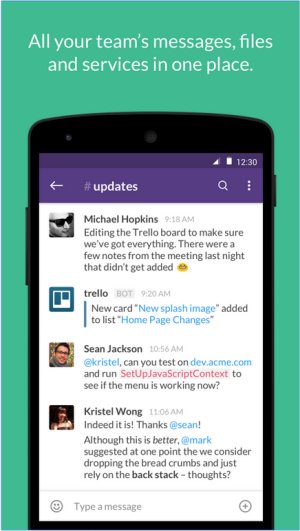
Slack is transforming team communications by bringing all messaging, file sharing, and conversations into a single platform, accessible from anywhere. This powerful tool is designed to enhance collaboration, reduce reliance on email, and streamline workflows for businesses, remote teams, and organizations.
At its core, Slack serves as a messaging application, but its functionality extends significantly with features such as Channels. These allow teams to categorize conversations based on projects, departments, or topics, helping to maintain clarity and focus. Direct messaging complements this by enabling quick conversations between individuals or small groups. Users can easily share files, links, and documents directly within chats, reducing the need for cumbersome email attachments. Slack's robust search function allows users to swiftly locate past messages and files.
One of Slack's standout features is its extensive integration capabilities. Users can connect it with popular productivity tools like Google Drive, Trello, Zoom, and Asana, enhancing its utility as a central hub for collaboration and task management. Key features include:
- Channels & Direct Messages: Organize discussions effectively.
- File Sharing: Upload and share various file types directly in chats.
- Integrations: Connect with a wide range of applications.
- Searchable History: Easily retrieve past conversations and files.
- Automation & Bots: Use Slackbot for reminders and automations.
- Voice & Video Calls: Communicate with teammates without switching platforms.
Slack offers a free plan that includes essential features such as access to 90 days of message history, limited integrations, and one-on-one video calls. For teams that need more advanced features, the Pro plan provides unlimited message history, enhanced integrations, and group video calls with screen sharing capabilities. Larger organizations can opt for Business+ and Enterprise Grid plans, which include additional security and administrative controls.
Pros:
- Intuitive and user-friendly interface
- Extensive third-party app integrations
- Organized channels for discussions
- Cross-device accessibility
- Searchable message history (with paid plans)
Cons:
- Free plan limits message history to 90 days
- Can become distracting due to notifications
- Costs can accumulate for larger teams with paid plans
In summary, Slack is a top-tier solution for teams aiming to enhance communication and productivity. Its impressive range of features, robust integrations, and user-friendly experience solidify its position as a leading choice for modern workplaces. While it is particularly effective for remote teams requiring organized communication, potential users should be mindful of the limitations of the free plan and the costs associated with scaling up. Effective management of notifications will also be essential to minimize distractions.
As organizations continue to adapt to hybrid and remote working models, tools like Slack will likely evolve further, introducing more features and improvements to meet user demands. Innovations in automation, AI-driven functionalities, and enhanced security measures could be on the horizon, ensuring Slack remains at the forefront of team collaboration solutions
Key Features of Slack
At its core, Slack serves as a messaging application, but its functionality extends significantly with features such as Channels. These allow teams to categorize conversations based on projects, departments, or topics, helping to maintain clarity and focus. Direct messaging complements this by enabling quick conversations between individuals or small groups. Users can easily share files, links, and documents directly within chats, reducing the need for cumbersome email attachments. Slack's robust search function allows users to swiftly locate past messages and files.
One of Slack's standout features is its extensive integration capabilities. Users can connect it with popular productivity tools like Google Drive, Trello, Zoom, and Asana, enhancing its utility as a central hub for collaboration and task management. Key features include:
- Channels & Direct Messages: Organize discussions effectively.
- File Sharing: Upload and share various file types directly in chats.
- Integrations: Connect with a wide range of applications.
- Searchable History: Easily retrieve past conversations and files.
- Automation & Bots: Use Slackbot for reminders and automations.
- Voice & Video Calls: Communicate with teammates without switching platforms.
Pricing Options
Slack offers a free plan that includes essential features such as access to 90 days of message history, limited integrations, and one-on-one video calls. For teams that need more advanced features, the Pro plan provides unlimited message history, enhanced integrations, and group video calls with screen sharing capabilities. Larger organizations can opt for Business+ and Enterprise Grid plans, which include additional security and administrative controls.
Pros and Cons
Pros:
- Intuitive and user-friendly interface
- Extensive third-party app integrations
- Organized channels for discussions
- Cross-device accessibility
- Searchable message history (with paid plans)
Cons:
- Free plan limits message history to 90 days
- Can become distracting due to notifications
- Costs can accumulate for larger teams with paid plans
Conclusion
In summary, Slack is a top-tier solution for teams aiming to enhance communication and productivity. Its impressive range of features, robust integrations, and user-friendly experience solidify its position as a leading choice for modern workplaces. While it is particularly effective for remote teams requiring organized communication, potential users should be mindful of the limitations of the free plan and the costs associated with scaling up. Effective management of notifications will also be essential to minimize distractions.
Future Outlook
As organizations continue to adapt to hybrid and remote working models, tools like Slack will likely evolve further, introducing more features and improvements to meet user demands. Innovations in automation, AI-driven functionalities, and enhanced security measures could be on the horizon, ensuring Slack remains at the forefront of team collaboration solutions
Slack 4.48.100 released
Slack puts all your team communications in one place wherever you go with real-time messaging, file sharing, and one-to-one and group conversations.