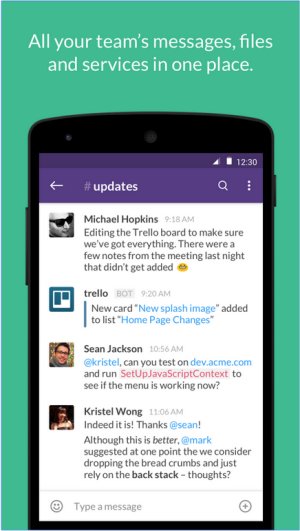
Slack has recently released version 4.47.72, enhancing its capabilities as a premier team communication tool. It centralizes team communications, enabling real-time messaging, file sharing, and both one-on-one and group conversations, making it particularly beneficial for businesses and remote teams.
As a robust platform, Slack aims to reduce reliance on email by offering a unified messaging experience. Its intuitive interface supports real-time chat, video calls, and file sharing while integrating with numerous productivity applications, thus creating an all-in-one workspace. Key features include organized Channels for focused discussions, direct messaging for quick conversations, and a powerful search function to retrieve past messages and files easily.
One of Slack's standout features is its extensive integration ecosystem, allowing users to connect with tools like Google Drive, Trello, and Zoom. This transforms Slack from merely a messaging app into a comprehensive hub for collaboration and project management. Notable features include:
- Channels & Direct Messages for organized communication.
- File Sharing capabilities directly in chat.
- Integrations with various applications to streamline workflows.
- Searchable History to easily access old messages.
- Automation & Bots for task management and reminders.
- Voice & Video Calls to facilitate communication without switching apps.
Slack offers a free plan that provides foundational features, including access to 90 days of message history and up to 10 integrations. Paid plans, such as Pro, Business+, and Enterprise Grid, offer enhanced functionalities, including unlimited message history, advanced integrations, and additional security features for larger organizations.
When compared to competitors like Microsoft Teams and Google Chat, Slack distinguishes itself with its user-friendly design and flexibility, making it particularly advantageous for remote teams where organized communication is paramount. However, the limitations of the free plan and the potentially high costs of paid plans may pose challenges for growing teams.
Pros and Cons of Slack:
Pros:
- Clean and user-friendly interface.
- Extensive third-party app integrations.
- Organized discussions through Channels.
- Accessibility across all devices.
- Searchable message history (with paid plans).
Cons:
- 90-day limit on message history in the free plan.
- Potential distractions from excessive notifications.
- High costs for larger teams on paid plans.
Conclusion: Slack is an exceptional choice for teams striving to enhance communication and productivity. With its vast feature set and seamless integration capabilities, it remains a leading solution for modern workplaces. Teams of any size can benefit significantly, provided they are prepared to manage their notification settings effectively and consider the costs associated with scaling their use of the platform. As Slack continues to evolve, it is poised to maintain its position as a vital tool for collaboration in the digital workspace
As a robust platform, Slack aims to reduce reliance on email by offering a unified messaging experience. Its intuitive interface supports real-time chat, video calls, and file sharing while integrating with numerous productivity applications, thus creating an all-in-one workspace. Key features include organized Channels for focused discussions, direct messaging for quick conversations, and a powerful search function to retrieve past messages and files easily.
One of Slack's standout features is its extensive integration ecosystem, allowing users to connect with tools like Google Drive, Trello, and Zoom. This transforms Slack from merely a messaging app into a comprehensive hub for collaboration and project management. Notable features include:
- Channels & Direct Messages for organized communication.
- File Sharing capabilities directly in chat.
- Integrations with various applications to streamline workflows.
- Searchable History to easily access old messages.
- Automation & Bots for task management and reminders.
- Voice & Video Calls to facilitate communication without switching apps.
Slack offers a free plan that provides foundational features, including access to 90 days of message history and up to 10 integrations. Paid plans, such as Pro, Business+, and Enterprise Grid, offer enhanced functionalities, including unlimited message history, advanced integrations, and additional security features for larger organizations.
When compared to competitors like Microsoft Teams and Google Chat, Slack distinguishes itself with its user-friendly design and flexibility, making it particularly advantageous for remote teams where organized communication is paramount. However, the limitations of the free plan and the potentially high costs of paid plans may pose challenges for growing teams.
Pros and Cons of Slack:
Pros:
- Clean and user-friendly interface.
- Extensive third-party app integrations.
- Organized discussions through Channels.
- Accessibility across all devices.
- Searchable message history (with paid plans).
Cons:
- 90-day limit on message history in the free plan.
- Potential distractions from excessive notifications.
- High costs for larger teams on paid plans.
Conclusion: Slack is an exceptional choice for teams striving to enhance communication and productivity. With its vast feature set and seamless integration capabilities, it remains a leading solution for modern workplaces. Teams of any size can benefit significantly, provided they are prepared to manage their notification settings effectively and consider the costs associated with scaling their use of the platform. As Slack continues to evolve, it is poised to maintain its position as a vital tool for collaboration in the digital workspace
Slack 4.47.72 released
Slack puts all your team communications in one place wherever you go with real-time messaging, file sharing, and one-to-one and group conversations.