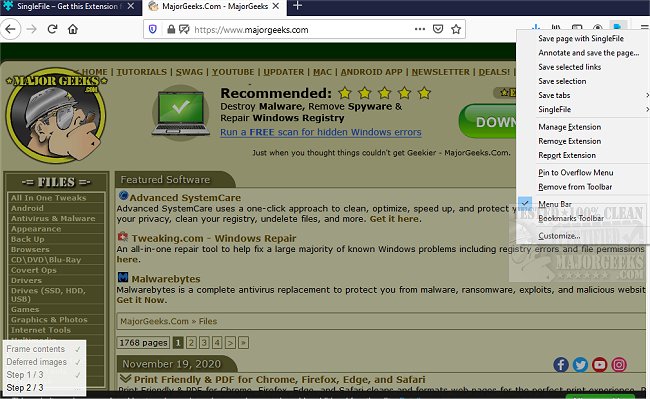
The latest release of SingleFile for Chrome, Firefox, and Edge (version 1.22.97) introduces an efficient command-line interface (CLI) tool designed to facilitate the process of saving entire web pages as single HTML files. This browser extension allows users to capture all elements of a webpage, including HTML, CSS, JavaScript, images, and other resources, effectively packaging them into a self-contained file. This capability not only aids in offline access but also simplifies sharing and experimentation with web content.
SingleFile enhances user experience by automating a task that was previously done manually—saving web pages for future viewing without an internet connection. This is particularly useful for researchers, students, and professionals who frequently need to reference web content offline.
In addition, users can explore related enhancements to their browsing experience, such as utilizing Google Chrome flags to optimize performance or revitalizing their browsers with maintenance tips for Chrome and Firefox. Overall, SingleFile serves as a valuable tool for anyone looking to manage and retain web content more effectively.
As the digital landscape evolves, tools like SingleFile not only improve productivity but also empower users to maintain control over their web experiences. Future updates may further enhance functionality, perhaps incorporating features that allow for easier organization of saved pages or improved compatibility with various web formats
SingleFile enhances user experience by automating a task that was previously done manually—saving web pages for future viewing without an internet connection. This is particularly useful for researchers, students, and professionals who frequently need to reference web content offline.
In addition, users can explore related enhancements to their browsing experience, such as utilizing Google Chrome flags to optimize performance or revitalizing their browsers with maintenance tips for Chrome and Firefox. Overall, SingleFile serves as a valuable tool for anyone looking to manage and retain web content more effectively.
As the digital landscape evolves, tools like SingleFile not only improve productivity but also empower users to maintain control over their web experiences. Future updates may further enhance functionality, perhaps incorporating features that allow for easier organization of saved pages or improved compatibility with various web formats
SingleFile for Chrome, Firefox, and Edge 1.22.97 released
SingleFile for Chrome, Firefox, and Edge is a CLI tool capable of helping you save a complete web page as a single HTML file.
SingleFile for Chrome, Firefox, and Edge 1.22.97 released @ MajorGeeks