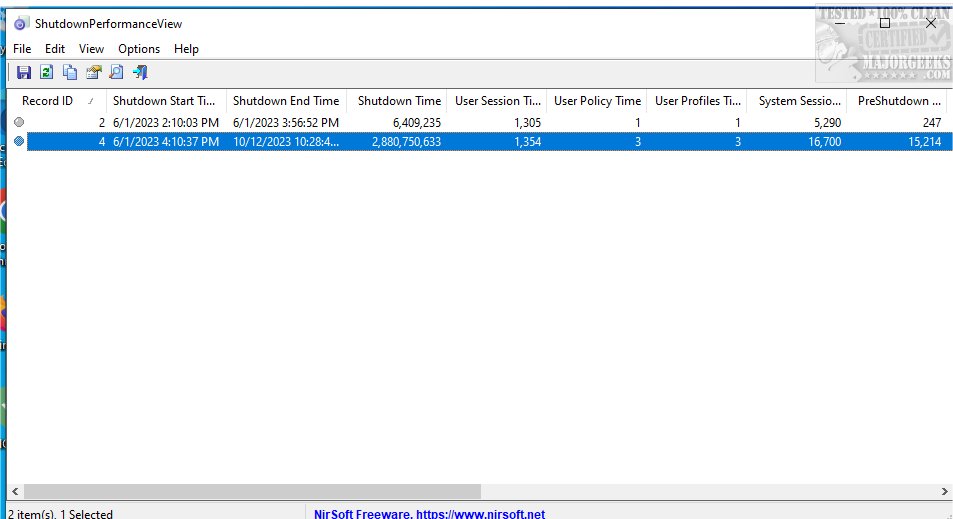
ShutdownPerformanceView is a recently released Windows application designed to deliver comprehensive performance metrics related to the system shutdown process. This tool serves as a valuable resource for users seeking to analyze the duration of their system's shutdown and diagnose any potential delays or issues that may occur during this critical operation.
Key Features and Functionality
Leveraging data sourced from the Microsoft-Windows-Diagnostics-Performance/Operational event log, ShutdownPerformanceView provides users with detailed insights into their system's shutdown process. Key metrics include:
- Shutdown Start Time: The point at which the shutdown process initiates.
- Shutdown End Time: The moment the system has completely powered down.
- Total Shutdown Time: A calculation of the total duration taken for the shutdown to complete.
The application also breaks down the shutdown time into specific components, such as:
- User Session Time: Duration spent terminating active user sessions.
- User Profiles Time: Time taken to save user profile configurations.
- Services Time: Duration required to stop system services.
Versatility for Users and Administrators
One of the standout features of ShutdownPerformanceView is its capability to gather shutdown performance data from both local and remote machines on a network. This makes it an essential tool for system administrators aiming to optimize performance across multiple systems. Furthermore, users can load shutdown performance data from external event log files, facilitating a thorough review of historical shutdown behaviors and aiding in identifying inefficiencies or bottlenecks in the shutdown process.
Command-Line Options for Enhanced Functionality
ShutdownPerformanceView includes a range of command-line options that enhance its usability:
- /stext: Saves records to a simple text file.
- /stab: Saves records to a tab-delimited text file.
- /scomma: Saves records to a CSV file.
- /shtml: Saves records as an HTML5 file (horizontal).
- /sverhtml: Saves records as an HTML5 file (vertical).
- /sxml: Saves records to an XML file.
- /sjson: Saves records to a JSON file.
- /sort: Sorts records by a specified column, either by index or by name, allowing for enhanced data organization.
- /cfg: Starts the application with a specified configuration file.
- /Columns: Allows users to specify which columns to display or export.
Conclusion
In summary, ShutdownPerformanceView 1.05 provides an in-depth examination of the metrics related to the system shutdown process, allowing users to gain a clearer understanding of the efficiency and timing of these operations. Its versatility, particularly in a networked environment, and robust command-line options make it an invaluable tool for both everyday users and system administrators alike. As technology evolves, tools like ShutdownPerformanceView will continue to play a crucial role in optimizing system performance and enhancing user experience.
Related Topics
- How to Enable or Disable Wake on LAN in Windows 10
- How to Automatically Lock Computer in Windows 10
- How to Add Allow Sleep with Remote Opens Power Settings
- Sleep, Hibernate, or Shut Down Your PC?
- How to Disable or Enable Hibernate in Window
Key Features and Functionality
Leveraging data sourced from the Microsoft-Windows-Diagnostics-Performance/Operational event log, ShutdownPerformanceView provides users with detailed insights into their system's shutdown process. Key metrics include:
- Shutdown Start Time: The point at which the shutdown process initiates.
- Shutdown End Time: The moment the system has completely powered down.
- Total Shutdown Time: A calculation of the total duration taken for the shutdown to complete.
The application also breaks down the shutdown time into specific components, such as:
- User Session Time: Duration spent terminating active user sessions.
- User Profiles Time: Time taken to save user profile configurations.
- Services Time: Duration required to stop system services.
Versatility for Users and Administrators
One of the standout features of ShutdownPerformanceView is its capability to gather shutdown performance data from both local and remote machines on a network. This makes it an essential tool for system administrators aiming to optimize performance across multiple systems. Furthermore, users can load shutdown performance data from external event log files, facilitating a thorough review of historical shutdown behaviors and aiding in identifying inefficiencies or bottlenecks in the shutdown process.
Command-Line Options for Enhanced Functionality
ShutdownPerformanceView includes a range of command-line options that enhance its usability:
- /stext: Saves records to a simple text file.
- /stab: Saves records to a tab-delimited text file.
- /scomma: Saves records to a CSV file.
- /shtml: Saves records as an HTML5 file (horizontal).
- /sverhtml: Saves records as an HTML5 file (vertical).
- /sxml: Saves records to an XML file.
- /sjson: Saves records to a JSON file.
- /sort: Sorts records by a specified column, either by index or by name, allowing for enhanced data organization.
- /cfg: Starts the application with a specified configuration file.
- /Columns: Allows users to specify which columns to display or export.
Conclusion
In summary, ShutdownPerformanceView 1.05 provides an in-depth examination of the metrics related to the system shutdown process, allowing users to gain a clearer understanding of the efficiency and timing of these operations. Its versatility, particularly in a networked environment, and robust command-line options make it an invaluable tool for both everyday users and system administrators alike. As technology evolves, tools like ShutdownPerformanceView will continue to play a crucial role in optimizing system performance and enhancing user experience.
Related Topics
- How to Enable or Disable Wake on LAN in Windows 10
- How to Automatically Lock Computer in Windows 10
- How to Add Allow Sleep with Remote Opens Power Settings
- Sleep, Hibernate, or Shut Down Your PC?
- How to Disable or Enable Hibernate in Window
ShutdownPerformanceView 1.05 released
ShutdownPerformanceView is a Windows app designed to provide you with detailed performance metrics regarding the system shutdown process.