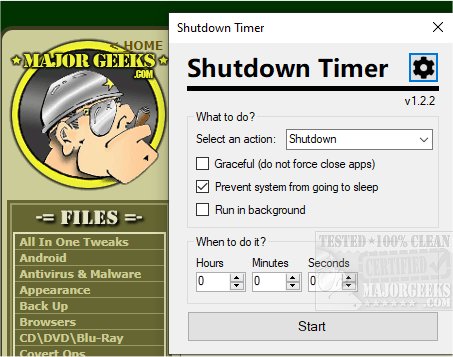
Shutdown Timer Classic is an open-source application designed to facilitate timed actions for your PC, such as shutdown, restart, hibernate, sleep, logout, and lock. The app boasts a user-friendly interface that makes it easy to operate. Users can simply select their desired action from a dropdown menu and set a countdown timer to execute that action.
Key features include the ability to avoid force-closing applications, prevent system sleep, and run the app in the background. The app's timer is color-coded, enhancing visual awareness of the remaining countdown time. By default, the countdown window remains on top of other applications, but users can hide it by enabling the "Run in background" option. If a countdown is active, right-clicking the countdown window allows users to minimize it to the background.
For advanced users, Shutdown Timer Classic can also be started through the command line, utilizing specific arguments to customize the countdown. These commands include setting the countdown time, choosing the desired action, and selecting control modes that determine how the timer behaves. Modes include 'Prefill', 'Lock', 'Launch', and 'ForcedLaunch', each with varying levels of user control. Additional options allow for graceful shutdowns, enabling sleep during countdowns, and running the countdown in the background while still providing notifications.
Overall, Shutdown Timer Classic offers a versatile and customizable solution for managing PC power states, catering to a range of user preferences and needs.
Extension:
In addition to its core functionalities, future updates could enhance Shutdown Timer Classic by introducing more customizable features, such as the ability to schedule recurring shutdowns or restarts, allowing users to set specific days and times for these actions. Integration with task automation tools could also be explored, enabling users to trigger shutdowns based on system conditions or other events.
Moreover, the app could benefit from improved notifications, such as alerts that remind users of the impending shutdown or restart, and a history log that tracks past scheduled actions. This feature would provide users insights into their usage patterns and help them manage their time more effectively.
Another potential improvement could involve expanding compatibility with various operating systems beyond Windows, making the app accessible to a broader audience. Finally, user feedback and community contributions could lead to the development of additional features, enhancing the overall user experience and solidifying Shutdown Timer Classic as a go-to tool for power management
Key features include the ability to avoid force-closing applications, prevent system sleep, and run the app in the background. The app's timer is color-coded, enhancing visual awareness of the remaining countdown time. By default, the countdown window remains on top of other applications, but users can hide it by enabling the "Run in background" option. If a countdown is active, right-clicking the countdown window allows users to minimize it to the background.
For advanced users, Shutdown Timer Classic can also be started through the command line, utilizing specific arguments to customize the countdown. These commands include setting the countdown time, choosing the desired action, and selecting control modes that determine how the timer behaves. Modes include 'Prefill', 'Lock', 'Launch', and 'ForcedLaunch', each with varying levels of user control. Additional options allow for graceful shutdowns, enabling sleep during countdowns, and running the countdown in the background while still providing notifications.
Overall, Shutdown Timer Classic offers a versatile and customizable solution for managing PC power states, catering to a range of user preferences and needs.
Extension:
In addition to its core functionalities, future updates could enhance Shutdown Timer Classic by introducing more customizable features, such as the ability to schedule recurring shutdowns or restarts, allowing users to set specific days and times for these actions. Integration with task automation tools could also be explored, enabling users to trigger shutdowns based on system conditions or other events.
Moreover, the app could benefit from improved notifications, such as alerts that remind users of the impending shutdown or restart, and a history log that tracks past scheduled actions. This feature would provide users insights into their usage patterns and help them manage their time more effectively.
Another potential improvement could involve expanding compatibility with various operating systems beyond Windows, making the app accessible to a broader audience. Finally, user feedback and community contributions could lead to the development of additional features, enhancing the overall user experience and solidifying Shutdown Timer Classic as a go-to tool for power management
Shutdown Timer Classic 1.3.2 released
Shutdown Timer Classic is an Open Source app for performing timed PC shutdown, restart, hibernate, sleep, logout, and lock.