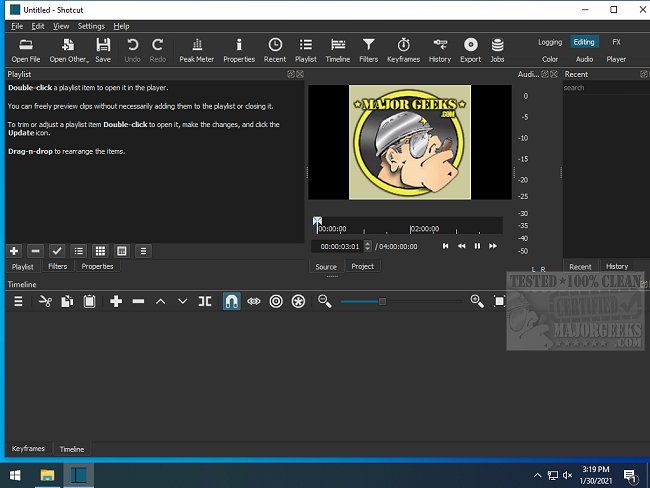
Shotcut Version 26.1.30 has been released, continuing its legacy as an open-source, cross-platform video editor that allows users to convert and edit video files across a variety of formats. It stands out in the crowded market of video editing software by being completely free, without paywalls or watermarks on final edits, making it an appealing option for both casual users and serious creators.
For audio, Shotcut offers features like equalization, compression, and real-time audio scopes. The integration of GPU acceleration enhances the editing experience, yielding smoother previews and faster exports, especially with larger files. Users can create polished videos for personal memories, vlogs, tutorials, or gaming highlight reels, making it versatile for various content creation needs.
- Completely free and open-source, eliminating hidden fees or watermarks.
- Supports a vast range of video and audio formats.
- Advanced features such as keyframes and GPU acceleration enhance editing capabilities.
- Cross-platform compatibility with Windows, Mac, and Linux.
Cons:
- The user interface may appear outdated compared to premium options.
- Beginners may experience a steeper learning curve.
- The interface can become unwieldy if items are rearranged excessively.
- Lacks a built-in asset library, necessitating external sourcing for music and effects.
Key Features of Shotcut
Shotcut is primarily focused on providing robust editing capabilities rather than flashy interfaces. It leverages FFmpeg, allowing support for an extensive array of video formats, from standard MP4 files to high-resolution 4K footage. Users benefit from a streamlined drag-and-drop timeline for ease of use, coupled with essential tools such as filters, transitions, keyframe animations, and chroma key functionalities, particularly useful for green screen projects.For audio, Shotcut offers features like equalization, compression, and real-time audio scopes. The integration of GPU acceleration enhances the editing experience, yielding smoother previews and faster exports, especially with larger files. Users can create polished videos for personal memories, vlogs, tutorials, or gaming highlight reels, making it versatile for various content creation needs.
Pros and Cons
Pros:- Completely free and open-source, eliminating hidden fees or watermarks.
- Supports a vast range of video and audio formats.
- Advanced features such as keyframes and GPU acceleration enhance editing capabilities.
- Cross-platform compatibility with Windows, Mac, and Linux.
Cons:
- The user interface may appear outdated compared to premium options.
- Beginners may experience a steeper learning curve.
- The interface can become unwieldy if items are rearranged excessively.
- Lacks a built-in asset library, necessitating external sourcing for music and effects.
Conclusion
Shotcut may not aim to cater to every user, but it provides a powerful editing suite without the financial burden. It is an excellent choice for those willing to invest time into mastering its features. While it has some rough edges, with patience and practice, Shotcut can unlock a world of creative possibilities for video editing enthusiasts.Future Prospects
As Shotcut continues to evolve, future updates could enhance its user interface, making it more accessible for newcomers while retaining its powerful editing capabilities. Additionally, the potential for integrating a built-in asset library could further streamline the editing process, attracting a broader user base. Overall, Shotcut represents a promising option for anyone looking to edit videos without the limitations often found in paid softwareShotcut 26.1.30 released
Shotcut is an Open Source, cross-platform video editor capable of converting and editing video files in various formats.