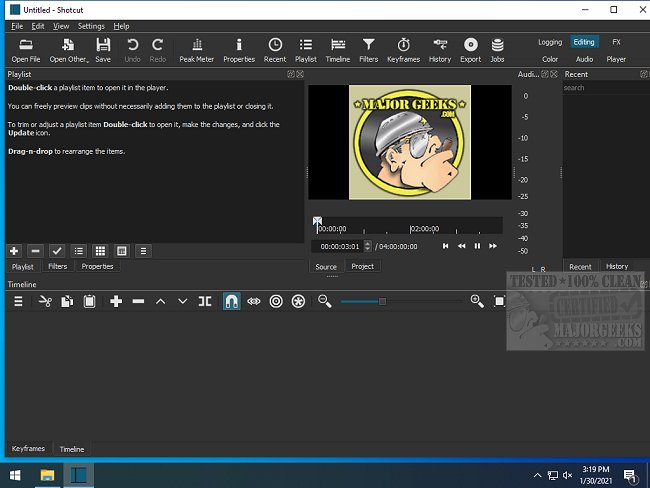
Shotcut has released version 25.12.30, reinforcing its status as a robust open-source video editing tool that operates across various platforms. Unlike many video editors that impose fees or watermarks, Shotcut offers a completely free experience, making it an appealing option for users seeking powerful editing capabilities without financial constraints.
Shotcut is designed for those who prioritize functionality over flashy aesthetics. It leverages FFmpeg for extensive format support, accommodating everything from standard MP4 files to high-resolution 4K videos. The user-friendly drag-and-drop timeline streamlines the editing process, allowing users to focus on refining their content efficiently.
Key features include a variety of essential video tools—such as filters, transitions, and keyframe animations—as well as robust audio editing capabilities, including EQ and compression. The integration of GPU acceleration enhances performance, particularly for large video files.
Shotcut is perfect for turning everyday moments—like family gatherings or fun events—into polished videos. It enables users to easily edit out unwanted sections, add transitions, overlay text, and even incorporate background music. The software is versatile enough for creating vlogs, tutorials, or gaming highlights, making it a valuable tool for both casual users and content creators.
- Multi-Format Timeline: Combine various resolutions and frame rates.
- Screen, Webcam & Audio Capture: Record directly from various sources (Linux only).
- Network Stream Playback: Supports a wide array of streaming protocols.
- Media Management: Enhanced properties panel and drag-and-drop functionality.
- Customizable User Interface: Adapt your workspace to suit your editing style.
- Encoding & Transcoding: Wide format and codec support via FFmpeg.
Pros:
- Completely free with no hidden costs or watermarks.
- Extensive format support.
- Advanced features like keyframes and GPU acceleration.
- Cross-platform compatibility (Windows, Mac, Linux).
Cons:
- The user interface may feel outdated compared to premium alternatives.
- Beginners might face a learning curve.
- Some interface quirks can arise with frequent adjustments.
- Lacks a built-in asset library for music and effects.
Shotcut may not boast the polish of high-end editors, but it remains a powerful editing suite for those willing to navigate its learning curve. Ideal for casual videos or aspiring YouTubers, Shotcut offers an unrestricted creative experience, allowing users to bring their visions to life without the constraints of cost or complicated licensing.
As an open-source project, Shotcut may continue to evolve with community input. Future updates could focus on refining the user interface and enhancing usability for beginners, potentially making it even more accessible while retaining its core functionalities. The potential for plugin support or integrated asset libraries could further enrich the user experience, making Shotcut a leading choice among free video editing software
Why Choose Shotcut?
Shotcut is designed for those who prioritize functionality over flashy aesthetics. It leverages FFmpeg for extensive format support, accommodating everything from standard MP4 files to high-resolution 4K videos. The user-friendly drag-and-drop timeline streamlines the editing process, allowing users to focus on refining their content efficiently.
Key features include a variety of essential video tools—such as filters, transitions, and keyframe animations—as well as robust audio editing capabilities, including EQ and compression. The integration of GPU acceleration enhances performance, particularly for large video files.
Practical Applications
Shotcut is perfect for turning everyday moments—like family gatherings or fun events—into polished videos. It enables users to easily edit out unwanted sections, add transitions, overlay text, and even incorporate background music. The software is versatile enough for creating vlogs, tutorials, or gaming highlights, making it a valuable tool for both casual users and content creators.
Noteworthy Features
- Multi-Format Timeline: Combine various resolutions and frame rates.
- Screen, Webcam & Audio Capture: Record directly from various sources (Linux only).
- Network Stream Playback: Supports a wide array of streaming protocols.
- Media Management: Enhanced properties panel and drag-and-drop functionality.
- Customizable User Interface: Adapt your workspace to suit your editing style.
- Encoding & Transcoding: Wide format and codec support via FFmpeg.
Pros and Cons
Pros:
- Completely free with no hidden costs or watermarks.
- Extensive format support.
- Advanced features like keyframes and GPU acceleration.
- Cross-platform compatibility (Windows, Mac, Linux).
Cons:
- The user interface may feel outdated compared to premium alternatives.
- Beginners might face a learning curve.
- Some interface quirks can arise with frequent adjustments.
- Lacks a built-in asset library for music and effects.
Conclusion
Shotcut may not boast the polish of high-end editors, but it remains a powerful editing suite for those willing to navigate its learning curve. Ideal for casual videos or aspiring YouTubers, Shotcut offers an unrestricted creative experience, allowing users to bring their visions to life without the constraints of cost or complicated licensing.
Future Enhancements
As an open-source project, Shotcut may continue to evolve with community input. Future updates could focus on refining the user interface and enhancing usability for beginners, potentially making it even more accessible while retaining its core functionalities. The potential for plugin support or integrated asset libraries could further enrich the user experience, making Shotcut a leading choice among free video editing software
Shotcut 25.12.30 released
Shotcut is an Open Source, cross-platform video editor capable of converting and editing video files in various formats.