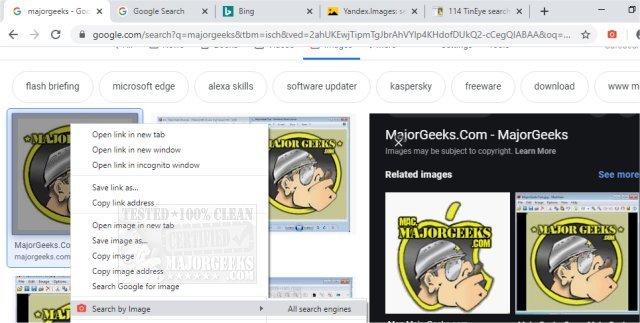
The recently released version 8.4.0 of the "Search by Image" extension for Chrome, Firefox, Edge, and Opera enhances the functionality of reverse image searching across various platforms. Users can easily initiate searches directly from the right-click context menu or the browser toolbar, leveraging a range of search engines including Baidu, Bing, Google, Yandex, and TinEye.
This versatile tool detects images from any part of a webpage, regardless of their embedding method, and offers the ability to upload local images, search for frames from videos, and capture specific details within images. Users can customize their experience by toggling and reordering the list of supported search engines in the extension's options.
The extension provides multiple search modes tailored for different scenarios, which can be independently set for the context menu and the toolbar. The available modes include:
1. Select: Searches the image URL when possible, defaulting to handle blob and data URLs as uploads.
2. Select & Upload: Fetches and uploads an image, ideal for sites that restrict direct linking.
3. Capture: Allows users to select and capture an area of the page for search.
4. Upload: Enables users to select or drop an image directly from their device or clipboard.
5. URL: Facilitates searching by entering an image URL.
Key features of the "Search by Image" extension include:
- The ability to search using one or multiple enabled engines directly from the menu or toolbar.
- Detection of any visible image on the page, including those styled with CSS.
- Options for users to select images from a dialog box when multiple options are found.
- Support for searching images from private sites and local images, as well as video frames.
Overall, this extension significantly enhances the reverse image search capabilities for users, making it easier to find image sources, verify content authenticity, or simply discover more about an image's origin.
In addition to its existing features, future updates could potentially include more integration with social media platforms, improved AI image recognition capabilities, or enhanced privacy settings to ensure user data remains secure while conducting searches. The versatility and user-friendly design of "Search by Image" could be expanded even further, perhaps by introducing a mobile version for users on the go or incorporating community feedback to refine search algorithms for even more accurate results
This versatile tool detects images from any part of a webpage, regardless of their embedding method, and offers the ability to upload local images, search for frames from videos, and capture specific details within images. Users can customize their experience by toggling and reordering the list of supported search engines in the extension's options.
The extension provides multiple search modes tailored for different scenarios, which can be independently set for the context menu and the toolbar. The available modes include:
1. Select: Searches the image URL when possible, defaulting to handle blob and data URLs as uploads.
2. Select & Upload: Fetches and uploads an image, ideal for sites that restrict direct linking.
3. Capture: Allows users to select and capture an area of the page for search.
4. Upload: Enables users to select or drop an image directly from their device or clipboard.
5. URL: Facilitates searching by entering an image URL.
Key features of the "Search by Image" extension include:
- The ability to search using one or multiple enabled engines directly from the menu or toolbar.
- Detection of any visible image on the page, including those styled with CSS.
- Options for users to select images from a dialog box when multiple options are found.
- Support for searching images from private sites and local images, as well as video frames.
Overall, this extension significantly enhances the reverse image search capabilities for users, making it easier to find image sources, verify content authenticity, or simply discover more about an image's origin.
In addition to its existing features, future updates could potentially include more integration with social media platforms, improved AI image recognition capabilities, or enhanced privacy settings to ensure user data remains secure while conducting searches. The versatility and user-friendly design of "Search by Image" could be expanded even further, perhaps by introducing a mobile version for users on the go or incorporating community feedback to refine search algorithms for even more accurate results
Search by Image for Chrome, Firefox, Edge, and Opera 8.4.0 released
Search by Image for Chrome, Firefox, Edge, and Opera is a powerful reverse image search extension/add-on that allows you to initiate a reverse image search from the right-click context menu or the browser toolbar with support for numerous search engines including Baidu, Bing, Google, Yandex, and TinEye.
Search by Image for Chrome, Firefox, Edge, and Opera 8.4.0 released @ MajorGeeks