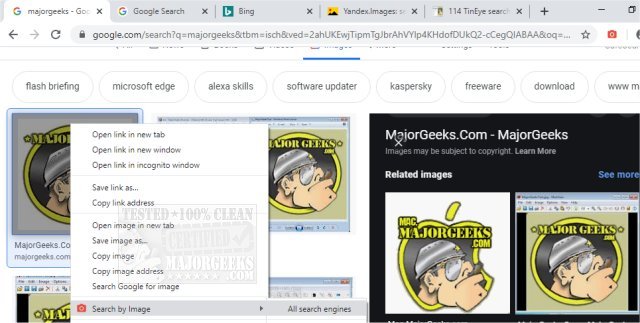
The "Search by Image" extension has been released in version 8.3.0 for popular web browsers, including Chrome, Firefox, Edge, and Opera. This tool allows users to perform reverse image searches conveniently through the right-click context menu or the browser toolbar. It supports a variety of search engines, such as Baidu, Bing, Google, Yandex, and TinEye, making it versatile for users looking to find the source or similar images online.
One of the key features of "Search by Image" is its ability to detect images embedded in web pages, regardless of their method of integration. Users can also upload local images, search for specific video frames, and explore images from private websites. The extension allows users to customize their experience by toggling and reordering the supported search engines within the options section.
The extension offers multiple search modes to cater to different needs. Users can choose to search using the image URL, upload images directly, capture portions of the screen, or search for URLs through the toolbar. The available modes include:
- Select: Search for an image URL by selecting an image directly from the page.
- Select & Upload: Upload an image fetched from the browser cache, useful for sites that restrict direct linking.
- Capture: Select a specific area of the page to capture and upload.
- Upload: Upload an image from the device or clipboard.
- URL: Perform a search using a provided image URL.
Additionally, the extension allows users to search images from private sites, detect all images on a page, and select the desired image when multiple results are found.
Overall, "Search by Image" enhances the browsing experience by providing powerful reverse image search capabilities, making it easier for users to find visual content online.
Extension and Future Developments:
As technology progresses, future updates might introduce additional features, such as enhanced AI-driven image recognition, support for more search engines, and improved integration with social media platforms. This could further streamline the process of finding images and enhance user engagement with visual content across the web
One of the key features of "Search by Image" is its ability to detect images embedded in web pages, regardless of their method of integration. Users can also upload local images, search for specific video frames, and explore images from private websites. The extension allows users to customize their experience by toggling and reordering the supported search engines within the options section.
The extension offers multiple search modes to cater to different needs. Users can choose to search using the image URL, upload images directly, capture portions of the screen, or search for URLs through the toolbar. The available modes include:
- Select: Search for an image URL by selecting an image directly from the page.
- Select & Upload: Upload an image fetched from the browser cache, useful for sites that restrict direct linking.
- Capture: Select a specific area of the page to capture and upload.
- Upload: Upload an image from the device or clipboard.
- URL: Perform a search using a provided image URL.
Additionally, the extension allows users to search images from private sites, detect all images on a page, and select the desired image when multiple results are found.
Overall, "Search by Image" enhances the browsing experience by providing powerful reverse image search capabilities, making it easier for users to find visual content online.
Extension and Future Developments:
As technology progresses, future updates might introduce additional features, such as enhanced AI-driven image recognition, support for more search engines, and improved integration with social media platforms. This could further streamline the process of finding images and enhance user engagement with visual content across the web
Search by Image for Chrome, Firefox, Edge, and Opera 8.3.0 released
Search by Image for Chrome, Firefox, Edge, and Opera is a powerful reverse image search extension/add-on that allows you to initiate a reverse image search from the right-click context menu or the browser toolbar with support for numerous search engines including Baidu, Bing, Google, Yandex, and TinEye.
Search by Image for Chrome, Firefox, Edge, and Opera 8.3.0 released @ MajorGeeks