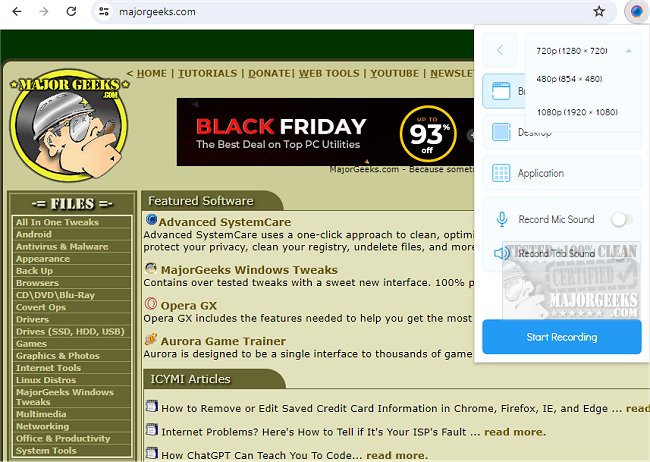
The Scrnli - Screenshot and Screen Recorder Tool has been updated to version 4.3.5 / 1.0.14.0, providing users with an enhanced tool for taking screenshots and recording screen activity. This Chrome extension offers a user-friendly interface that allows for easy capturing, editing, downloading, and sharing of content, making it an ideal resource for both personal and professional use.
Beyond basic screen recording and capturing, Scrnli includes robust features for content creation. Users can record their screens, save videos in various formats, and share them instantly, facilitating collaboration among team members or sharing information with friends and family. The tool supports recording from both display monitors and webcams, enhancing its versatility. Additionally, it provides a built-in link for online video file conversions, enabling users to easily change video formats for compatibility across different devices.
Capturing screenshots is made simple with options to select either the entire page or a specific area, allowing for customization with text, shapes, and annotations. Once captured, users can share their work through links, save files directly to their devices, or print them for physical distribution.
Overall, Scrnli - Screenshot and Screen Recorder Tool serves as a comprehensive solution for all content creation needs, combining advanced features for taking screenshots, recording videos, and converting files into an intuitive package. With just a single click, users can access all functionalities, making it easier than ever to share high-quality content efficiently.
To further enhance the user experience, future updates could focus on integrating more advanced editing tools, such as the ability to add voiceovers to screen recordings, collaborate in real-time with others on captured content, or implement cloud storage options for easy access and sharing. Additionally, offering tutorials or guides for new users could help them maximize the tool's capabilities, ensuring they can create and share content effectively
Beyond basic screen recording and capturing, Scrnli includes robust features for content creation. Users can record their screens, save videos in various formats, and share them instantly, facilitating collaboration among team members or sharing information with friends and family. The tool supports recording from both display monitors and webcams, enhancing its versatility. Additionally, it provides a built-in link for online video file conversions, enabling users to easily change video formats for compatibility across different devices.
Capturing screenshots is made simple with options to select either the entire page or a specific area, allowing for customization with text, shapes, and annotations. Once captured, users can share their work through links, save files directly to their devices, or print them for physical distribution.
Overall, Scrnli - Screenshot and Screen Recorder Tool serves as a comprehensive solution for all content creation needs, combining advanced features for taking screenshots, recording videos, and converting files into an intuitive package. With just a single click, users can access all functionalities, making it easier than ever to share high-quality content efficiently.
To further enhance the user experience, future updates could focus on integrating more advanced editing tools, such as the ability to add voiceovers to screen recordings, collaborate in real-time with others on captured content, or implement cloud storage options for easy access and sharing. Additionally, offering tutorials or guides for new users could help them maximize the tool's capabilities, ensuring they can create and share content effectively
Scrnli - Screenshot and Screen Recorder Tool 4.3.5 / 1.0.14.0 released
Scrnli - Screenshot & Screen Recorder Tool lets you take screenshots or screen recordings, edit, download, and share through a free, easy-to-use Chrome extension.
Scrnli - Screenshot and Screen Recorder Tool 4.3.5 / 1.0.14.0 released @ MajorGeeks