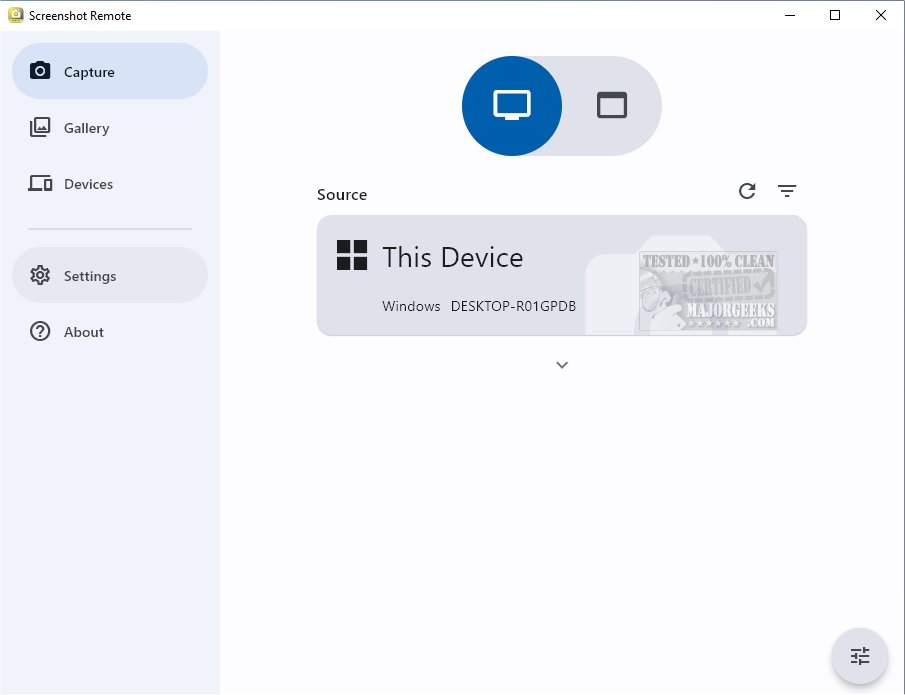
The latest version of Screenshot Remote, 1.1.3, introduces an innovative solution for capturing and organizing screenshots across various platforms while maintaining a focus on security and user efficiency. This tool allows users to effortlessly capture screenshots from their desktop, web browsers, and mobile devices, centralizing all visual content for easy access and organization.
Remote Capture Capability
Screenshot Remote stands out with its ability to capture screenshots from remote computers using a phone, tablet, or another computer connected via a local network or Wi-Fi. This feature is particularly useful for both personal and professional scenarios such as monitoring, technical support, or simply documenting important information from afar.
Multi-Platform Support with Limitations
While Screenshot Remote is designed to work seamlessly across multiple platforms, the screen capture functionality on Android and iOS devices is limited due to strict policy restrictions. Users can fully utilize the screenshot capabilities on PC and Mac, but will find that capturing screenshots on remote computers is the primary option on mobile platforms.
Enhanced Security Measures
Security is a top priority for Screenshot Remote, as all data is stored locally on users' devices—eliminating concerns about external server uploads. The tool employs industry-standard encryption protocols for the secure transfer of images and commands over local networks or Wi-Fi. Users can also customize their screen capture settings to align with their specific needs and preferences.
Multi-Monitor Functionality
For users with multiple monitors, Screenshot Remote includes a feature that allows for precise selection of which monitor to capture. The Gallery tab serves as a dedicated space for storing screenshots, equipped with editing tools and sharing options, streamlining the entire process from capture to application.
Device Pairing and Management
To ensure a secure connection for transferring and managing screenshots, users must initiate a pairing process between their devices. This can easily be done from the Capture tab, and the dedicated Devices tab allows users to manage and edit their paired devices effectively.
Screenshot Remote 1.1.3 is an advanced tool for anyone needing a reliable method for capturing and managing screenshots across various platforms. Its robust security features, remote capture capabilities, multi-monitor support, and user-friendly interface make it an essential asset for both personal and business use. As Screenshot Remote continues to evolve, users can look forward to new functionalities that will further enhance their screenshot management experience.
- How to Create a Screen Snip Shortcut in Windows 10 & 11
- How to Take High-Resolution Screenshots in Windows 10 & 1
Key Features
Remote Capture Capability
Screenshot Remote stands out with its ability to capture screenshots from remote computers using a phone, tablet, or another computer connected via a local network or Wi-Fi. This feature is particularly useful for both personal and professional scenarios such as monitoring, technical support, or simply documenting important information from afar.
Multi-Platform Support with Limitations
While Screenshot Remote is designed to work seamlessly across multiple platforms, the screen capture functionality on Android and iOS devices is limited due to strict policy restrictions. Users can fully utilize the screenshot capabilities on PC and Mac, but will find that capturing screenshots on remote computers is the primary option on mobile platforms.
Enhanced Security Measures
Security is a top priority for Screenshot Remote, as all data is stored locally on users' devices—eliminating concerns about external server uploads. The tool employs industry-standard encryption protocols for the secure transfer of images and commands over local networks or Wi-Fi. Users can also customize their screen capture settings to align with their specific needs and preferences.
Multi-Monitor Functionality
For users with multiple monitors, Screenshot Remote includes a feature that allows for precise selection of which monitor to capture. The Gallery tab serves as a dedicated space for storing screenshots, equipped with editing tools and sharing options, streamlining the entire process from capture to application.
Device Pairing and Management
To ensure a secure connection for transferring and managing screenshots, users must initiate a pairing process between their devices. This can easily be done from the Capture tab, and the dedicated Devices tab allows users to manage and edit their paired devices effectively.
Conclusion
Screenshot Remote 1.1.3 is an advanced tool for anyone needing a reliable method for capturing and managing screenshots across various platforms. Its robust security features, remote capture capabilities, multi-monitor support, and user-friendly interface make it an essential asset for both personal and business use. As Screenshot Remote continues to evolve, users can look forward to new functionalities that will further enhance their screenshot management experience.
Related Resources
- How to Take Screenshots in Windows 10 & 11- How to Create a Screen Snip Shortcut in Windows 10 & 11
- How to Take High-Resolution Screenshots in Windows 10 & 1
Screenshot Remote 1.1.3 released
Screenshot Remote seamlessly captures and organizes screenshots across different platforms while ensuring secure and efficient management.