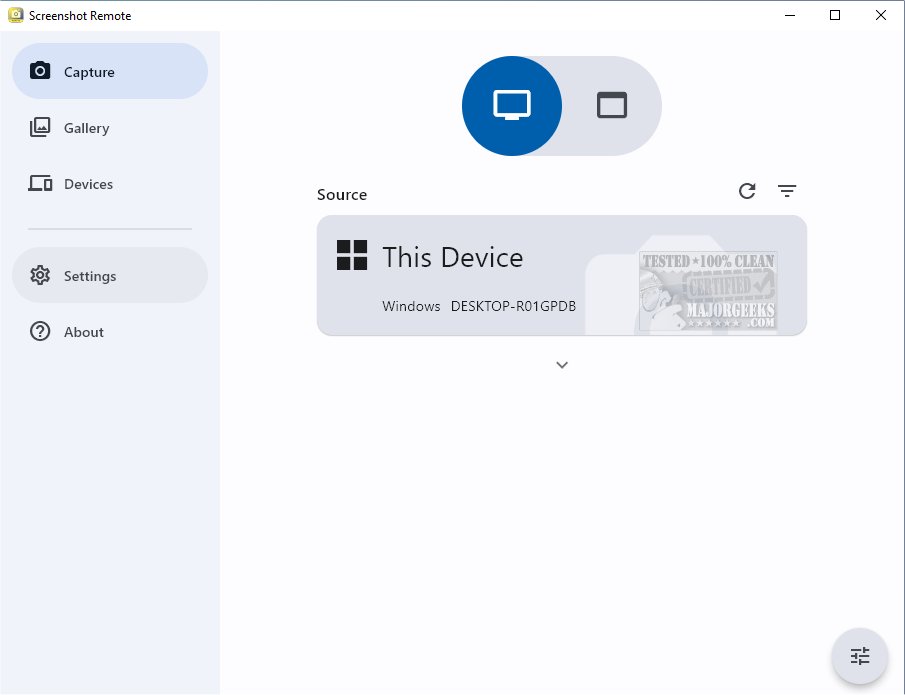
The recently launched Screenshot Remote 1.1.2 offers an innovative solution for capturing and organizing screenshots across various platforms, combining ease of use with robust management features. This tool simplifies the process of capturing and categorizing screenshots from desktops, web browsers, and mobile devices, placing all visual content conveniently in one accessible location.
One of the standout features of Screenshot Remote is its ability to capture screenshots on remote computers using a phone, tablet, or another computer, all through a local network or Wi-Fi connection. This feature caters to a diverse range of use cases, making it an ideal tool for both personal and business environments, including monitoring activities, providing technical support, or simply enhancing personal productivity.
While Screenshot Remote is designed as a multi-platform application to offer a seamless experience across various devices, users should be aware of certain limitations. Full functionality is available on PC and Mac; however, due to policy restrictions, Android and iOS users will find that the screenshot capture capability is confined to remote computers only.
Security is a top priority for Screenshot Remote, as all data is stored locally on users' devices rather than on external servers or databases. This ensures high-level data security for users, who can rest easy knowing their information is protected. The application employs industry-standard encryption protocols for secure image and command transfer over local networks or Wi-Fi. Users also have the flexibility to customize their screen capture settings, tailoring the tool to meet their specific needs.
For those utilizing multiple monitors, Screenshot Remote includes a feature that allows users to select which monitor to capture, ensuring precise screenshot management. The integrated Gallery tab serves as a dedicated storage space for screenshots and offers various editing tools and sharing options, enhancing the overall user experience from capture to utilization.
To establish a secure connection for seamless screenshot management, users must initiate a pairing process for their devices. This can be done directly from the Capture tab, with an additional Devices tab available for managing and editing paired devices effectively.
Future Developments and Enhancements
Looking ahead, the developers of Screenshot Remote plan to continually refine the application by addressing current platform restrictions and expanding compatibility with mobile operating systems. Enhancements in cloud integration for optional backup solutions while maintaining data security will also be explored. Furthermore, user feedback will play a crucial role in shaping future updates, ensuring that Screenshot Remote remains a leader in screenshot management solutions.
In summary, Screenshot Remote 1.1.2 is a powerful tool for anyone needing efficient screenshot capture and organization, with a focus on security and ease of use, making it a valuable addition to both personal and professional toolsets
One of the standout features of Screenshot Remote is its ability to capture screenshots on remote computers using a phone, tablet, or another computer, all through a local network or Wi-Fi connection. This feature caters to a diverse range of use cases, making it an ideal tool for both personal and business environments, including monitoring activities, providing technical support, or simply enhancing personal productivity.
While Screenshot Remote is designed as a multi-platform application to offer a seamless experience across various devices, users should be aware of certain limitations. Full functionality is available on PC and Mac; however, due to policy restrictions, Android and iOS users will find that the screenshot capture capability is confined to remote computers only.
Security is a top priority for Screenshot Remote, as all data is stored locally on users' devices rather than on external servers or databases. This ensures high-level data security for users, who can rest easy knowing their information is protected. The application employs industry-standard encryption protocols for secure image and command transfer over local networks or Wi-Fi. Users also have the flexibility to customize their screen capture settings, tailoring the tool to meet their specific needs.
For those utilizing multiple monitors, Screenshot Remote includes a feature that allows users to select which monitor to capture, ensuring precise screenshot management. The integrated Gallery tab serves as a dedicated storage space for screenshots and offers various editing tools and sharing options, enhancing the overall user experience from capture to utilization.
To establish a secure connection for seamless screenshot management, users must initiate a pairing process for their devices. This can be done directly from the Capture tab, with an additional Devices tab available for managing and editing paired devices effectively.
Future Developments and Enhancements
Looking ahead, the developers of Screenshot Remote plan to continually refine the application by addressing current platform restrictions and expanding compatibility with mobile operating systems. Enhancements in cloud integration for optional backup solutions while maintaining data security will also be explored. Furthermore, user feedback will play a crucial role in shaping future updates, ensuring that Screenshot Remote remains a leader in screenshot management solutions.
In summary, Screenshot Remote 1.1.2 is a powerful tool for anyone needing efficient screenshot capture and organization, with a focus on security and ease of use, making it a valuable addition to both personal and professional toolsets
Screenshot Remote 1.1.2 released
Screenshot Remote seamlessly captures and organizes screenshots across different platforms while ensuring secure and efficient management.