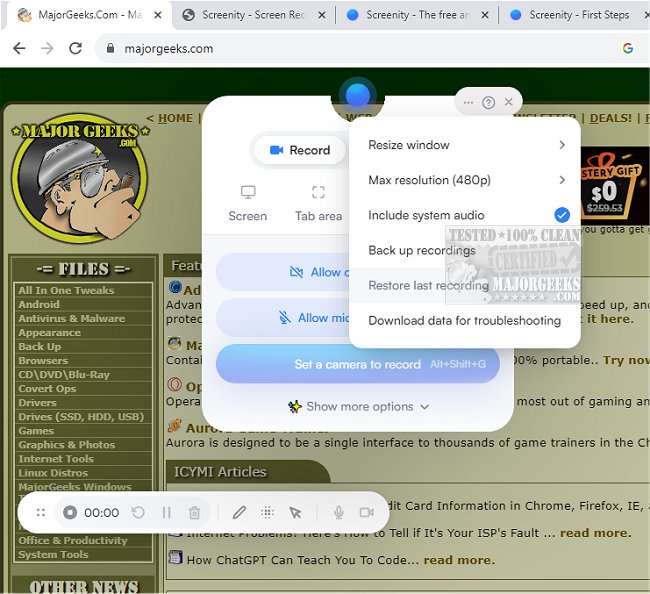
Screenity for Chrome has recently launched version 4.3.5, enhancing its capabilities as a user-friendly screen recording extension. This tool provides users with an unlimited recording experience, allowing them to capture high-quality videos of their screens, including audio, and to enrich their recordings with annotations and highlights. Its intuitive interface and customizable settings make it an ideal choice for creating various video content such as tutorials, presentations, and demos without the need for user sign-in, ensuring a seamless user experience.
Screenity stands out as a privacy-focused screen recorder and annotation tool, making it suitable for generating product demonstrations, educational content, and team feedback. Users can record their entire desktop, a specific application, or even their webcam, while also capturing internal audio or microphone input with features like push-to-talk. The extension allows for extensive annotation options, including drawing on the screen, adding text, shapes, arrows, and more.
Notably, the latest version introduces AI-powered camera backgrounds and blurring effects to improve the visual quality of recordings. Users can smoothly zoom in on specific areas, blur sensitive information, and utilize a comprehensive editor for trimming, cutting, and cropping videos. Additionally, Screenity enables users to highlight clicks, use spotlight mode, and set alarms for automatic recording stops. Videos can be exported in various formats such as MP4, GIF, and WebM, and saved directly to Google Drive for easy sharing.
The extension's lack of recording limits allows users to create an infinite number of videos for any duration, enhancing its usability for professionals and casual users alike. To fully utilize Screenity, permissions for microphone and camera access are required.
In summary, Screenity for Chrome 4.3.5 is an exceptional tool for anyone looking to create high-quality screen recordings effortlessly. Its extensive features, privacy focus, and user-friendly design make it a preferred option for educators, marketers, and content creators. As digital content continues to grow in importance, tools like Screenity will remain invaluable for effective communication and presentation
Screenity stands out as a privacy-focused screen recorder and annotation tool, making it suitable for generating product demonstrations, educational content, and team feedback. Users can record their entire desktop, a specific application, or even their webcam, while also capturing internal audio or microphone input with features like push-to-talk. The extension allows for extensive annotation options, including drawing on the screen, adding text, shapes, arrows, and more.
Notably, the latest version introduces AI-powered camera backgrounds and blurring effects to improve the visual quality of recordings. Users can smoothly zoom in on specific areas, blur sensitive information, and utilize a comprehensive editor for trimming, cutting, and cropping videos. Additionally, Screenity enables users to highlight clicks, use spotlight mode, and set alarms for automatic recording stops. Videos can be exported in various formats such as MP4, GIF, and WebM, and saved directly to Google Drive for easy sharing.
The extension's lack of recording limits allows users to create an infinite number of videos for any duration, enhancing its usability for professionals and casual users alike. To fully utilize Screenity, permissions for microphone and camera access are required.
In summary, Screenity for Chrome 4.3.5 is an exceptional tool for anyone looking to create high-quality screen recordings effortlessly. Its extensive features, privacy focus, and user-friendly design make it a preferred option for educators, marketers, and content creators. As digital content continues to grow in importance, tools like Screenity will remain invaluable for effective communication and presentation
Screenity for Chrome 4.3.5 released
Screenity for Chrome is a user-friendly screen recording extension designed to provide a seamless and unlimited recording experience.