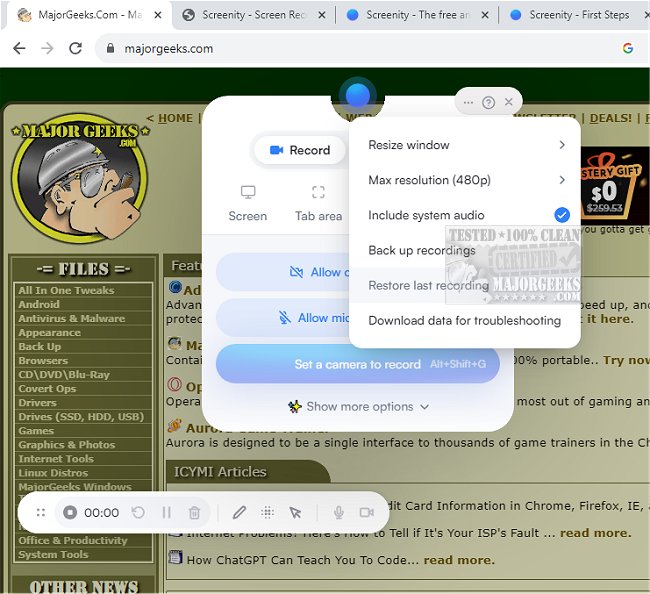
Screenity for Chrome has recently launched version 4.2.7, enhancing its reputation as a user-friendly screen recording extension that offers an unlimited and seamless recording experience. This powerful tool allows users to capture high-quality screen videos with optional audio while providing features for annotations and highlights, making it ideal for creating tutorials, presentations, demos, or any other video content. Notably, Screenity does not require users to sign in, ensuring a straightforward and privacy-centric experience.
The extension's versatility enables users to record their entire screen, specific areas, applications, or even their webcam. It supports audio recording from both the microphone and internal sources and includes convenient features like push-to-talk. Users can enhance their recordings with AI-powered camera backgrounds or blurring effects to maintain privacy.
In addition, Screenity provides a comprehensive editing suite that allows for cutting, trimming, and cropping videos, along with the ability to highlight clicks and cursor movements. The tool includes options for setting alarms to automatically stop recordings, exporting files in various formats such as MP4, GIF, and WebM, and saving videos directly to Google Drive for easy sharing.
Screenity's interface is simple and offers customizable settings, making it easy for users to create unlimited recordings without time constraints. Users only need to grant permission for microphone and camera access to utilize the full capabilities of this extension.
In summary, Screenity for Chrome 4.2.7 is an exceptional tool for anyone looking to capture and share video content efficiently and effectively. Its array of features caters to diverse needs, from professional presentations to casual tutorials, reinforcing its position as a must-have extension for screen recording on Chrome. As technology evolves, further enhancements and features may be expected in future releases, catering to the growing demands of content creators
The extension's versatility enables users to record their entire screen, specific areas, applications, or even their webcam. It supports audio recording from both the microphone and internal sources and includes convenient features like push-to-talk. Users can enhance their recordings with AI-powered camera backgrounds or blurring effects to maintain privacy.
In addition, Screenity provides a comprehensive editing suite that allows for cutting, trimming, and cropping videos, along with the ability to highlight clicks and cursor movements. The tool includes options for setting alarms to automatically stop recordings, exporting files in various formats such as MP4, GIF, and WebM, and saving videos directly to Google Drive for easy sharing.
Screenity's interface is simple and offers customizable settings, making it easy for users to create unlimited recordings without time constraints. Users only need to grant permission for microphone and camera access to utilize the full capabilities of this extension.
In summary, Screenity for Chrome 4.2.7 is an exceptional tool for anyone looking to capture and share video content efficiently and effectively. Its array of features caters to diverse needs, from professional presentations to casual tutorials, reinforcing its position as a must-have extension for screen recording on Chrome. As technology evolves, further enhancements and features may be expected in future releases, catering to the growing demands of content creators
Screenity for Chrome 4.2.7 released
Screenity for Chrome is a user-friendly screen recording extension designed to provide a seamless and unlimited recording experience.