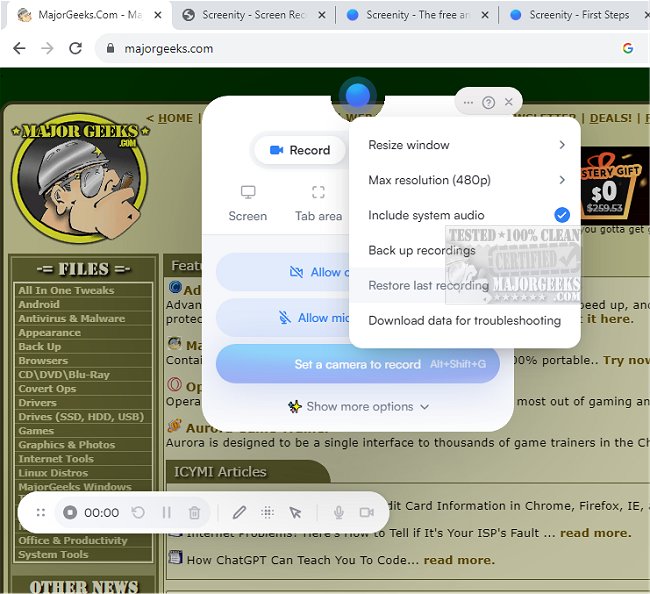
Screenity for Chrome has just released version 4.2.4, enhancing its reputation as a user-friendly screen recording extension that offers an unlimited and seamless recording experience. This powerful tool allows users to capture high-quality videos of their screens, complete with audio, and provides options for adding annotations and highlights, making it ideal for creating informative content such as tutorials, presentations, and demos.
One of the standout features of Screenity is its commitment to user privacy, as it does not require any sign-in, making it accessible for everyone. The extension supports unlimited recordings of various formats, including capturing your entire desktop, specific applications, or even your webcam. Users can record audio from their microphone or internal system sounds, utilizing features like push-to-talk for enhanced control.
Screenity also offers advanced annotation capabilities, allowing users to draw on the screen, add text, arrows, and shapes. Additionally, it includes AI-powered tools for camera backgrounds and blurring effects, enabling users to maintain privacy by obscuring sensitive information. The zoom feature allows a smooth focus on specific areas, enhancing the overall quality of the recordings.
For editing, Screenity provides a comprehensive set of tools, including options to trim, cut, crop, and mix audio tracks. Users can highlight clicks and cursor movements or activate spotlight mode to draw attention to key elements. The extension also includes convenient functionalities like setting up automatic recording stop alarms, exporting videos in various formats (mp4, gif, WebM), and saving directly to Google Drive for easy sharing.
With Screenity for Chrome, there are no limitations on the number or duration of recordings, making it a versatile solution for anyone looking to create video content. Users need to grant permission for microphone and camera access to take full advantage of its features.
In conclusion, Screenity for Chrome 4.2.4 is more than just a screen recording tool; it is a comprehensive suite for video production that combines user-friendliness, privacy, and advanced features, making it a must-have extension for educators, professionals, and content creators alike
One of the standout features of Screenity is its commitment to user privacy, as it does not require any sign-in, making it accessible for everyone. The extension supports unlimited recordings of various formats, including capturing your entire desktop, specific applications, or even your webcam. Users can record audio from their microphone or internal system sounds, utilizing features like push-to-talk for enhanced control.
Screenity also offers advanced annotation capabilities, allowing users to draw on the screen, add text, arrows, and shapes. Additionally, it includes AI-powered tools for camera backgrounds and blurring effects, enabling users to maintain privacy by obscuring sensitive information. The zoom feature allows a smooth focus on specific areas, enhancing the overall quality of the recordings.
For editing, Screenity provides a comprehensive set of tools, including options to trim, cut, crop, and mix audio tracks. Users can highlight clicks and cursor movements or activate spotlight mode to draw attention to key elements. The extension also includes convenient functionalities like setting up automatic recording stop alarms, exporting videos in various formats (mp4, gif, WebM), and saving directly to Google Drive for easy sharing.
With Screenity for Chrome, there are no limitations on the number or duration of recordings, making it a versatile solution for anyone looking to create video content. Users need to grant permission for microphone and camera access to take full advantage of its features.
In conclusion, Screenity for Chrome 4.2.4 is more than just a screen recording tool; it is a comprehensive suite for video production that combines user-friendliness, privacy, and advanced features, making it a must-have extension for educators, professionals, and content creators alike
Screenity for Chrome 4.2.4 released
Screenity for Chrome is a user-friendly screen recording extension designed to provide a seamless and unlimited recording experience.