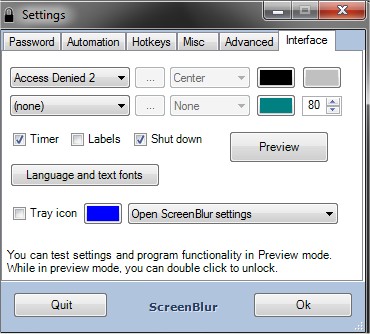
The latest version of ScreenBlur, 2.1.6, has been launched, offering enhanced security features for users looking to protect their desktop. This software enables you to lock and conceal your desktop with ease, providing a simple password mechanism for unlocking.
ScreenBlur effectively hides visible windows, icons, gadgets, and the taskbar, ensuring that your workspace remains private. Notable features include an auto-lock function, customizable hotkeys, a mute sound option, and a personalized lock screen, making it a versatile tool for safeguarding your data. Additionally, it serves as a helpful solution for preventing children or pets from tampering with your computer settings and information.
Extended Features and Benefits:
- User-Friendly Interface: The intuitive design of ScreenBlur makes it accessible for all users, regardless of technical expertise.
- Enhanced Security: With the ability to hide all desktop elements, your sensitive information remains out of sight from prying eyes.
- Customization Options: Users can tailor the lock screen to reflect their personal style or branding, adding a layer of uniqueness to their workspace.
- Child and Pet Safety: This feature not only secures data but also acts as a preventive measure to keep children or pets from unintentionally disrupting your work or accessing inappropriate content.
In addition to these features, ScreenBlur is comparable to other tools that enhance the security of Windows 10, such as disabling lock screen ads and managing start menu suggestions. Whether you want to maintain privacy in a shared environment or ensure a safe space for your family, ScreenBlur proves to be an essential utility
ScreenBlur effectively hides visible windows, icons, gadgets, and the taskbar, ensuring that your workspace remains private. Notable features include an auto-lock function, customizable hotkeys, a mute sound option, and a personalized lock screen, making it a versatile tool for safeguarding your data. Additionally, it serves as a helpful solution for preventing children or pets from tampering with your computer settings and information.
Extended Features and Benefits:
- User-Friendly Interface: The intuitive design of ScreenBlur makes it accessible for all users, regardless of technical expertise.
- Enhanced Security: With the ability to hide all desktop elements, your sensitive information remains out of sight from prying eyes.
- Customization Options: Users can tailor the lock screen to reflect their personal style or branding, adding a layer of uniqueness to their workspace.
- Child and Pet Safety: This feature not only secures data but also acts as a preventive measure to keep children or pets from unintentionally disrupting your work or accessing inappropriate content.
In addition to these features, ScreenBlur is comparable to other tools that enhance the security of Windows 10, such as disabling lock screen ads and managing start menu suggestions. Whether you want to maintain privacy in a shared environment or ensure a safe space for your family, ScreenBlur proves to be an essential utility
ScreenBlur 2.1.6 released
ScreenBlur allows you to lock and hide your desktop, easily unlocking it with a password.