The release of Safing Portmaster version 2.1.14 has introduced enhancements to this free and open-source application designed to give users control over their computer's network connections. The application features a straightforward setup process that allows users to adjust default settings, including options for tracker blocking and secure DNS.
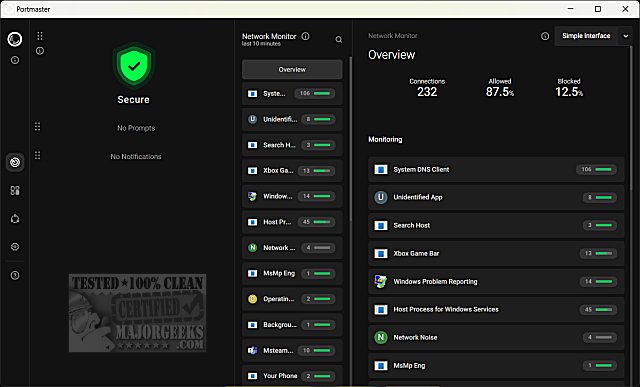
Upon completion of the initial setup, users can access an overview of their current security status, as well as a network monitor. While there are navigation shortcuts on the left side of the interface, some features may not be fully functional yet, such as a simplified interface that appears to be in the alpha testing phase.
Users can click on any connection to view detailed information, including the number of connections established, their destinations, the countries involved, and which connections are allowed or blocked. Additionally, users can review their connection history for further insights into their network activity.
In summary, Safing Portmaster is a powerful tool for managing and securing network connections, but it may still be undergoing some development to refine its features. As users explore the application, they might also find parallels with other network management tools, like managing firewall settings in Windows 10 and 11. Future updates may continue to enhance its functionality, making it an increasingly valuable resource for users seeking to enhance their online privacy and security
Upon completion of the initial setup, users can access an overview of their current security status, as well as a network monitor. While there are navigation shortcuts on the left side of the interface, some features may not be fully functional yet, such as a simplified interface that appears to be in the alpha testing phase.
Users can click on any connection to view detailed information, including the number of connections established, their destinations, the countries involved, and which connections are allowed or blocked. Additionally, users can review their connection history for further insights into their network activity.
In summary, Safing Portmaster is a powerful tool for managing and securing network connections, but it may still be undergoing some development to refine its features. As users explore the application, they might also find parallels with other network management tools, like managing firewall settings in Windows 10 and 11. Future updates may continue to enhance its functionality, making it an increasingly valuable resource for users seeking to enhance their online privacy and security
Safing Portmaster 2.1.14 released
Portmaster is a free and Open Source application that puts you back in charge of your computer's network connections.