Ruler version 2.3.0 has been officially released, offering users a convenient and portable tool for measuring screen pixels on Windows devices. This lightweight application is designed for quick and efficient screen measurements, making it a go-to choice for those who require precise dimensions.
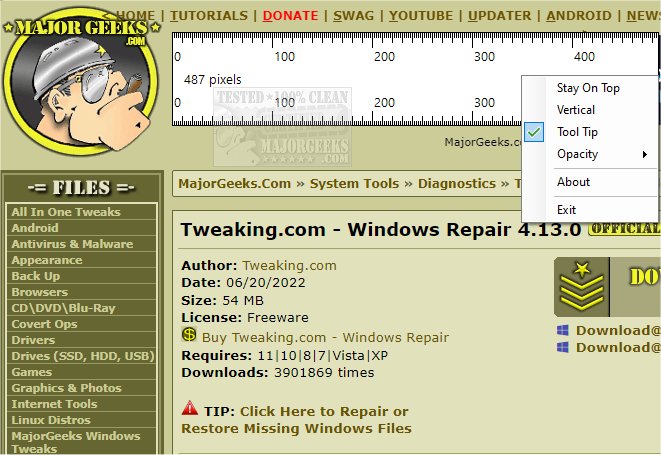
The latest update includes several features aimed at enhancing user experience. The "Stay on Top" functionality allows the ruler to remain visible above other windows, ensuring easy access while working on different tasks. Users can also align the ruler either vertically or horizontally to suit their specific measurement needs. Additionally, a Tool Tip feature provides real-time dimensions of the ruler via a floating dialogue box, displaying the height and width for accurate measurements. The opacity setting enables users to adjust the ruler's visibility, further customizing their measuring experience.
Ruler 2.3.0 is ideal for anyone in need of a straightforward yet accurate tool for screen measurements, whether for design, development, or general use. Its user-friendly interface and portable nature make it an essential addition to the toolkit of professionals and casual users alike.
In summary, Ruler 2.3.0 stands out as a reliable solution for precise screen measurements, equipped with user-friendly features that enhance functionality and accessibility. As technology continues to evolve, future updates could potentially incorporate advanced capabilities like customizable measurement units or integration with other design software, making it even more versatile for a wider range of applications
The latest update includes several features aimed at enhancing user experience. The "Stay on Top" functionality allows the ruler to remain visible above other windows, ensuring easy access while working on different tasks. Users can also align the ruler either vertically or horizontally to suit their specific measurement needs. Additionally, a Tool Tip feature provides real-time dimensions of the ruler via a floating dialogue box, displaying the height and width for accurate measurements. The opacity setting enables users to adjust the ruler's visibility, further customizing their measuring experience.
Ruler 2.3.0 is ideal for anyone in need of a straightforward yet accurate tool for screen measurements, whether for design, development, or general use. Its user-friendly interface and portable nature make it an essential addition to the toolkit of professionals and casual users alike.
In summary, Ruler 2.3.0 stands out as a reliable solution for precise screen measurements, equipped with user-friendly features that enhance functionality and accessibility. As technology continues to evolve, future updates could potentially incorporate advanced capabilities like customizable measurement units or integration with other design software, making it even more versatile for a wider range of applications
Ruler 2.3.0 released
Ruler provides you with a simple portable Windows tool for measuring screen pixels.