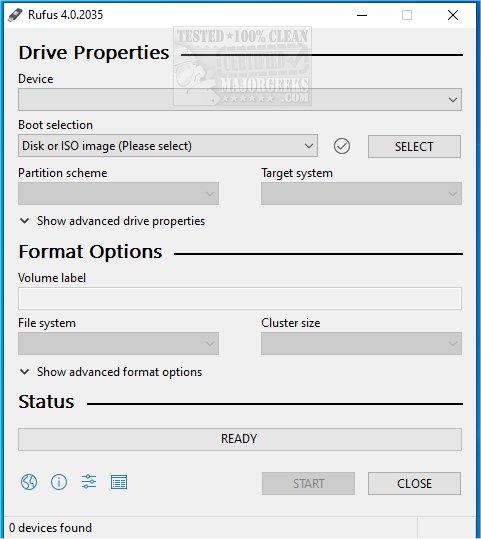
Rufus 4.13 has been released, enhancing its functionality as a small Open Source utility designed for quickly formatting and creating bootable USB flash drives, such as USB keys, pen drives, and memory sticks. The latest version now integrates with Fido, enabling users to download Windows 10 and 8.1 ISOs directly from Microsoft servers, making the process even more efficient. A video guide is available to assist users in navigating these new features.
Rufus stands out as an essential tool for anyone working with ISO files or needing to set up bootable USB drives. Its advantages include:
- Fast Bootable USB Creation: Ideal for installing various operating systems, running diagnostics, or flashing firmware.
- Lightweight and Portable: No installation is necessary, allowing it to run instantly.
- Compatibility: Works seamlessly with both UEFI and Legacy BIOS systems.
- Open Source: Free from ads or unnecessary bloat.
Rufus is perfect for several scenarios, including:
- Creating bootable installation drives for Windows or Linux.
- Developing rescue disks to recover non-bootable systems.
- Flashing firmware and updating BIOS.
- Running live operating systems directly from USB.
While Rufus excels in making single OS installations straightforward, users seeking a multi-OS solution on a single USB drive might consider alternatives like Ventoy.
Rufus is packed with numerous features that enhance its usability:
- Support for Various ISOs: Compatible with a wide range of ISO files, including different Linux distributions and rescue disks.
- Persistent Storage: Allows Linux users to maintain files and settings across reboots.
- Advanced Partition Options: Users can select between MBR and GPT for better compatibility.
- Windows 11 Installation on Unsupported Hardware: Includes a Secure Boot and TPM bypass feature.
- Automatic Bad Block Detection: Ensures reliability by checking USB drives before data writing.
- Low-Level Formatting: Enables complete erasure and restoration of USB drives.
- Remember that USB data will be erased, so backing up important files is essential.
- Rufus is Windows-only, requiring Mac users to look for alternatives like BalenaEtcher.
- Some ISOs may necessitate additional configurations.
- Choosing the correct partition scheme—GPT for UEFI and MBR for BIOS—is crucial for compatibility.
Rufus is widely regarded as one of the best tools available for creating bootable USB drives, earning a spot on the "Ultimate 25 for 2025" list due to its lightweight design, speed, and robust features. It is an invaluable download for anyone involved in OS installations or system recovery. Users are encouraged to try Rufus to simplify the bootable USB creation process.
As technology evolves, future updates to Rufus may include enhanced support for newer operating systems and improved user interfaces. Additionally, expanding compatibility for Mac users could broaden its user base, making it even more essential for a diverse audience
Key Features of Rufus
Rufus stands out as an essential tool for anyone working with ISO files or needing to set up bootable USB drives. Its advantages include:
- Fast Bootable USB Creation: Ideal for installing various operating systems, running diagnostics, or flashing firmware.
- Lightweight and Portable: No installation is necessary, allowing it to run instantly.
- Compatibility: Works seamlessly with both UEFI and Legacy BIOS systems.
- Open Source: Free from ads or unnecessary bloat.
Ideal Use Cases
Rufus is perfect for several scenarios, including:
- Creating bootable installation drives for Windows or Linux.
- Developing rescue disks to recover non-bootable systems.
- Flashing firmware and updating BIOS.
- Running live operating systems directly from USB.
While Rufus excels in making single OS installations straightforward, users seeking a multi-OS solution on a single USB drive might consider alternatives like Ventoy.
Additional Features
Rufus is packed with numerous features that enhance its usability:
- Support for Various ISOs: Compatible with a wide range of ISO files, including different Linux distributions and rescue disks.
- Persistent Storage: Allows Linux users to maintain files and settings across reboots.
- Advanced Partition Options: Users can select between MBR and GPT for better compatibility.
- Windows 11 Installation on Unsupported Hardware: Includes a Secure Boot and TPM bypass feature.
- Automatic Bad Block Detection: Ensures reliability by checking USB drives before data writing.
- Low-Level Formatting: Enables complete erasure and restoration of USB drives.
Safety Tips for USB Creation
- Remember that USB data will be erased, so backing up important files is essential.
- Rufus is Windows-only, requiring Mac users to look for alternatives like BalenaEtcher.
- Some ISOs may necessitate additional configurations.
- Choosing the correct partition scheme—GPT for UEFI and MBR for BIOS—is crucial for compatibility.
Conclusion
Rufus is widely regarded as one of the best tools available for creating bootable USB drives, earning a spot on the "Ultimate 25 for 2025" list due to its lightweight design, speed, and robust features. It is an invaluable download for anyone involved in OS installations or system recovery. Users are encouraged to try Rufus to simplify the bootable USB creation process.
Future Considerations
As technology evolves, future updates to Rufus may include enhanced support for newer operating systems and improved user interfaces. Additionally, expanding compatibility for Mac users could broaden its user base, making it even more essential for a diverse audience
Rufus 4.13 released
Rufus is a small Open Source utility that helps quickly format and creates bootable USB flash drives, such as USB keys/pen drives, memory sticks, etc. Rufus is now integrated with Fido to download Windows 10 and 8.1 ISOs from Microsoft servers. Video guide available.