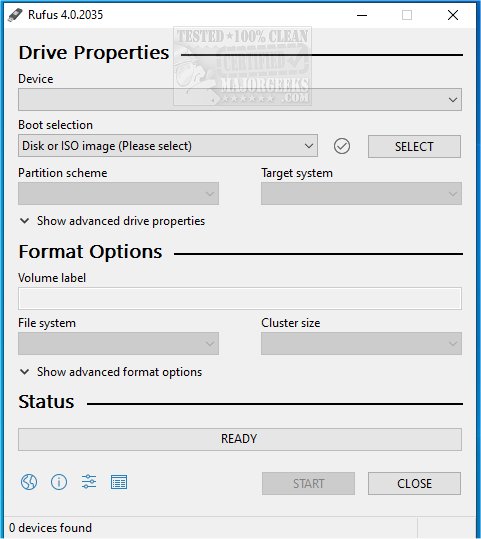
Rufus 4.12 Beta and 4.11 have recently been released, enhancing this popular open-source utility designed for quickly formatting and creating bootable USB drives, including USB keys, pen drives, and memory sticks. One of the notable new features is its integration with Fido, allowing users to download Windows 10 and 8.1 ISOs directly from Microsoft servers, making the process even more streamlined. For those who prefer visual guidance, a video tutorial is available.
Why Choose Rufus?
Rufus stands out as a must-have tool for anyone dealing with ISO files or creating bootable USB drives. Unlike many other utilities, Rufus offers several advantages:
- Bootable USB Creation: Supports installations of various operating systems, including Windows and Linux.
- Portable & Lightweight: No installation is necessary; it runs immediately.
- Speed: Rufus is recognized for its superior speed compared to similar tools.
- Compatibility: Works with both UEFI and legacy BIOS systems.
- Free & Open Source: No advertisements or unnecessary features, just a reliable tool.
Ideal Use Cases for Rufus
Rufus is versatile, making it great for a variety of situations. It simplifies the creation of installation media for operating systems, assists in system recovery by creating rescue disks, and allows for firmware flash updates. Additionally, it supports running live operating systems, enabling users to boot into Linux without needing to install it on their hard drive. IT professionals and tech support teams find it especially useful for troubleshooting and maintaining multiple systems. However, it is primarily geared towards creating a single OS on a USB drive, so users seeking multi-OS capabilities may consider alternatives like Ventoy.
Additional Features & Benefits
Rufus offers several powerful features that enhance the bootable USB creation experience:
- ISO Support: Compatible with a wide range of ISO files, including various Linux distributions and rescue disks.
- Persistent Storage: Allows Linux users to save files and settings across reboots.
- Advanced Partitioning: Users can select MBR or GPT partition schemes for improved compatibility.
- Secure Boot and TPM Bypass: Facilitates installing Windows 11 on unsupported hardware.
- Bad Block Detection: Checks USB drives for reliability before writing data.
- Low-Level Formatting: Enables complete erasure and restoration of USB drives.
- Command-Line Support: Facilitates scripting and automation for advanced users.
Safety Tips for USB Creation
- Data Erasure: Always back up important files before using Rufus, as it will erase existing data on the USB drive.
- Mac Users: Note that Rufus is Windows-exclusive; alternatives like BalenaEtcher are recommended for Mac.
- Additional Steps for Some ISOs: Certain Linux distributions or Windows versions may require extra configurations.
- Correct Partition Scheme: Use GPT for UEFI systems and MBR for BIOS to ensure compatibility.
Conclusion
Rufus is widely regarded as one of the best tools for creating bootable USB drives, earning a spot on our Ultimate 25 for 2025 list. Its lightweight design, speed, and array of useful features make it essential for anyone involved in operating system installations or system recovery. Download Rufus today and simplify your bootable USB creation process!
In addition to its core functionalities, users are encouraged to explore community resources and forums for tips and updates, as the Rufus user base is actively engaged in sharing insights and troubleshooting advice. As technology continues to evolve, keeping Rufus updated ensures access to the latest features and improvements, empowering users to adapt to new demands in software installation and system recovery
Why Choose Rufus?
Rufus stands out as a must-have tool for anyone dealing with ISO files or creating bootable USB drives. Unlike many other utilities, Rufus offers several advantages:
- Bootable USB Creation: Supports installations of various operating systems, including Windows and Linux.
- Portable & Lightweight: No installation is necessary; it runs immediately.
- Speed: Rufus is recognized for its superior speed compared to similar tools.
- Compatibility: Works with both UEFI and legacy BIOS systems.
- Free & Open Source: No advertisements or unnecessary features, just a reliable tool.
Ideal Use Cases for Rufus
Rufus is versatile, making it great for a variety of situations. It simplifies the creation of installation media for operating systems, assists in system recovery by creating rescue disks, and allows for firmware flash updates. Additionally, it supports running live operating systems, enabling users to boot into Linux without needing to install it on their hard drive. IT professionals and tech support teams find it especially useful for troubleshooting and maintaining multiple systems. However, it is primarily geared towards creating a single OS on a USB drive, so users seeking multi-OS capabilities may consider alternatives like Ventoy.
Additional Features & Benefits
Rufus offers several powerful features that enhance the bootable USB creation experience:
- ISO Support: Compatible with a wide range of ISO files, including various Linux distributions and rescue disks.
- Persistent Storage: Allows Linux users to save files and settings across reboots.
- Advanced Partitioning: Users can select MBR or GPT partition schemes for improved compatibility.
- Secure Boot and TPM Bypass: Facilitates installing Windows 11 on unsupported hardware.
- Bad Block Detection: Checks USB drives for reliability before writing data.
- Low-Level Formatting: Enables complete erasure and restoration of USB drives.
- Command-Line Support: Facilitates scripting and automation for advanced users.
Safety Tips for USB Creation
- Data Erasure: Always back up important files before using Rufus, as it will erase existing data on the USB drive.
- Mac Users: Note that Rufus is Windows-exclusive; alternatives like BalenaEtcher are recommended for Mac.
- Additional Steps for Some ISOs: Certain Linux distributions or Windows versions may require extra configurations.
- Correct Partition Scheme: Use GPT for UEFI systems and MBR for BIOS to ensure compatibility.
Conclusion
Rufus is widely regarded as one of the best tools for creating bootable USB drives, earning a spot on our Ultimate 25 for 2025 list. Its lightweight design, speed, and array of useful features make it essential for anyone involved in operating system installations or system recovery. Download Rufus today and simplify your bootable USB creation process!
In addition to its core functionalities, users are encouraged to explore community resources and forums for tips and updates, as the Rufus user base is actively engaged in sharing insights and troubleshooting advice. As technology continues to evolve, keeping Rufus updated ensures access to the latest features and improvements, empowering users to adapt to new demands in software installation and system recovery
Rufus 4.12 Beta / 4.11 released
Rufus is a small Open Source utility that helps quickly format and creates bootable USB flash drives, such as USB keys/pen drives, memory sticks, etc. Rufus is now integrated with Fido to download Windows 10 and 8.1 ISOs from Microsoft servers. Video guide available.