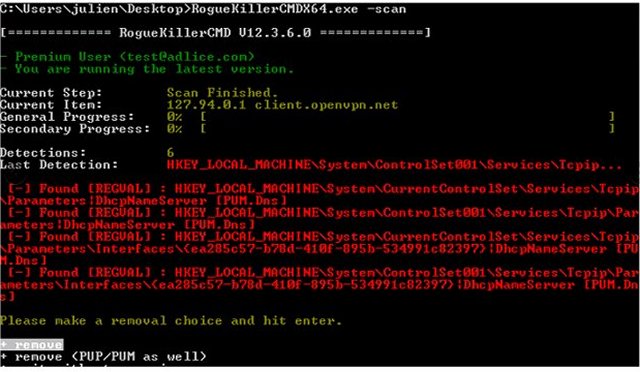
RogueKillerCMD version 5.4.1.0 has been released, providing users with a command-line option for the Adlice Protect malware removal tool, previously known as RogueKiller. This version is specifically available for 32-bit systems and is designed to detect and eliminate a wide variety of both known and unknown malware, making it particularly useful in situations where a graphical user interface (UI) is not accessible, such as in safe mode.
One of the key advantages of RogueKillerCMD is its effectiveness in dealing with stubborn malware infections that may resist removal by other antivirus software. It allows users to check the integrity of their operating system without conflicting with existing antivirus programs. However, it is essential to note that RogueKillerCMD is best suited for advanced users and IT professionals. Unlike many mainstream antivirus tools that offer straightforward scanning and removal, RogueKillerCMD displays all detected items, necessitating a knowledgeable approach to determine what should be removed.
Users are advised to exercise caution when using this tool. A lack of understanding can lead to the unintended deletion of critical system files or applications. For those who are less experienced, tools like Malwarebytes may be more appropriate. Users are encouraged to do thorough research before taking any action or to seek assistance from tech-savvy individuals, such as those found on support forums like MajorGeeks.
In summary, RogueKillerCMD 5.4.1.0 is a powerful tool for advanced users looking to tackle persistent malware problems, but it requires a careful and informed approach to ensure safe usage.
Extension: As malware threats continue to evolve, tools like RogueKillerCMD are crucial for cybersecurity. Users should stay updated on the latest malware trends and best practices for system protection. Additionally, the integration of such tools with regular system maintenance, such as software updates and backups, can enhance overall security. For those interested in improving their malware defense strategies, exploring other advanced tools and understanding their functionalities can lead to better protection against cyber threats
One of the key advantages of RogueKillerCMD is its effectiveness in dealing with stubborn malware infections that may resist removal by other antivirus software. It allows users to check the integrity of their operating system without conflicting with existing antivirus programs. However, it is essential to note that RogueKillerCMD is best suited for advanced users and IT professionals. Unlike many mainstream antivirus tools that offer straightforward scanning and removal, RogueKillerCMD displays all detected items, necessitating a knowledgeable approach to determine what should be removed.
Users are advised to exercise caution when using this tool. A lack of understanding can lead to the unintended deletion of critical system files or applications. For those who are less experienced, tools like Malwarebytes may be more appropriate. Users are encouraged to do thorough research before taking any action or to seek assistance from tech-savvy individuals, such as those found on support forums like MajorGeeks.
In summary, RogueKillerCMD 5.4.1.0 is a powerful tool for advanced users looking to tackle persistent malware problems, but it requires a careful and informed approach to ensure safe usage.
Extension: As malware threats continue to evolve, tools like RogueKillerCMD are crucial for cybersecurity. Users should stay updated on the latest malware trends and best practices for system protection. Additionally, the integration of such tools with regular system maintenance, such as software updates and backups, can enhance overall security. For those interested in improving their malware defense strategies, exploring other advanced tools and understanding their functionalities can lead to better protection against cyber threats
RogueKillerCMD 5.4.1.0 released
RogueKillerCMD is the command-line version of the ever-popular Adlice Protect (formerly RogueKiller) malware removal tool. Available for 32-Bit.