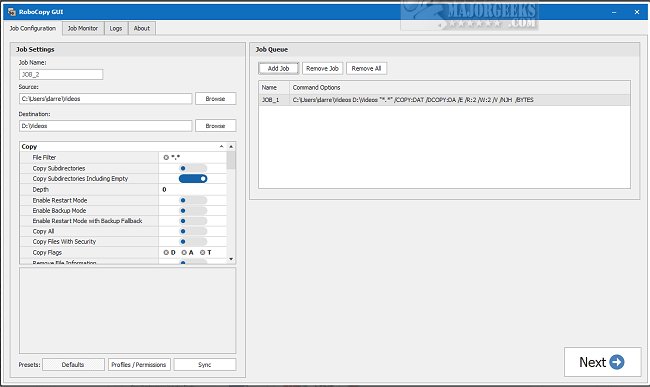
RoboCopy GUI 3.9 has been released, enhancing the user experience for managing file transfers and backups through a visual interface. This software allows users to queue multiple RoboCopy jobs, monitor their progress, and log activities efficiently. The intuitive graphical user interface simplifies navigation, enabling users to customize settings or choose from various presets with ease.
The job queuing feature helps users prioritize and organize their tasks effectively, while the real-time monitoring capability keeps them informed about job progress, allowing for timely adjustments. Additionally, the logging feature provides comprehensive records of operations, aiding in tracking and troubleshooting.
Newly added functionality includes the ability to run analyses to identify files and folders that need copying, further streamlining the process. The Job Monitor allows for continuous oversight of active tasks, ensuring a smooth and efficient experience.
Overall, RoboCopy GUI is a robust and versatile tool catering to users' diverse file-copying needs. Its features not only enhance productivity but also provide a customizable solution for efficient file management.
In addition to its core functions, RoboCopy GUI can assist users in optimizing their workflow with helpful resources and guides on related topics. For instance, it may be beneficial to explore keyboard shortcuts for file navigation, methods for altering default drag-and-drop actions, or how to reset folder view settings in Windows 10/11. Users can also learn how to customize folder view templates and reveal hidden files, folders, or drives, ensuring they maximize their overall file management efficiency
The job queuing feature helps users prioritize and organize their tasks effectively, while the real-time monitoring capability keeps them informed about job progress, allowing for timely adjustments. Additionally, the logging feature provides comprehensive records of operations, aiding in tracking and troubleshooting.
Newly added functionality includes the ability to run analyses to identify files and folders that need copying, further streamlining the process. The Job Monitor allows for continuous oversight of active tasks, ensuring a smooth and efficient experience.
Overall, RoboCopy GUI is a robust and versatile tool catering to users' diverse file-copying needs. Its features not only enhance productivity but also provide a customizable solution for efficient file management.
In addition to its core functions, RoboCopy GUI can assist users in optimizing their workflow with helpful resources and guides on related topics. For instance, it may be beneficial to explore keyboard shortcuts for file navigation, methods for altering default drag-and-drop actions, or how to reset folder view settings in Windows 10/11. Users can also learn how to customize folder view templates and reveal hidden files, folders, or drives, ensuring they maximize their overall file management efficiency
RoboCopy GUI 3.9 released
RoboCopy GUI provides a visual interface for RoboCopy featuring job queuing, job monitoring, and logging.