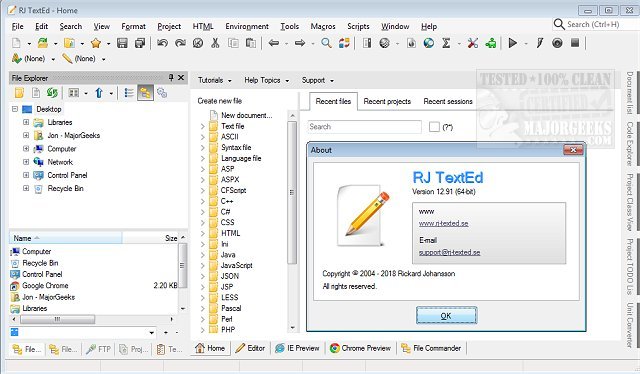
RJ TextEd version 16.56.1 has been released, enhancing its functionalities as a comprehensive web development tool and text editor. This versatile application offers a plethora of features, including syntax highlighting, advanced column mode for effective text manipulation, and text folding to streamline editing tasks. A portable version is also available for users who prefer a flexible, on-the-go option.
Key features of RJ TextEd include:
- Auto-completion: Assists with HTML tags and CSS classes to speed up coding.
- Code folding: Enables users to collapse sections of text for a clearer view and easier navigation.
- Column mode: Provides a unique editing experience that supports column-based manipulation of text.
- Support for ASCII and binary files: Allows users to work with a variety of file types seamlessly.
- HTML tag wizards: Offers built-in tools to help create tables and frames effortlessly.
- CSS editor: Included for styling web pages directly within the application.
- FTP client: Facilitates site management by enabling users to synchronize local files with their remote web servers.
- Sidebar functionality: Features explorers, a text clip manager, and a project manager for better organization.
- File conversion capabilities: Converts between different code pages, Unicode, and various text formats compatible with Windows, Unix/Linux, and Macintosh.
- UTF-8 support: Manages files that use this format without a Byte Order Mark (BOM).
- HTML validation tools: Allows users to validate, format, and repair HTML code using intuitive wizards.
- Various utilities: Includes tools like a syntax editor and character map utility to enhance productivity.
In addition to these features, RJ TextEd is comparable to other text editors, offering similar functionalities. Users may find interest in learning how to add context menu options for Notepad, change zoom levels, adjust font settings, or manage recent document history in applications like WordPad.
As RJ TextEd continues to evolve, users can expect ongoing improvements and additional features that cater to the needs of web developers and text editing enthusiasts alike
Key features of RJ TextEd include:
- Auto-completion: Assists with HTML tags and CSS classes to speed up coding.
- Code folding: Enables users to collapse sections of text for a clearer view and easier navigation.
- Column mode: Provides a unique editing experience that supports column-based manipulation of text.
- Support for ASCII and binary files: Allows users to work with a variety of file types seamlessly.
- HTML tag wizards: Offers built-in tools to help create tables and frames effortlessly.
- CSS editor: Included for styling web pages directly within the application.
- FTP client: Facilitates site management by enabling users to synchronize local files with their remote web servers.
- Sidebar functionality: Features explorers, a text clip manager, and a project manager for better organization.
- File conversion capabilities: Converts between different code pages, Unicode, and various text formats compatible with Windows, Unix/Linux, and Macintosh.
- UTF-8 support: Manages files that use this format without a Byte Order Mark (BOM).
- HTML validation tools: Allows users to validate, format, and repair HTML code using intuitive wizards.
- Various utilities: Includes tools like a syntax editor and character map utility to enhance productivity.
In addition to these features, RJ TextEd is comparable to other text editors, offering similar functionalities. Users may find interest in learning how to add context menu options for Notepad, change zoom levels, adjust font settings, or manage recent document history in applications like WordPad.
As RJ TextEd continues to evolve, users can expect ongoing improvements and additional features that cater to the needs of web developers and text editing enthusiasts alike
RJ TextEd 16.56.1 released
RJ TextEd is a web development tool plus a text editor with many features, including syntax highlighting, advanced column mode, and text folding. Portable version also available.