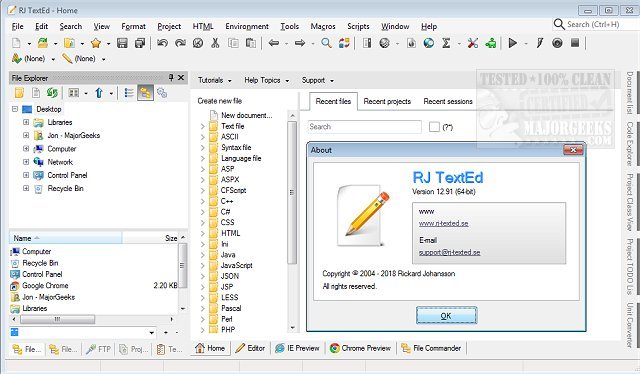
RJ TextEd version 16.54.1 has been released, enhancing its reputation as a powerful web development tool and text editor. This software comes packed with numerous features that cater to both novice and experienced developers. Among its standout functionalities are syntax highlighting, advanced column mode, and text folding, which streamline coding and editing processes. Additionally, a portable version of RJ TextEd is available, allowing users to utilize the software on different machines without installation.
Key features of RJ TextEd include:
- Auto-completion: Facilitates faster coding by suggesting tags and classes.
- Code folding: Allows users to collapse sections of code for a cleaner workspace.
- Column mode: Supports editing in columns, enhancing organization.
- Support for ASCII and binary files: Ensures versatility in handling various file types.
- HTML tag wizards: Assist users in easily creating complex structures such as tables and frames.
- Integrated CSS editor: Streamlines the process of designing styles.
- FTP client: Aids in managing websites by synchronizing local and remote files efficiently.
- Sidebar tools: Includes explorers, text clip manager, and project manager to enhance workflow.
- Conversion capabilities: The editor can convert between different code pages, Unicode, and various text formats, accommodating different operating systems.
- UTF-8 support: Handles files using UTF-8 encoding, including those without a BOM (Byte Order Mark).
- HTML validation tools: Users can validate, format, and repair HTML code easily through wizards.
- Additional utilities: Comes with various tools like a syntax editor and character map utility for improved functionality.
With its comprehensive set of features, RJ TextEd is an excellent choice for developers looking for an efficient and versatile text editing solution. Future updates may continue to enhance its capabilities, potentially incorporating more advanced features and integrations that cater to the evolving needs of web development.
Moreover, for users interested in enhancing their text editing experience, RJ TextEd offers resources and guides on related topics, such as customizing Notepad settings in Windows 10 and 11, further expanding its utility and user engagement
Key features of RJ TextEd include:
- Auto-completion: Facilitates faster coding by suggesting tags and classes.
- Code folding: Allows users to collapse sections of code for a cleaner workspace.
- Column mode: Supports editing in columns, enhancing organization.
- Support for ASCII and binary files: Ensures versatility in handling various file types.
- HTML tag wizards: Assist users in easily creating complex structures such as tables and frames.
- Integrated CSS editor: Streamlines the process of designing styles.
- FTP client: Aids in managing websites by synchronizing local and remote files efficiently.
- Sidebar tools: Includes explorers, text clip manager, and project manager to enhance workflow.
- Conversion capabilities: The editor can convert between different code pages, Unicode, and various text formats, accommodating different operating systems.
- UTF-8 support: Handles files using UTF-8 encoding, including those without a BOM (Byte Order Mark).
- HTML validation tools: Users can validate, format, and repair HTML code easily through wizards.
- Additional utilities: Comes with various tools like a syntax editor and character map utility for improved functionality.
With its comprehensive set of features, RJ TextEd is an excellent choice for developers looking for an efficient and versatile text editing solution. Future updates may continue to enhance its capabilities, potentially incorporating more advanced features and integrations that cater to the evolving needs of web development.
Moreover, for users interested in enhancing their text editing experience, RJ TextEd offers resources and guides on related topics, such as customizing Notepad settings in Windows 10 and 11, further expanding its utility and user engagement
RJ TextEd 16.54.1 released
RJ TextEd is a web development tool plus a text editor with many features, including syntax highlighting, advanced column mode, and text folding. Portable version also available.